
When it comes to email, trust is everything. But before your message even reaches someone’s inbox, it has to pass a few silent security checks. SPF, DKIM, and DMARC decide whether your emails look legitimate or end up in spam.
Knowing how these records work, and how to set them up correctly, can protect your domain, and make sure your messages always land where they’re meant to.
What are SPF, DKIM, and DMARC in email?
Between hitting send and your email landing, a quiet chain of checks begins. Each one asks the same question: is this really from you?
SPF, DKIM and DMARC, form a feedback loop between sender and receiver, verifying your identity either before your message leaves your domain, when it arrives, or both. Together, they’re what stand between your message and the spam folder.
SPF, DKIM, and DMARC explained in short:
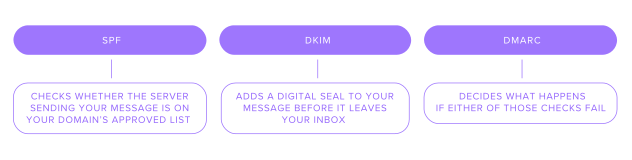
SPF – checks whether the server sending your message is on your domain’s approved list. If it is, the email passes through. If not, it’s flagged. Think of it as the guest list for your domain.
DKIM – adds a digital seal to your message before it leaves your inbox. Once it reaches the other side, the receiving server opens the seal to make sure nothing was altered in transit.
DMARC – decides what happens if either of those checks fail. It tells the receiving server what to do, whether to deliver the message, send it to spam, or block it entirely.
These three work together: one verifies the sender, one protects the message, and one enforces the rules.
Why are SPF, DKIM, and DMARC important for email security?
SPF, DKIM, and DMARC protect against two of the biggest threats to email today: spam and spoofing. Attackers often send messages pretending to be someone they’re not. Imagine receiving an email from Support@yourbank.com, asking you to confirm your account details. These three checks make sure your “bank” really is your bank:
In a phishing attack, hackers use fake emails to trick people into sharing passwords, credit card numbers, or clicking malicious links. Without these protections, your domain could be impersonated, and customers might receive convincing messages that look like they came from you. With SPF, DKIM, and DMARC in place, those fake messages are usually stopped before they ever reach an inbox.
SPF would check to see if the email was sent from an approved server.
DKIM would make sure the email hadn’t been tampered with during transit.
If either of these checks failed, then DMARC would make sure the email was thrown out before it reached your inbox
Similarly, during a phishing attack, hackers send fake emails to trick people into giving away passwords or clicking dangerous links. If your company's domain is not protected, they could pretend to be an employee and email your customers asking for their details. If SPF, DKIM, and DMARC are in place, most of these fake messages would never reach customers’ inboxes, because the receiving servers can tell they’re not really from you.
Why they also matter for deliverability (not just security)
If you send newsletters, invoices, or marketing campaigns, your goal probably isn’t just to send, it’s to be seen. But as global spam has surged, major providers like Gmail and Yahoo have introduced new rules to keep inboxes clean.
Since 2024, these providers have required senders to authenticate their domains with SPF, DKIM, and DMARC. Without them, your emails could be rejected before they even leave your inbox. Passing these checks consistently boosts your sender reputation and stops your emails ending up in spam. The better your reputation, the faster your delivery, the fewer spam flags, and the stronger your credibility. Building that reputation on a new sending domain — or rehabilitating it on a damaged one — is exactly what dedicated warm-up platforms like Warmy are designed for: gradually ramping outbound volume in controlled daily increments and generating positive engagement signals with major mailbox providers so SPF, DKIM, and DMARC-authenticated mail consistently lands in the primary inbox rather than promotions or spam.
SPF vs DKIM vs DMARC — What’s the difference?
Every time you board a plane, you go through a process that’s almost identical to how SPF, DKIM, and DMARC work. That might sound strange, but these three terms don’t exactly roll off the tongue, and it helps to have a simpler way of remembering them. Plus, without these three being set up your mail is likely to end up just like you when you miss your check in for a flight. Out in the cold.
SPF – Your email’s first security checkpoint
When you roll up to the desk, ready to board, the agent checks your ticket against the flight log. If your name’s there, you’re cleared to fly. If not, no boarding pass, no flight.
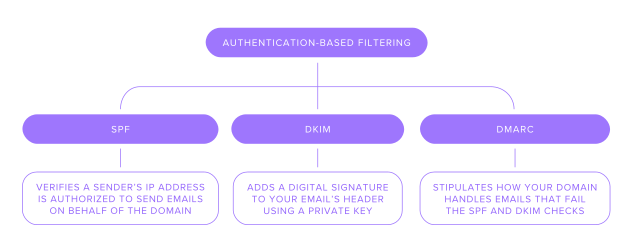
SPF works the same way. Every domain, like example.com, keeps a “passenger list” or a record of which mail servers are allowed to send emails on its behalf. When you send an email, the receiving server checks whether your sending server is on that list. By setting your SPF record, you’re basically adding your name to the manifest so your messages can pass security without delay.
DKIM – The ID check for your inbox
Once your ticket checks out, it’s time to prove your identity. Your passport photo confirms you’re really you, a physical signature that can’t easily be faked. DKIM does the same thing, but for email.
DomainKeys Identified Mail (DKIM) adds a digital signature to each outgoing message. This signature proves the email hasn’t been changed or tampered with in transit and prevents your email from being tracked. When you hit send, your server signs the email with a private key. When it arrives, the receiving server verifies that signature, confirming the message is genuine and untouched.
DMARC – What happens when things go wrong
If you show up at the airport without a ticket or passport, the airline has a clear policy on what happens next. DMARC works the same way when SPF or DKIM checks fail.
DMARC tells the receiving server what to do with the email if the SPF or DKIM check fails.It can:
Do nothing
Quarantine the message (send it to spam)
Reject the message completely
As the sender, you decide which rule applies. You set it in your DNS, defining what happens when your messages don’t pass inspection.
How to set up SPF, DKIM, and DMARC for your domain
To set up SPF, DKIM, DMARC, you'll need access to your DNS. This is where your domain's nameservers point, so the registrar or DNS host.

As we mentioned above, SPF functions like a passenger list, that tells receiving servers which hosts can send mail for your domain. So to setup SPF, you need to get your email on that passenger list. To do this there are a few steps.
1. Check if you already have SPF
Start by using a free DNS lookup tool to check whether your domain already has an SPF record.If the tool in the TXT tab shows a record that begins with v=spf1, it means SPF is already set up for your domain.
If no such record appears, you’ll need to create a new SPF record from scratch.
2. Add a new SPF record in DNS
To add a new SPF record, go to your domain host’s DNS settings. This could be Spaceship, Google, Outlook, etc, depending on who your provider is. Find the list of existing records and select Add Record, then choose TXT from the type menu.
Next, fill in the fields as shown below to create your SPF entry.
For Spacemail this would look like:Type: TXT Record | Host: @ | Value: v=spf1 include:spf.spacemail.com ~all | TTL: Automatic
Save and wait a few minutes for propagation.
3. Verify the record
At this point, you can run another check on your DNS lookup tool. If it displays your value, you’re good. It’s also important to remember that the host record can take up to 24 hours to update, so don’t panic if it’s not there right away.
Step 2. Update your DKIM settings

DKIM adds a digital signature to every email your domain sends, proving it hasn’t been tampered with.
1: Generate your DKIM record
Start in your email provider’s settings.
Go to the section for domain authentication or email security.
Find an option labeled DKIM, DomainKeys, or something similar.
Select the button to generate new DKIM keys.
Your provider will give you two key pieces of information:
A selector (for example, selector1._domainkey)
The DKIM record itself — a long string of encrypted text
It’s a good idea to copy both somewhere safe, as you’ll need them in the next step.
2: Add the DKIM record to your DNS
Next, log in to your DNS provider.
Open your DNS records and create a new entry.
Choose CNAME if the record is short, or TXT if it’s a longer key.
In the Host or Name field, enter the DKIM selector (for example, selector1._domainkey).
In the Value field, paste the DKIM record from your email provider.
Save your changes.
Give it a few minutes as DNS changes can take a while to update.
For Spacemail business email, you are welcome to set up a DKIM record with this guide.
Step 3. Add DMARC settings

Once SPF and DKIM are set up, the final step is DMARC. You’re just adding one more TXT record to your domain’s DNS. This record tells receiving mail servers what to do if an email from your domain fails authentication, and it gives you visibility into who’s sending mail on your behalf.
A DMARC record has a few key parts you’ll need to understand before you add it:
v=DMARC1 – this tells mail servers you’re using DMARC. It always comes first.
p= – This sets your policy for how to handle unauthenticated messages:
rua=mailto: – This tells mail servers where to send your daily DMARC reports. You can use an address like security@yourdomain.com or dmarc@yourdomain.com. These reports show which IPs are sending on behalf of your domain, helping you spot anything unusual.
1: Generate a DMARC record for your domain
Open the DMARC Record Generator tool (feel free to use any DMARC generator tool you prefer) and fill in your domain name in the search bar. Once done, click on the Check DMARC Record button. Customize the DMARC settings according to your needs and get your generated record.
2: Add your DMARC record to DNS settings
Navigate to your DNS provider. Create a new record, selecting TXT as the host record type. DMARC uses a TXT record format, just like SPF.
Use host: _dmarcAdd value, the one you generated previously
Once you’ve added it, save your changes and wait a few minutes for it to propagate. You can use tools like MX Lookup Tool or other free tools to check that your DMARC record is set up correctly.
You can use this guide to set up a DMARC record for your domain with Spacemail.
Getting your email setup right
If your messages keep landing in spam or disappearing mid-flight, it could be down to missing authentication. SPF, DKIM, and DMARC give your emails the credentials they need to reach the inbox safely.
When hearing SPF, DKIM, and DMARC explained, it can sound complicated, but the best thing is,they don’t require costly tools or complex setups, just a few DNS records and a bit of patience. They’re some of the simplest email protocols you can add to your email system that pays off every time your message lands exactly where it should.
Frequently asked questions
SPF verifies that your email is sent from an approved server. DKIM email security works by signing each message with a digital key so the receiver knows the message wasn’t tampered with. DMARC ties them together, telling the server what to do if something looks off. Together, they keep your emails trusted, verified, and secure.
When looking at DMARC vs SPF and DKIM, they work best as a team. SPF and DKIM email authentication do the checking, while DMARC decides what happens if those checks fail. Without DMARC, your emails might still pass, but you won’t have control over what happens when they don’t. Set up all three once, and you’ll cover every base for both security and deliverability.
Spoofing happens when someone sends an email pretending to be you. SPF checks where the message came from, DKIM confirms it hasn’t been altered, and DMARC blocks anything suspicious.
Without DMARC, there’s no clear rule for how mail servers handle suspicious messages. That means fake emails could slip through, or your real ones could be marked as spam. DMARC is the part that enforces the rules and without it, your domain is left unguarded.
Not really, they just do different jobs. SPF checks who’s sending the email; DKIM checks if it’s been changed. Neither works perfectly alone, but together they create a strong first line of defense.

Suggested articles




Share your thoughts