
Has someone told you they didn’t receive an email you know you sent? Are you missing replies to important messages? It could be that your emails are getting caught in spam filters.
As spam evolves, so do the methods of identifying it. In this article, we’re first going to look at how filters decide what is and isn’t spam, and then explore 12 top things you can do to keep emails from going to junk folders.
So, how do spam filters work?
In order to truly avoid spam filters, we must first understand a bit about them. There isn’t just one type of filter. In fact, any good spam filter worth its salt in 2025 will use a combination of these strategies to identify emails.
Rule and content-based filtering
Rule-based filtering involves creating a set of predefined rules by the email provider and/or the user to block emails that violate these rules. Rules can be around anything from the sender's email address to the subject line, or key phrases in the email.
Content-based filtering specifically focuses on scanning email content for key phrases or patterns within the body text that indicate spam.
While both methods are relatively basic compared to modern techniques, they laid the groundwork for more advanced filtering methods that have evolved in more recent years.
Blacklisting
Blacklisting is exactly what it sounds like. Blacklisting can happen to an email address (if you’ve sent spam before — this is unlikely for personal accounts), or most likely, at domain or IP Address level. In these cases, it’s putting you into context with those around you — for example, people who have sent from your domain historically, or other people using the same IP address.
If you believe your email address has been blacklisted, for whatever reason, even if it’s just by one recipient, you can ask them to add you to their whitelist. This will essentially create an exception to the rule for you.
Bayesian, heuristic, and machine learning-based filtering
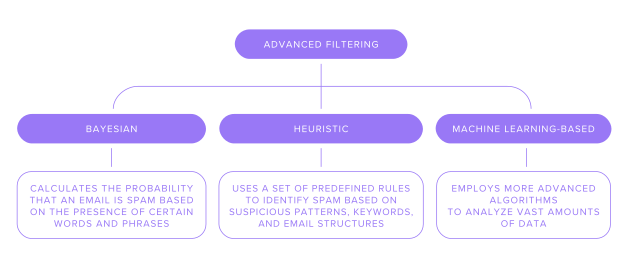
We’ve arrived at the more advanced methods. These methods are less cut-and-dry, and (unsurprisingly) in the case of machine learning-based filters, they constantly adapt to the ever-changing landscape of spam messages.
Bayesian filtering calculates the probability that an email is spam based on the presence of certain words and phrases. The key here is that it learns from user feedback, adjusting its understanding of what constitutes spam over time.
Heuristic filtering uses a set of predefined rules (or algorithms) to identify spam based on common characteristics, such as suspicious patterns, keywords, and email structures. A similar result to Bayesian, but uses a different approach to achieve it.
Machine learning-based filtering employs more advanced algorithms to analyze vast amounts of data. By doing this, it is able to identify complex patterns associated with spam. The parameters these filters look at align with what we’ve mentioned above, but they also include more sophisticated parameters, like language and tone, and also sender protocols — more on these coming up.
Some see machine learning in spam filtrationas a mixed blessing because the technology can be used by spammers, as well as filterers (the goodies and the baddies). For us, innocent email writers (as senders, at least), the protocols are great because they mean we’re less likely to be interpreted as spam.
Authentication-based filtering
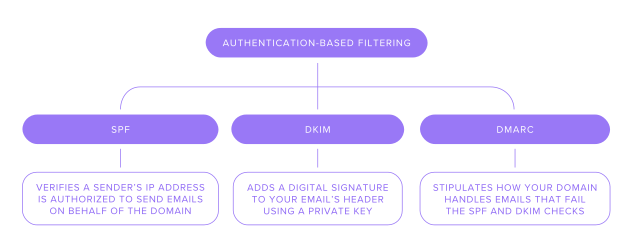
Unlike the other filtration methods we’ve mentioned so far, Authentication-based filtering isn’t concerned with an email’s content. Instead, it focuses entirely on verifying the sender's authenticity. When properly set up, these protocols demonstrate your authenticity and, by doing so, validate the legitimacy of your emails. When you read the following explanations, it’s important to bear in mind that regardless of what the frameworks do, not having them set up will serve as a black mark against your email address, making all of your emails more likely to end up in the recipient’s spam folder.
1. SPF (Sender Policy Framework):
This verifies a sender’s IP address is authorized to send emails on behalf of the domain. Essentially, if someone tries to send an email from your address from a server that isn’t yours, the email should fail the SPF check and therefore is much more likely to end up in a spam folder.
2. DKIM (Domain Keys Identified Mail):
DKIM adds a digital signature to your email’s header using a private key. Your recipient’s email server can verify the signature by checking it against a publicly available key published in the sender's DNS records. DKIM also ensures emails have not been tampered with during transit.
3. DMARC (Domain-based Message Authentication, Reporting, and Conformance):
DMARC is a policy that stipulates how your domain handles emails that fail the SPF and DKIM checks. It specifies the actions to take (e.g., reject, quarantine, or allow) when emails fail these checks and helps you to monitor your email account. DMARC helps establish trust and enhances email security by preventing spoofing and phishing attempts.
12 ways to stop your emails going into spam
Now we understand how email filters work, let’s go through the top ways you can avoid getting caught in them.
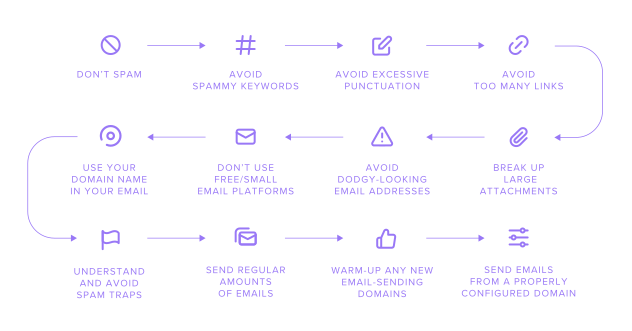
1. Don’t spam
This is number one because it should go without saying. By writing natural, from-the-heart emails — even if they are about something professional or business-focused — you should be able to avoid these filters. As we’ve mentioned, the content filters are mostly looking for unnatural uses of language or phrases associated with spammers. In most cases, you won’t fall into these traps simply because you aren’t trying to spam.
For example, when is the phrase ‘You won’t believe how easy it is to make $10,000’ going to crop up in a normal conversation?
Another consideration is that your domain’s spam reputation is generated based on past behavior (as well as a few other contributing factors like your server and IP reputation).
If your domain was previously owned by someone else in the past who sent a lot of spam, it might be affected by this even if you don’t do it yourself. For this reason, it’s always good to check the reputation of a domain before you buy it.
2. Avoid spammy keywords
So, let’s now presume you aren’t going to spam. You can help avoid filters by avoiding certain keywords and phrases. Things like: ‘Winner’, ‘Guarantee’, ‘Urgent’, or other words or phrases associated with scams. In fact, phrases to avoid are practically worth an article in themselves.
3. Avoid excessive punctuation
While it could almost be rolled with the above, it’s worth a separate mention. Too many exclamation marks, and the overuse of block caps are common tropes of spammers. Keep to a moderate level of excitement to avoid this. We should probably throw in emojis here for good measure — nobody is ever six faces' worth of smiley. One is plenty.
4. Avoid too many links
Spam emails often direct customers to multiple fraudulent sites. Sometimes they’re almost entirely comprised of links or email addresses.
To avoid this trap, regulate the number of links and email addresses contained within your emails. You’re even more likely to be filtered if you’re linking to sites with poor reputations, but it’s easy enough to check the reputations of sites you want to link to.
5. Break up large attachments
Including large attachments may trigger a spam filter, even if what you’re sending is harmless, because many email providers set limits on attachment sizes. To avoid this, you could also consider breaking up the attachment or using cloud storage services like Google Drive or Dropbox.
6. Avoid strange email addresses

We’ve all seen them, so let’s not beat about the bush. Some email addresses just look dodgy. Maybe they have an unlikely format that appears autogenerated (j67fhjsahte@gmail.com), or are flat out trying to resemble an established company or website (jamie@mypaypals.com).
Just avoid them. In the end, there’s no benefit to having a lookalike domain/email for any legitimate reason.
7. Don’t use free/small email platforms
We won’t name any names, but if it’s free and you’re using it for domain-based email (name@yoursite.com), the chances are it is not doing you any favors.
Firstly, smaller providers may not have enough IP addresses in their ‘pool’. This could mean your IP address is the same as someone who sent a lot of spam, and got it blacklisted. Larger companies have more substitute IP addresses they can use.
Free platforms tend to lack the security protocols (SPF, etc.) we mentioned above, which legitimize emails by validating you as a sender. Without these protocols, your email content might not even matter — it’s that important.
8. Use your domain name in your email
With the above being said, you might think it’s easier to just not bother and stick to a generic Hotmail or Gmail address. But that isn’t the case at all. Firstly, if you choose a professional email provider (rather than a free one), it’s likely that some of these protocols are set up automatically by the provider.
But this is where we must branch out and talk about another kind of filter: our own personal gut feeling. We’ve all seen enough spam to be able to pick up on some of the cues ourselves.
Be especially mindful of this in business scenarios. There’s a good chance you’ve never contacted the customer/client before, and that the message concerns an order or payment. It’s reassuring for recipients to see your domain within the email address, as it helps them to know that the message really came from the site they ordered from.
9. Send regular amounts of emails
Don’t send massive amounts of messages. If you want to do a mailout, consider using software designed to handle this to mitigate against the risk of spam ranking. You should also avoid hitting the same email address multiple times in quick succession, or sending one-word emails that say things like ‘test’.
10. Understand and avoid spam traps
Spam traps look like regular email addresses on paper, but they’re email addresses created by ISPs to monitor who is sending spam. Ordinarily, you’re unlikely to message one, but if you’ve purchased (or own) a large list of email addresses, it may well contain a spam trap email.
If you send an email, especially one that could be considered spammy, to a spam trap, it’s likely your domain’s spam score will get worse. Think of these addresses as secret agents, quietly lurking on otherwise ordinary email lists in a bid to monitor and control spam.
One way to mitigate your risk if you are sending emails to large lists of contacts is to include the correct unsubscribe options in all emails you send that aren’t personal communications.
11. Warm up any new email-sending domains
If you’ve never emailed from a certain address or domain, it’s worth learning how to warm up an email domain for better email deliverability. ‘Warming up’ in this context means gradually building your reputation with Email Service Providers (ESPs). Do this by starting slowly - send a low number of emails to start with. Focus on emails that are likely to get replies. Replies help to legitimize an email address and add to its positive reputation.
Warming up is also a good idea if your business moves to another domain or expands to multiple domains. Perhaps the biggest thing you can do to warm up an email is follow step 12.
12. Send emails from a properly configured domain
It’s one of the more fiddly things to do initially, but once it’s set up, you can forget about it. By choosing a professional email provider, you may find that some of these records are set up for you.
How to set up the authentication protocols for your domain
The process will depend on your provider. Generally, the process involves generating/finding keys in your email account, then going to domain management for the domain you are using for your email addresses. From there, you can create new DNS records that relate to the three protocols.
There are plenty of detailed guides on how to set up SPF and DKIM in the popular content management system, cPanel. There are also many helpful videos on YouTubethat take you through it step-by-step.
Stay informed by testing email deliverability
Follow these simple steps, and you should make it into your recipients' inboxes every time.
But it’s good to keep on top of things by checking how many of your emails reach recipients. You could also track open and delivery rates in the long run, which will allow you to pick up on potential problems in a timely manner.
You can find tools that allow you to monitor key metrics, without sending more emails to test things for yourself.
Happy sending
Take these easy steps to avoid your emails going to the recipient’s spam folder. They may seem a lot, but most are things not to do, and require no immediate action — just good email practices.
As a general rule of thumb, if you haven’t sent spam and your domain has a good reputation, you don’t really have anything to fear. Leave any thoughts or tips in the comments section below.
Frequently asked questions
Emails can go into spam folders for many reasons, such as poor domain reputation, contents, or not having the correct protocols set up.
As a starting point, avoid certain keywords, (like ‘free’, ‘prize’, and ‘winner’) and be careful not to use excessive punctuation. Additionally, set up protocols (like SPF and DMARC) to help validate your emails.
Yes, there are several different types of spam filters. Some moderate content, while others look at sender information. More modern filters look for complex patterns and can learn what spammers are doing. This is why an all-around approach is required to ensure your messages aren’t wrongly classed as spam.

Suggested articles




Comments (2)
imri rapaport
Aug 12, 2025
Olha Nesen. Product and Marketing Coordinator
Aug 13, 2025