
Email plays a central role in modern communication, whether you’re managing a business, handling client work, signing up for services, or staying connected with family and friends.
But with increased activity comes a cluttered inbox, exposure to spam and phishing messages, and the risk of mixing personal and professional conversations. Fortunately, there’s a simple solution: the email alias.
Often overlooked, email aliases are a smart way to regain control over your email experience. They can help you stay organized, maintain privacy, and even present a more professional image without the need to create and manage multiple accounts.
In this guide, we're going to learn about the email alias, meaning how they work, how they differ from traditional accounts, and why they're a valuable tool for everyday communication.
What is an email alias?
An email alias is a secondary email address that delivers messages to your main inbox. It doesn’t have its own login or password and doesn’t require you to set up a new mailbox. Instead, it acts like an alternative doorway — one that leads to the same place.
How do email aliases work?

An alias email address functions as a forwarder — emails sent to the alias are automatically delivered to the main inbox associated with your account. There’s no extra mailbox to check, no new password to remember, and no added complexity. It works behind the scenes, letting you organize and segment your email flow with minimal effort.
Aliases are typically created through your email provider’s settings. You choose the alias name (such as events@yourdomain.com) and link it to your existing account. Once activated, you can use it to receive mail just like any standard address.
Let’s break it down with an example.
Imagine your primary email is julia@yourdomain.com. You run a small business, and people reach out to you for different reasons — new orders, support questions, and invoice requests. Rather than using your personal email for everything, you can create aliases like:
orders@yourdomain.com — for customers making purchases.
support@yourdomain.com — for general enquiries.
billing@yourdomain.com — for finance-related queries.
Now, when someone sends an email to any of those addresses, it all lands in Julia’s main inbox — julia@yourdomain.com. But because the email shows which alias it was sent to, she immediately knows what the message is about and how to prioritize it.
Another example: Say you’re signing up for a travel website and don’t want to use your main email address in case you start receiving promotional messages. You could use an alias like travel@yourdomain.com. If that alias begins to receive too many emails, or if you suspect it was shared, you can deactivate it without affecting your main email.This makes an alias email address incredibly handy. You can create multiple aliases for different purposes — business roles, hobbies, events, or online registrations — and still keep everything centralized in one inbox. No need to manage separate accounts or worry about forgetting passwords. It’s like giving your email different "faces" for different situations, while you stay in control behind the scenes.
What’s the difference between an alias and a new email account?
The key distinction lies in the structure and control:
Email aliases—share the same mailbox. They’re like masked extensions of your main address, ideal for organizing and streamlining communication without complicating your workflow.
Additional email addresses — are separate email accounts. They require individual logins and may incur extra costs depending on your email hosting plan.
For example, if a business owner wants to separate client inquiries from internal operations, they can use clients@yourdomain.com and admin@yourdomain.com as aliases, while managing everything from a single inbox.
If fully independent accounts are required for different users or departments, then creating separate mailboxes may be more appropriate.
For those building a brand or business presence, pairing aliases with a custom email domain helps project professionalism and consistency across all communications.
Why use an email alias?

Aliases offer more than just convenience — they help address real-world problems tied to digital communication. Whether you're streamlining operations, minimizing distractions, or protecting your data, aliases provide a flexible, low-maintenance solution.
Keep your primary email private
Every time you sign up for a new platform, fill out a form, or share your email online, your address becomes more exposed. Over time, this can lead to unwanted messages, marketing emails, or even phishing attempts.
Using an alias as a buffer allows you to share a functional email address without exposing your primary one. If an alias starts receiving too much spam, you can stop using it, all while keeping your main inbox protected and private.
This strategy is especially useful for privacy-conscious users and is part of a broader approach to email safety in the digital age.
Organize incoming messages automatically
One of the biggest challenges in modern email management is keeping different types of messages separated. With aliases, you can create alternate email addresses for specific purposes, such as newsletter@, bookings@, or social@.
These aliases act as filters, making it easier to identify and prioritize messages based on their purpose. While everything still arrives in the same inbox, the address it was sent to gives you instant context, reducing time spent sorting through emails and, therefore, increasing your productivity.
Manage multiple roles or departments with ease
If you’re running a small business or working as a freelancer, it’s common to play multiple roles: Customer service, marketing, billing, project management — the list goes on. With alias email accounts, you can assign a unique address to each role.
This approach helps organize your inbox and gives external contacts a clear, professional point of contact. For example, support@yourdomain.com can handle customer issues, while billing@ addresses can deal with invoicing — all managed under one login. For inspiration, take a look at some popular email alias examples commonly used across teams and industries.
It’s a simple way to create the impression of a larger, more structured team without the overhead of multiple mailboxes.
Reduce spam and phishing risk
Not only do aliases help limit how often your main email address is shared, but they also make it easier to identify where spam is coming from. If you use a unique alias for each sign-up (e.g., signup-store@yourdomain.com) and it begins receiving unsolicited mail, you’ll know exactly which source leaked or sold your information.You can then disable the alias or route it to a junk folder — all while your main address stays safe and untouched. When combined with effective anti-spam tactics, aliases form part of a strong digital security toolkit.
Limitations of using email aliases
While versatile, aliases do have limitations:
They don’t provide separate inboxes, so all messages arrive in the same place.
You typically can’t assign aliases to other users — they’re tied to your main account.
Depending on your provider, sending emails from aliases may require extra configuration or may not be supported.
Aliases are best suited for internal organization, privacy, and lightweight segmentation, not for completely independent use cases.
If you need completely distinct accounts for team members or departments, full email accounts might be the better fit.
Common use cases for email aliases
However, aliases are remarkably flexible, and their benefits extend across personal and professional use cases. Here are some real-life examples:
Business departments (e.g., sales@, support@)
Small teams or solo entrepreneurs can use aliases to establish department-specific contact points without the need for multiple users. It helps streamline communication while presenting a more professional structure to customers.
Temporary emails for signups
A temporary alias can help with limited-use interactions, such as registering for an event, testing a service, or downloading a resource. Once the interaction ends or if the alias starts receiving spam, you can delete it without consequence.
Freelancers or contractors working with multiple clients
Create a unique alias for each client to easily track conversations, assignments, and deadlines. It also helps maintain clear boundaries and keeps your communication organized.
Personal use – online shopping, newsletters, travel
Use aliases to separate transactional emails (like receipts or travel itineraries) from your personal correspondence. It becomes easier to locate specific types of emails and reduce distractions in your main inbox.
How to create an email alias
Many providers make this process intuitive, allowing you to set up alias email accounts in minutes.
Here’s a general guide for many email providers to get you started:
Log in to your email provider’s settings. Navigate to the account or email management section.
Find the alias feature. Look for options labeled “email aliases”, “alternate email address”, “set aliases”, or similar.
Create your alias. Enter a new email address (e.g., support@domain.com) and confirm it routes to your primary inbox.
Test it out. Send a test email to your alias to ensure it arrives in your inbox.
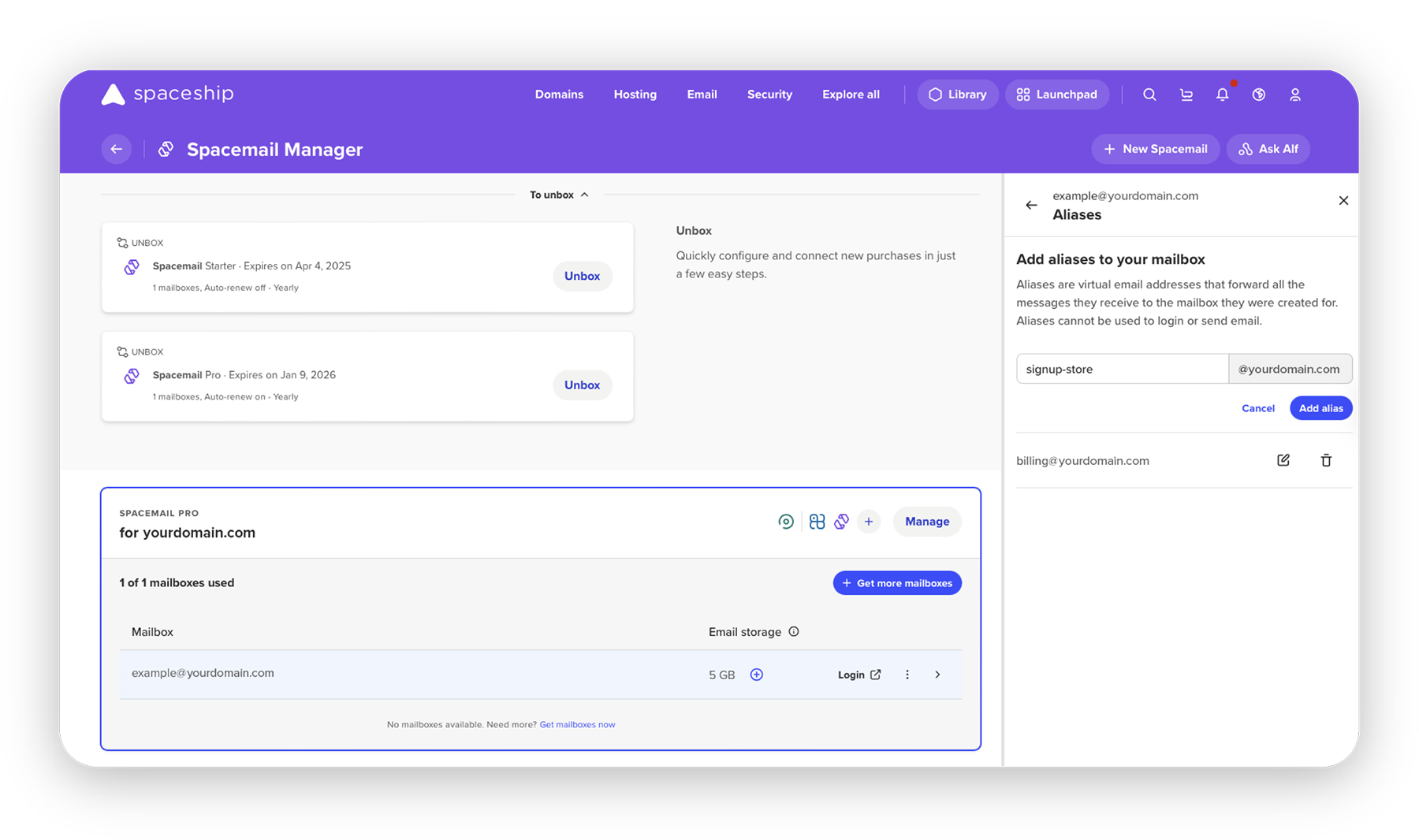
To set up an email alias in Spacemail, follow these steps:
Log in to your Spaceship account.
In Launchpad, navigate to Spacemail Manager.
Locate the Spacemail subscription associated with the mailbox for which you want to create an alias.
Click on the three dots next to the mailbox and choose the “Set aliases” option.
Set the desired alias, and the messages sent to this alias will now be forwarded to your main mailbox.
Final thoughts
Email aliases are a small but powerful feature that can make a big difference when it comes to how you manage communication. From decluttering your inbox and improving privacy to simplifying client interactions and projecting a more professional image, they’re an efficient solution for a wide range of users.
The ability to create and manage alias email addresses without extra accounts or complexity offers immediate benefits. Minimal effort and maximum impact. That’s exactly the kind of thing we love at Spacemail.
Frequently asked questions
An email alias is a secondary email address that forwards all messages to your primary inbox. It acts as an alias email address, allowing you to receive emails without exposing your main email or creating a separate account. It’s a simple way to organize and protect your communications.
Yes, many email providers allow you to send email from alias addresses. This feature lets you reply or send messages using the alias email address as the sender, but you should check your provider’s settings to confirm availability and setup instructions.
The number of email aliases you can create varies by provider. Some services offer unlimited alias email accounts, while others may limit you to a specific number, often based on your subscription plan. Review your email provider’s documentation for details.With the Spacemail Starter plan, you get 5 aliases per mailbox, with the Pro plan: 10 aliases per mailbox, and with the Advanced plan, you get unlimited aliases.
Most email providers include email aliases as a free feature within their standard plans. However, some premium plans may unlock additional alias email address options or advanced features. Check with your provider to understand any potential costs.
An email alias routes messages to your primary inbox, sharing the same login and storage, making it a lightweight solution. A new email account, however, is a fully separate entity with its own inbox and credentials, requiring more management than an alias email account.

Suggested articles




Comments (2)
Ming
May 26, 2026
Galina Muzyka
May 27, 2026