
For some, an email address is a box-ticking exercise. You’re doing some online shopping, you’re asked to add an email, and you pop in one you hastily created a few years back.
For others, an email address means brand-building power that parcels all the best bits of their company into a single line of text and squiggles.
Both types can be extremely useful. You just need to know when and where to use them.
What does an email address look like?
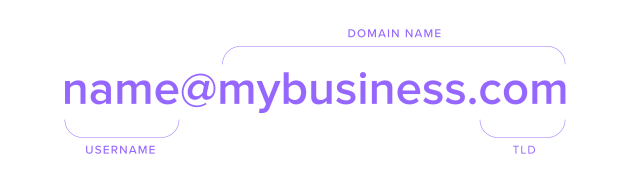
There are three parts to an email address. The domain, the username, and the @ symbol in the middle. Here’s how they work.
The domain
The domain is everything after the @. Its job is to tell the internet where to send the email. When you send an email, the system first looks at the domain. The domain points to the email server that handles messages for that website or company.
If we think of sending an email like sending a package, then the domain would point to the city and street address where the person lives.
Username — The local part
On the flip side, the local part is everything before the @. It tells the email system who the message is for once it arrives. To continue our mailman analogy, the mail carrier first delivers the letter to the building. Then the building (server) uses the username to deliver it to the right person.To round this off with a final example using alex@gmail.com:
Gmail.com gets the email to Gmail.
Alex tells Gmail which account to put it in
The @ part
And then there’s that squiggly symbol in the middle: the @ sign. Why is it there?
Back in the 1970s, the inventor of email, Ray Tomlinson, needed a symbol to sit between the username and the domain. At first, he thought about using a comma or a slash. But those were already used a lot in computer code and usernames, which would have caused confusion. So he looked for a symbol that almost no one was using. Most of them were taken, except one, the @ symbol.
The @ symbol had mainly been used in accounting. It showed the price of one item, like “12 cookies @ $1 each.” When applied to email, it works perfectly, because it literally means “at,” as in name at domain.
|
What is an email address used for?
There’s a reason you create more respectable email addresses as you age. It’s because emails are so important for every part of our digital life. Here’s when you might need one:
For talking (online) – If you plan to send an email, it’s pretty self-explanatory that you would need an email address. There are loads of places where you can create one.
For sign-ups – If you’re signing up for a website or app, you’ll need an email address. Even if you sign up with Google, everything routes back to an email behind the scenes.
For password recovery – Unless you use the same password for every signup (bad idea), you’ll probably forget it at some point. If you do, email is usually the preferred fallback.
For business activities– Your email address shapes how professional you appear. Sending emails from @mybusiness.com will instantly signal legitimacy and trust.
For online identity – Email is considered more formal and permanent than messaging apps. That’s why banks, governments, employers, and courts still rely on it.
Email address examples
Once you know that personal and business email addresses cover everything you’ll do online, you don’t need more emails —you just need to know which one to use and how to create the right one.
Personal email address examples
Personal emails work best for any informal communication or situation. That could be contacting friends, non-work sign-ups, or online shopping. They look like this.
Killer personal email formats and examples:
firstname.lastname@gmail.com – alex.morgan@gmail.com
firstname123@yahoo.com – emily.jones@yahoo.com
firstnamelastname@outlook.com – samwilson@outlook.com
firstinitiallastname@gmail.com – j.taylor@gmail.com
Pro tip: Multiple sign-ups using the same email address can fill your inbox with spam. Use email aliases to create multiple inboxes for a single email address and then filter the spam.
Business email address examples
A business email handle lets you add a custom domain for added credibility. This means you can add your business or brand name to your email address so that your online communication looks legitimate and unified. Here are a few formats to get you started.
The best business email formats and examples:
firstname.lastname@mybrand.com – alex.morgan@mybrand.com
firstinitiallastname@brand.com – s.wilson@brand.com
firstname@company.com – alex@brightstudio.com
hello@company.studio – hello@bright.studio
support@company.io – support@techflow.io
Pro tip:The pulling power of a .com is undeniable, but if your brand name is already taken or you’re struggling to make it work, a modern TLD like .io or .AI can still look professional but make it easier to create a suitable email address.
|
Personal vs business email addresses – what’s the difference?

We’ve covered when to use each type, but it can help to compare free and pro email side by side for a clearer comparison.
|
Put it all together
Hopefully, it’s now clear that email addresses are all about context. Sparkleforce123@Gmail.com might be the right choice for your online forum, but it probably won’t get you a callback for a job interview. This doesn’t mean that personal emails aren’t valuable — they just need to be used in the right place.
If you’re aiming to promote your brand, or look professional (or both), professional emails are the way to go. Personal emails should fill in the rest of the gaps, and if you’re unsure, you can always come back to this guide.
Frequently asked questions
The meaning of an email address can sometimes seem confusing, but simply put, it’s the digital address people use to send you messages online. It works by telling email systems who a message is for and where to deliver it. It’s best to think of it like a postal address for your inbox.
An email address has three main parts:Username (local part) – Everything before the @ symbol. This identifies the specific inbox.@ symbol – Means “at” and connects the username to the domain.Domain – Everything after the @. This tells the internet which email server to use.Together, these parts help messages reach the right person.
Yes. An email ID and an email address mean the same thing. You might hear “email ID” more often in forms or customer support, but if you’re wondering “what is an email ID”, it is the same as an email address in practice.
A simple email ID example looks like this:jane.doe@gmail.comThe format follows the standard structure: username + @ + domain. Business examples might use a company name instead of a free provider.
It can be tough to define email for personal and business use, but mostly it depends on the context.A personal email address usually uses a free provider like Gmail or Outlook and works well for everyday sign-ups and personal messages.A business email address uses a custom domain (like @company.com), which looks more professional and helps build trust and brand recognition.This means the definition of email addresses can vary depending on the context. If you’re communicating casually, a personal email is fine. If you’re representing a business or brand, a business email address is the better choice.

Suggested articles




Share your thoughts