
You have likely heard of cPanel at least once if you are trying to establish an online presence for your business, create a blog, or are simply interested in the topic. So, what is cPanel? Let’s try to make it clear once and for all together right now. If we were to go to Wikipedia to check the cPanel meaning, we would see this:
“cPanel is web hosting control panel software developed by cPanel, L.L.C. It provides a graphical interface (GUI) and automation tools designed to simplify the process of hosting a web site for the website owner or "end user". It enables administration through a standard web browser using a three-tier structure. While cPanel is limited to managing a single hosting account, cPanel & WHM allow the administration of the entire server. In addition to the GUI, cPanel also has command line and API-based access that allows third-party software vendors, web hosting organizations, and developers to automate standard system administration processes. cPanel & WHM is designed to function either as a dedicated server or virtual private server. The latest cPanel & WHM version supports installation on AlmaLinux, Rocky Linux, CloudLinux OS, and Ubuntu.” — https://en.wikipedia.org/
Pretty clear, right? Let me make it even clearer. Whether you are using shared, VPS, or dedicated hosting environments, with cPanel, you can easily create and manage your website, handle files and databases needed for your website, set up backups for emergency cases, analyze your website traffic, make security checks and cleanups, and much more—all from one interface. Best of all, you don't need any coding experience or technical skills to get started; everything is just a few clicks away.
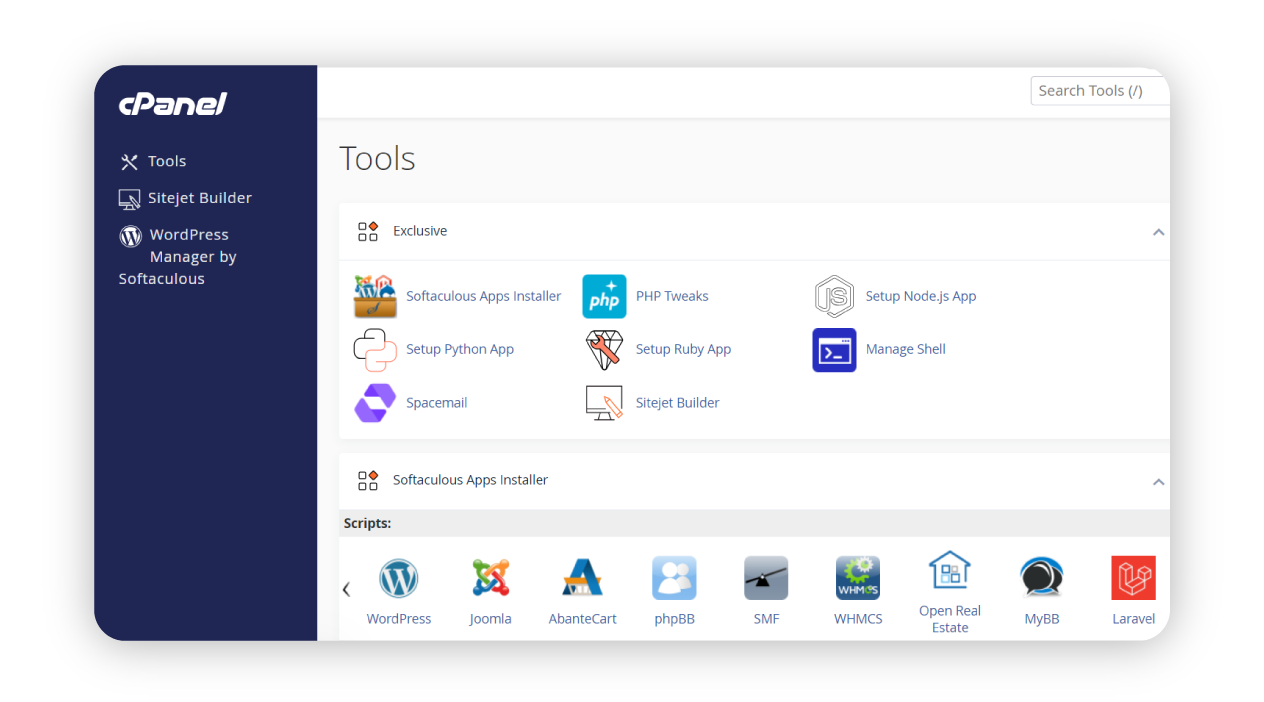
How Does cPanel Work?
Looking at the picture above and the definition from Wikipedia, I am feeling that you are thinking, “it doesn't look so easy”. I hear you. Let me explain and add a little bit to the knowledge about how cPanel operates. There are three distinct user levels to make web hosting easy:
Admin (WHM): Manages the entire server, sets up cPanel accounts, and configures server limits and settings.
Resellers: Can manage multiple client accounts, providing services without needing full server access.
End-users: Website owners who can easily manage their sites, emails, backups, and settings.
If you just want to launch your website as a solopreneur, blogger, or small business owner, you are living in the end‑user view in this simple user-level hierarchy. You will be accessing cPanel via a secure web browser (using ports 2082/2083 for an encrypted connection), automating routine tasks including cron jobs, email setup, DNS configurations, SSL installations, and data backups via cPanel.
Good to know: Cron jobs in cPanel let you schedule any script at minute‑level precision. They’re optional, depending on your website’s purpose.
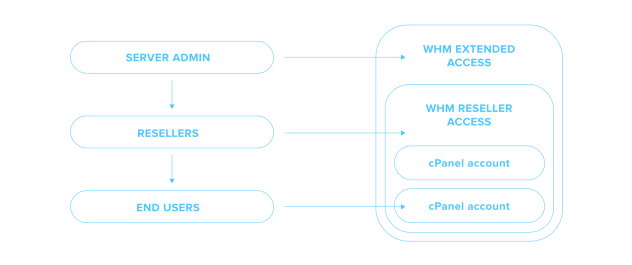
Key Features of cPanel
Let’s not get ahead of ourselves with cron jobs. What is cPanel used for exactly? Which cPanel features to use for a website is up to you, depending on your goal, but after reading this, you should be able to understand what the basic features are and which ones are particularly important for you.
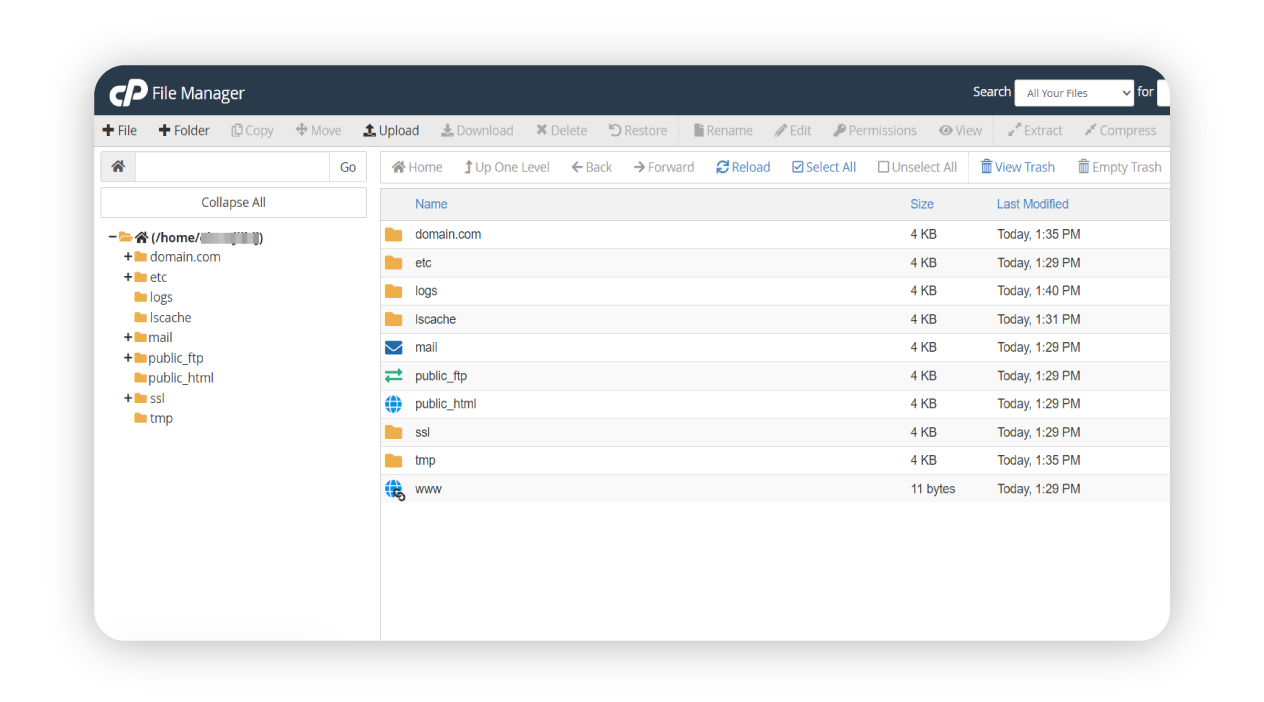
Website: File Manager, backups, FTP
File Manager is needed if you want to upload, edit, and manage website files such as HTML files, images, videos, audio, database files, etc., directly in your browser.
Backups are essential if you want to back up your site to avoid losing important information.
FTP Access can be useful if you want a quicker way to upload or download files for your website.
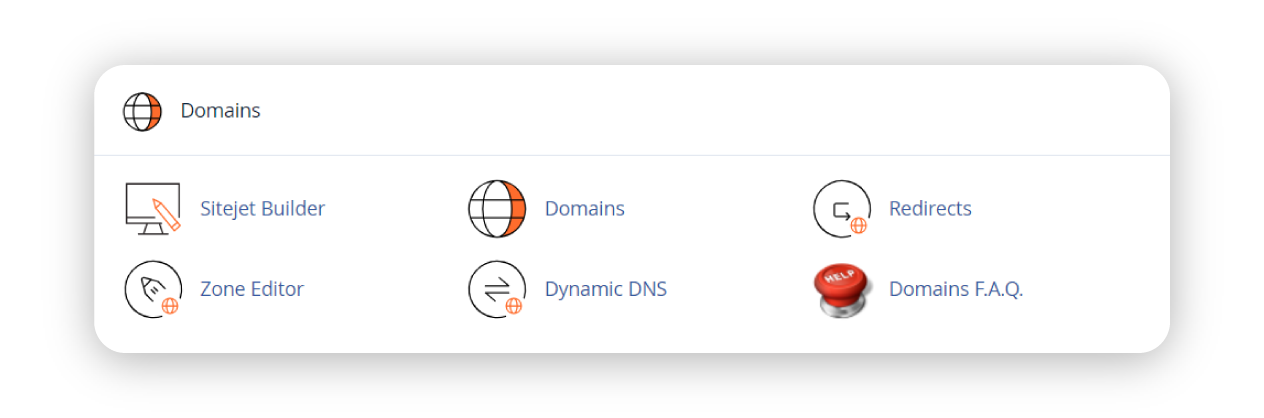
Domains: addon/sub/domains DNS editor
Addons & Subdomains are needed if you need to run multiple websites from different entities from one cPanel account. Look no further, if you don’t have a domain for your website yet - visit this page.
DNS Editor will allow you to update and control your domain hosting records.
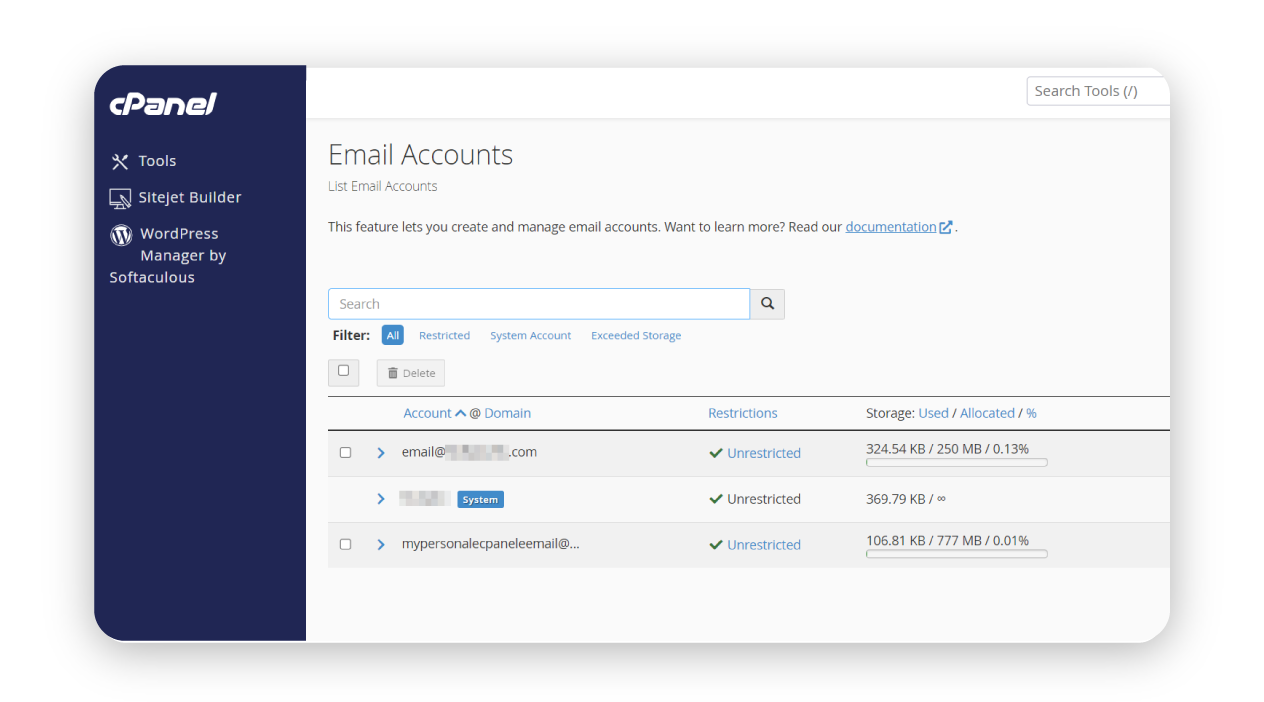
Email: POP3/IMAP setup, spam filters, webmail
Email Accounts (POP3/IMAP): If you need to quickly create email addresses for professional communication with your hosted domain.
Spam Filters will keep your inbox clean and secure.
Webmail Access will be handy to check your emails anywhere, directly from your browser.
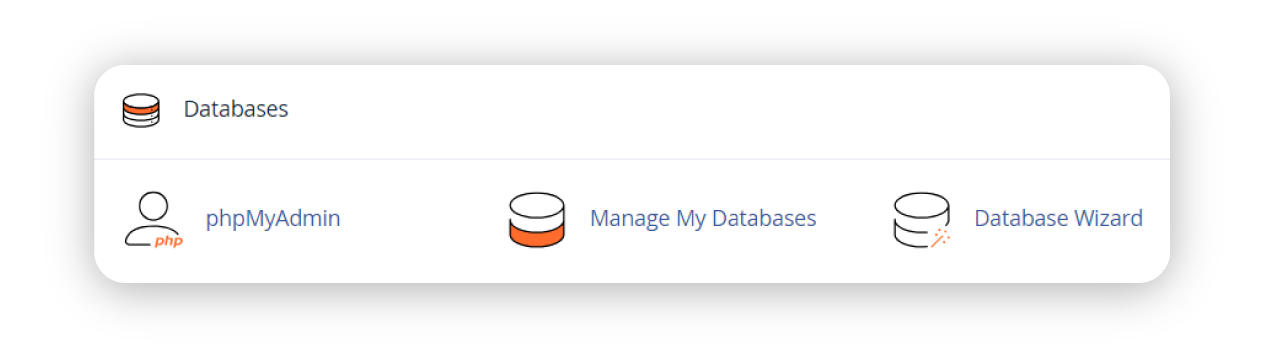
Databases: MySQL, PostgreSQL
MySQL/PostgreSQL will be valuable for you when you need to set up databases for websites that need dynamic content. For example, every time someone writes a post, leaves feedback, or buys something on your site, that information is stored and managed by a database, making your website more organized, flexible, and interactive.
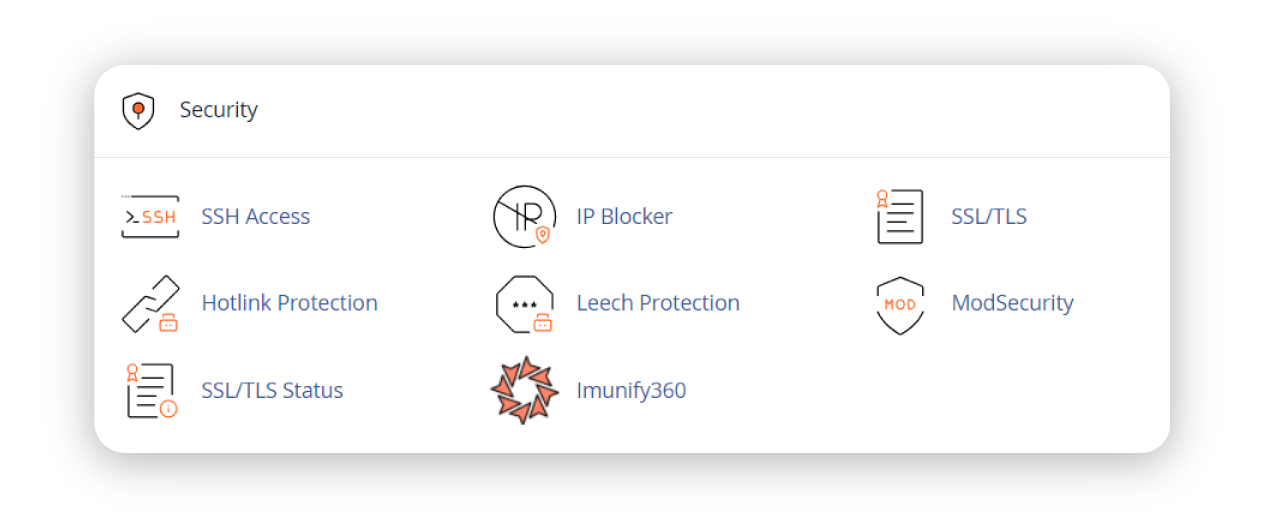
Security: SSL manager, 2FA, IP blockers
SSL Certificates quickly secure your site to build visitor trust. Two-Factor Authentication (2FA) adds extra protection to your hosting account.
IP Blocker allows you to block unwanted visitors or potential threats on your website.
Good to know: Security is important. Check out this post about web hosting cPanel security strategies and recommendations.
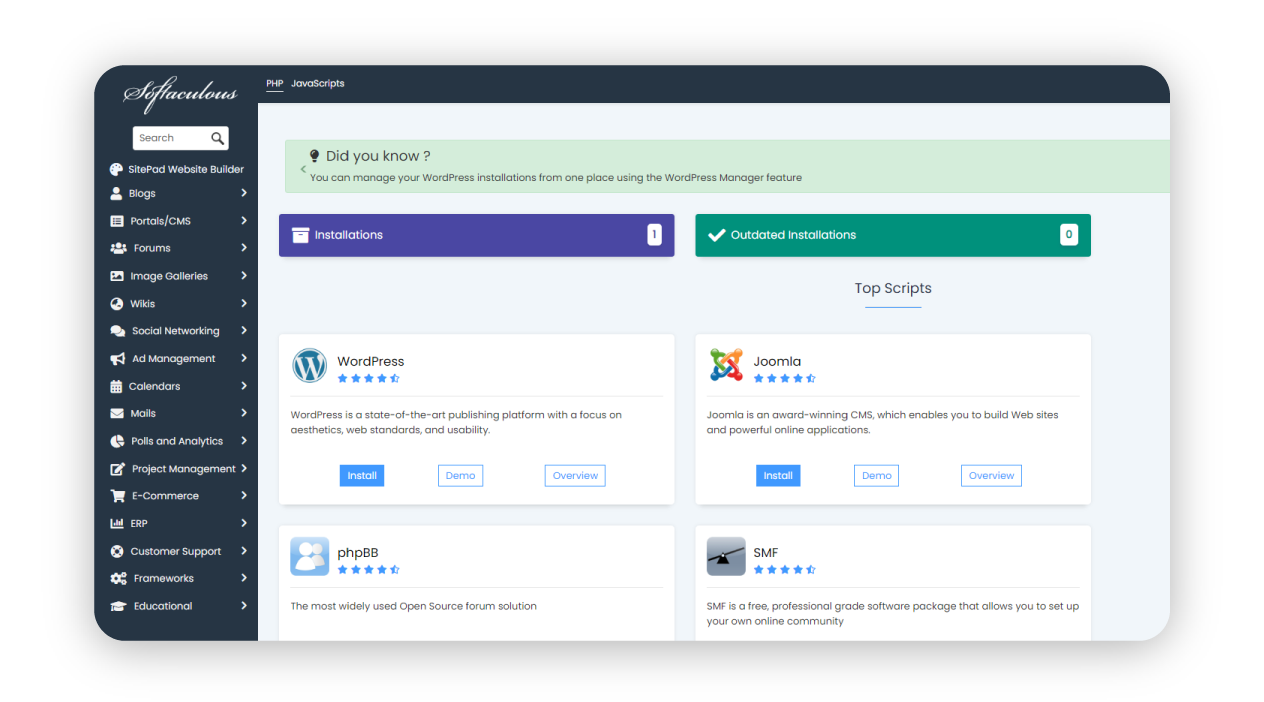
Auto-installers: WordPress via Softaculous
If you want to create a website fast, you can do that by installing a CMS (Content Management System). The most popular is WordPress. Softaculous in cPanel quickly installs popular CMSs like WordPress with just a few clicks—no technical skills needed.
Good to know: Spaceship Supreme and Pro shared hosting plans install WordPress and AI tools automatically, turning your blank site into a ready‑to‑go blog or store in minutes.
So, if you ask, “What is the cPanel of a website?” cPanel simplifies everything you need to build, manage, and secure your website, even if you're not tech-savvy.
Using cPanel with other types of hosting
cPanel isn’t just for shared hosting. On Spaceship Cloud VPS (Virtual Machines) or dedicated servers, you can pair cPanel & WHM to control every account on the machine, carve out reseller plans, and run multiple PHP versions side by side. Just remember licence costs scale per server.
Why Choose Spaceship Shared Hosting with cPanel
Now, we know what cPanel is and why you need it, and which exact feature is needed for your purposes. Possibly, you also heard the phrase “cPanel hosting”. What is cPanel hosting? Or what is Linux hosting with cPanel? It is any hosting solution that runs on the Linux operating system (typically CentOS, AlmaLinux, Ubuntu, etc.) and includes this control panel so you can manage your website without the Linux command line. It is that easy.
Let me introduce you to our Shared cPanel Hosting. cPanel provides a familiar interface with user-friendly controls that are ideal for beginners needing website management without coding skills. Spaceship Shared cPanel Hosting leverages this simplicity, offering:
Quick WordPress setup with AI tools, free SSL, and automatic DNS settings.
Spacemail® business email: skip cPanel email’s clunky mailbox setup and enjoy our purpose-built, spam-shielded inboxes instead.
In addition to the backup options in cPanel and Softaculous, Autobakup is offered as an affordable add-on with 1 monthly, 4 weekly, and 6 daily backups on a separate server.
Comprehensive resources and traffic monitoring.
Seamless site migration – will allow you to move your website, databases, from almost any host to Spaceship with zero downtime and no extra cost to keep your domain and hosting under one roof to avoid split billing and nameserver confusion.
However, are there alternatives that can be used, and if cPanel, which was initially released 29 years ago, is even still relevant in 2025? The short answer is “Yes”. Let’s dig deeper for the longer answer.
While Hosting providers are increasingly adopting other control panels available on the market or custom-built control panels to tailor interfaces to ensure simplicity and ease of use, directly addressing customer pain points, cPanel’s 29‑year evolution means potentially fewer bugs, richer documentation, and instant muscle memory for millions of admins.
Spaceship’s philosophy is simple: give you the choice of a battle‑tested cPanel today, while we continually develop our custom panel - Hosting Manager. That way, you get both stability and innovation, without learning yet another interface every year. Custom panels can be optimized specifically for infrastructure, improving uptime, load times, and resource utilisation, and have easier integration with other tools, APIs, and unique service offerings.
Alternatives to cPanel
WHM for admins
As it was mentioned earlier, it is not the separate panel per se, it is the level of management. WHM (Web Host Manager) is an administrator's panel for handling multiple cPanel accounts, while cPanel is the tool for end-users to manage their websites.
Webuzo, Plesk, DirectAdmin
If you ever feel that cPanel’s layout is a little crowded, Plesk and DirectAdmin step in as solid alternatives. Both deliver the same core tools: file, database, and email management, with different workflows, though. Plesk leans toward a modern, app-centric interface and deep WordPress integration, while DirectAdmin emphasizes speed and simplicity, making it popular on smaller VPSs. Whichever you choose, you’ll still get one-click installers, robust security modules, and an active community ready to help.
Meanwhile, Softaculous’s Webuzo embraces a minimalist approach for single-site or single-server owners: one clean sidebar, one login, and instant access to files, databases, domains, and 400+ one-click apps. Nothing more, nothing less. Because Webuzo is lightweight and more efficient in license pricing, it keeps overhead tiny and performance snappy, without sacrificing capability. Namecheap offers it as a budget-friendly alternative with VPS and dedicated servers for users who crave simplicity without giving up cPanel’s power.
Spaceship-native control options vs. external panels
For those who prefer an all-in-one experience, Spaceship’s native Hosting Manager combines the tools of cPanel and custom solutions. The interface is constantly being developed and purpose-built for our infrastructure, so every toggle, metric, and alert loads instantly and feels exactly what and where you expect them.
Let’s see the comparison table to break down custom panel hosting and hosting with the earlier-mentioned external panels:
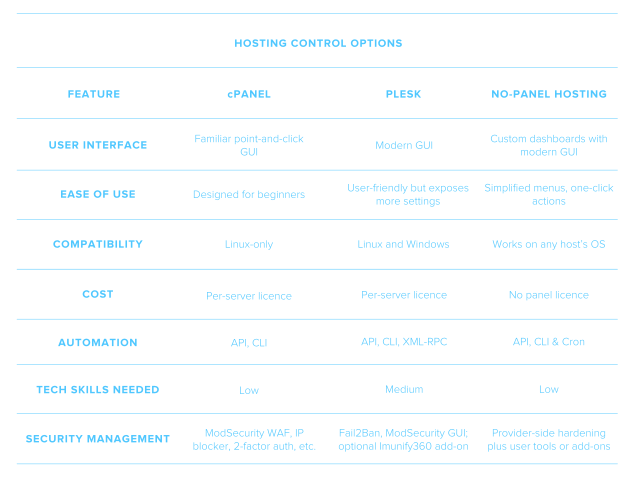
Good to know: What is ModSecurity in cPanel? ModSecurity (often shortened to ModSec) is an open-source Web Application Firewall (WAF) module that inspects every HTTP request for patterns that match known attacks such as SQL injection, cross-site scripting, or brute-force login attempts, and blocks or logs them before they reach your site’s code.
Final Thoughts
Despite challenges like rising licensing costs and performance considerations, cPanel, the gold standard for traditional shared hosting, remains highly relevant and popular among users. It provides ease-of-use for newcomers and reliable control for seasoned users, thanks to its extensive feature set and massive community. However, as the hosting landscape evolves towards cloud-native, headless, and AI-driven solutions, you should evaluate whether a GUI-based control panel like cPanel aligns with your specific needs. If you’re after streamlined UX, integrated AI helpers, and zero extra licences, hosting offerings with custom panels will have your back.
Either way, your mission is the same: launch something awesome online, then scale it with confidence.
Frequently asked questions
cPanel lets you manage files, databases, security, and performance from a single dashboard—no command line required.
Not strictly. What is cPanel in WordPress? Nothing. cPanel isn’t part of WordPress at all. You can deploy WordPress on any Linux server, but cPanel (and such tools as Softaculous) or our Hosting Manager make the install and ongoing maintenance far easier.
Plesk, DirectAdmin, Webuzo, or a custom panel setup managed via SSH or dashboards with a modern GUI.
For VPS and Dedicated servers, licences start around $32.99/month for one server with up to five accounts. Prices increase with account counts and feature add‑ons.
This is the ability to log in to cPanel if you have a licence with your VPS or dedicated server hosting, or your shared hosting plan has cPanel included. Most hosts provide a shortcut in their customer area. At Spaceship, in Hosting Manager, click on the “⋮” sign next to the “Manage” button next to the hosting subscription and hit the “Go to cPanel” button. Alternatively, you can use access tokens to use a separate link for cPanel access. For your other hosting solutions, you usually can visit https://your‑domain.com:2083 (secure) or https://your‑server‑ip:2083 and enter the username/password supplied by your host.

Share your thoughts