
When purchasing a domain name, one of the most common mistakes people often make is not checking the domain's history before finalizing the deal. Just like buying a home or a car, you need to ensure the domain doesn’t come with hidden issues that could impact your plans.
A domain history lookup allows you to investigate a domain’s past ownership, usage, and reputation to avoid potential problems.
Common issues found in domain name history
A domain’s past can significantly impact its future usability and reputation.
If a previous owner engaged in black hat SEO practices, such as excessive link buying or manipulative tactics to boost rankings, Google may have penalized the domain. This can make it difficult for your website to perform well in search results, negatively affecting visibility.
Additionally, the domain’s prior use could be problematic if it was associated with inappropriate or controversial industries, such as adult content or gambling. Even if the previous content has been removed, lingering backlinks and references could still affect your brand’s credibility.
Another concern is if the domain has blacklist or spam issues. Some domains are flagged for malicious activity or excessive spam, which can lead to search engines and email providers distrusting them. If a domain has been blacklisted, it may take significant time and effort to restore its reputation and remove it from blocklists.
How to perform a domain history lookup
Performing a domain history lookup is essential to uncover any past issues that could affect your website’s reputation and performance. By using specialized tools, you can investigate previous ownership, past content, backlink quality, and if the domain has been flagged for spam or blacklisted. Here are some valuable tools and tips to do just that:
1. Use Spaceship’s domain history search
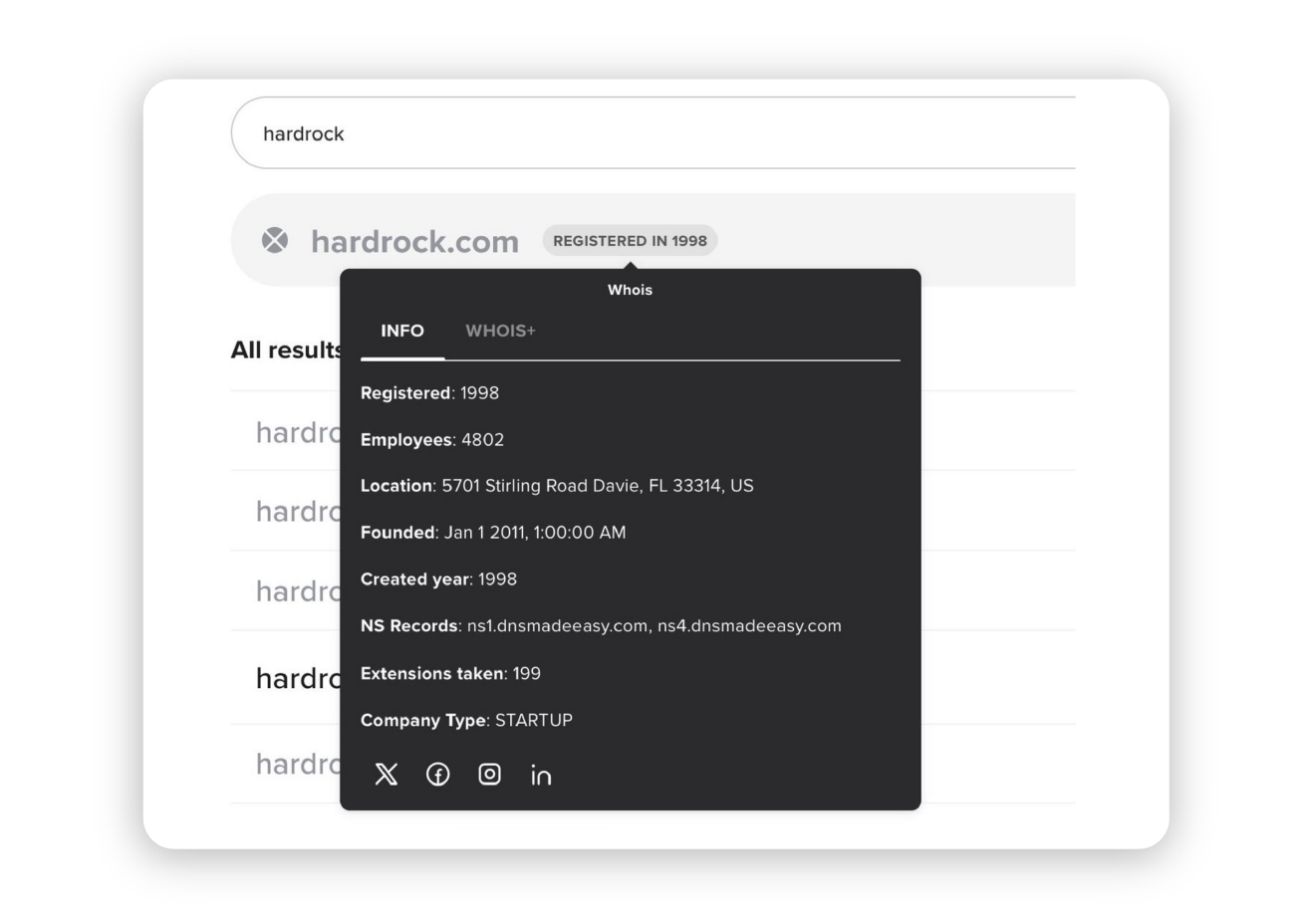
When searching for a domain on spaceship.com, if you hover over a registered domain in the search results, you can view both enhanced WHOIS information and other non-WHOIS data on the company that registered the domain, as well as domain registration history. It gives you upfront info without needing to sign up for external services.
For example:
2. Use the Wayback Machine (Internet Archive)
The Wayback Machine provides snapshots of websites over time. Enter the domain name and check previous versions of the site to see how it was used.
3. Check domain ownership history with DomainIQ
DomainIQ offers tools to track WHOIS history, showing past ownership records. Reviewing these records helps you identify potential red flags, such as frequent ownership changes or disputes.
4. Analyze backlinks using SEMRush
SEMRush allows you to check a domain’s backlink profile, revealing whether it has a history of spammy or irrelevant links. Excessive toxic backlinks can indicate past SEO manipulation.
5. Run a Google search on the domain name
Searching for a domain using:
site:example.com (to check if it’s indexed by Google)
"example.com" (to find mentions of the domain in news or forums)
can reveal whether the domain has been involved in negative press or scams.
6. Use Moz’s domain analysis tool
Moz provides free Domain Authority and Spam Score metrics. A high spam score could indicate a problematic past, while good domain authority suggests a reputable history.
7. Use a basic WHOIS lookup
A simple WHOIS search can provide key details about current and past registrants, domain creation dates, expiration dates, and registrar information. It's a quick way to identify red flags, such as frequent ownership changes or concealed identity behind a privacy shield.
8. Explore domain details with DomainTools
DomainTools offers comprehensive insights into domain registration history, WHOIS records, DNS changes, and risk scoring. This platform can be especially useful for identifying long-term patterns, including past ownership, hosting history, and any connections to malicious activity.
Final steps before buying a domain
Before finalizing a domain purchase, it's important to ask the seller about its domain history. Find out how long they have owned it and how it has been used in the past. Understanding its previous purpose can help determine if it aligns with your intended use. If the domain’s past content and reputation support your goals, it may be a valuable acquisition. Additionally, it’s crucial to ensure the domain hasn’t been blacklisted. Tools like Google Safe Browsing and Spamhaus can help verify its status and alert you to any security or spam-related issues.
Taking these steps can help you avoid potential problems and make a well-informed decision.
While no check is foolproof, using these tools to investigate a domain name history can help prevent costly mistakes and ensure you acquire a valuable digital asset.
Frequently asked questions
To check the domain history, use tools like the Wayback Machine to view past website snapshots, DomainIQ to view WHOIS history, and SEMRush to analyze backlinks.When searching for a domain on spaceship.com you can also view both enhanced WHOIS (enriched with other non-WHOIS data on the company) and domain registration history when you hover over a registered domain. You can also perform a basic WHOIS lookup or use DomainTools for a detailed view of past registration data.
A domain’s history affects its reputation, SEO performance, and trustworthiness. Issues like black hat SEO, spam links, or past controversial content can negatively impact future use.
Yes, but it can take time. Removing toxic backlinks, improving site content, and requesting delisting from blocklists can help restore a domain’s credibility.
Avoid domains with high spam scores, excessive toxic backlinks, past use for controversial content, and frequent ownership changes that may indicate disputes or security concerns. You can also perform a basic WHOIS lookup or use DomainTools for a detailed view of past registration data.By checking domain history, you can make a smarter investment and build your website on a solid foundation.

Suggested articles




Share your thoughts