How to troubleshoot issues with VPS Command Line
Sometimes, the VPS Command Line may not work as expected.
These issues may occur on newly deployed Virtual Machines or result from various failures, such as:
There is no space left on a device;
Network issues;
Authentification issues;
The VM is disabled in
systemd.
To help you identify and resolve these issues, we provide a self-service troubleshooting tool called Starlight Agent.
You can run the troubleshooter by connecting to your VM via SSH and executing the following command:
sudo /opt/starlight/bin/starlight-agent-check
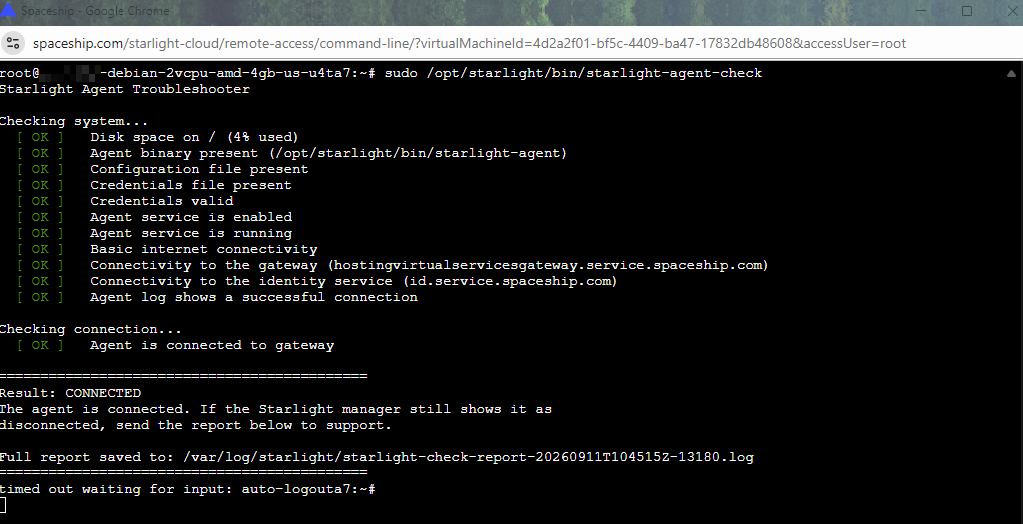
A detailed log of the checks performed by the script is also saved on your VM. You can find the log using the path provided in the script summary. In the example above, the log file is /var/log/starlight/starlight-check-report.log.
As shown in the example, the script did not detect any issues with the VM, and the VPS agent is connected successfully.
If Starlight Agent cannot resolve the issue and the VPS agent is still disconnected, copy the script summary and contact our Support team. Make sure to include the summary in your request so our specialists can investigate the issue further.