How to transfer a domain name to Spaceship
It’s easy to transfer a domain registered with another provider to Spaceship. Simply follow the steps outlined below.
Prepare your domain
Before initiating the transfer, ensure your domain is:
Unlocked for transfer at your current registrar — if you aren’t sure, you can use a Whois checker. Here, the status of your domain should be “okay” or “active” indicating it’s ready to transfer. Alternatively, reach out to your provider to find out.
You have obtained the authorization (EPP) code — from your current registrar.
Note: If you are transferring a .UK group domain (.UK, .CO.UK, .ME.UK, .ORG.UK), you will need to change the IPS tag on the side of the current registrar to SPACESHIP before submitting a domain transfer.
An expired domain can be transferred to us as long as it is not in the redemption state — this means the domain is outside the grace period.
However, the .UK group of TLDs (.UK, .CO.UK, .ME.UK, .ORG.UK) and .EU domains can be transferred even while in redemption. Note that the remaining registration time is not lost during the transfer, so there's no need to wait until a domain is close to expiration.
Initiate the transfer
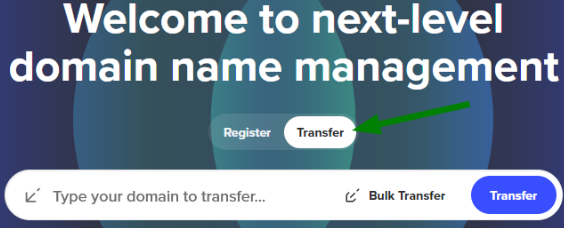
Visit Spaceship.com and click on the Transfer toggle:
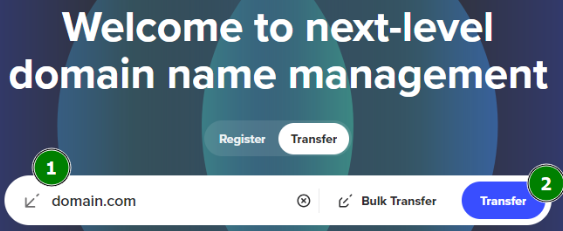
Next, enter the domain you’re transferring into the search field and click Transfer:
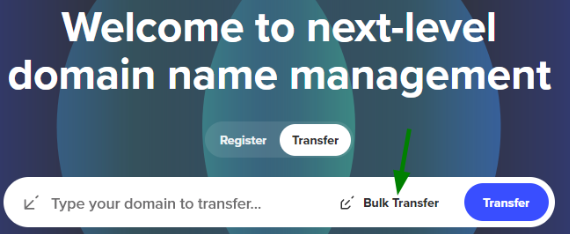
On the same page, you can also activate the Bulk Transfer mode if you’re transferring multiple domains:
In Bulk Transfer mode, you can upload a CSV file or enter multiple domains manually. You may also provide authorization codes along with the domains:
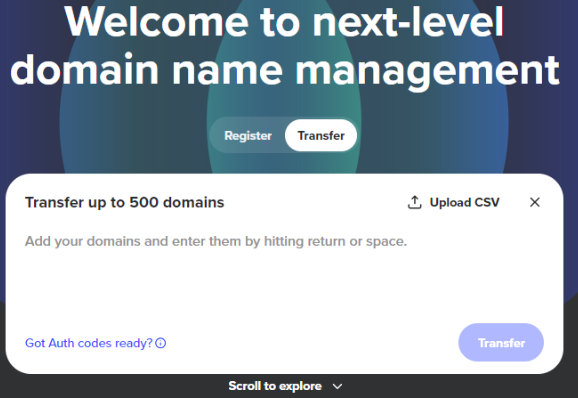
Once all domains are added, click the Transfer button to proceed:
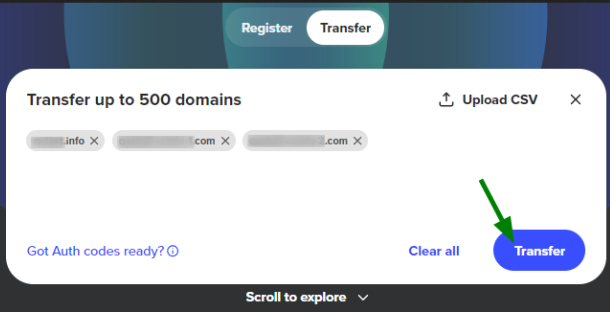
Proceed with domain transfer
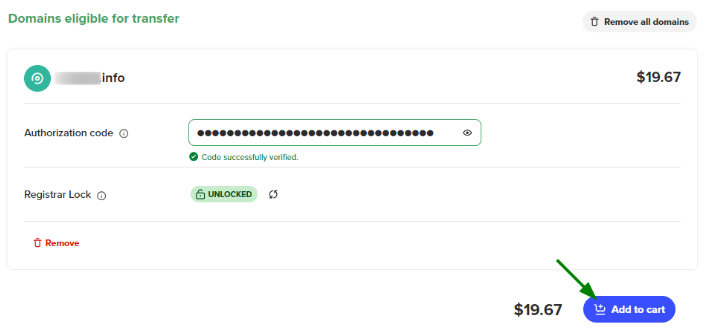
Once you’ve made sure that your domain is unlocked and the authorization code has been provided, you can add the domain to your Shopping Cart and proceed with the checkout:
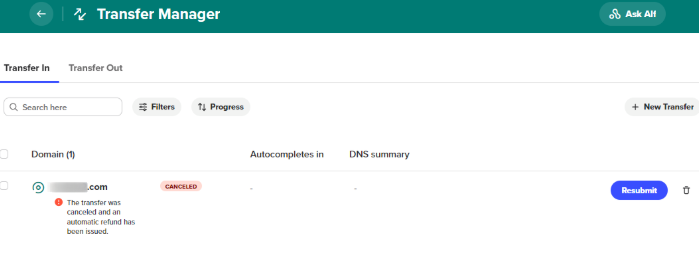
After placing your order, you can track the status of your domain transfer in the Transfer Manager app.
It allows you to monitor the statuses of all ongoing transfers, resubmit failed ones and initiate new transfers. Bulk transfer options are also supported.
The downtime prevention functionality helps ensure uninterrupted service when transferring a domain to Spaceship.
In the Transfer Manager, you can click the “Find solution” button in the DNS Summary column and choose one of two options: Importing host records from the registrar you’re transferring out of (this also updates the nameservers to Spaceship's), or switching to Spaceship nameservers without importing existing records.
These options help prevent service disruption after the transfer is completed.
Check your inbox
Your current registrar will send you an email, allowing you to either approve and expedite the transfer or cancel it. If you take no action, the domain will be transferred automatically to Spaceship in approximately five days. To speed up the process, follow the link in the email to approve the transfer.
Once the transfer is complete, our system will add the domain to your Spaceship account and send a confirmation email.