
Qué es un ataque de fuerza bruta — y cómo amenaza tus contraseñas.
Tipos comunes, desde ataques de diccionario hasta credential stuffing.
Cómo prevenir ataques de fuerza bruta con limitación de tasa, 2FA y más.
Las mejores herramientas y defensas para tu plataforma.
Preguntas frecuentes.
Aunque los actores de amenazas continuamente idean formas nuevas y sofisticadas de hackear o vulnerar sitios web, hay algunos métodos clásicos que siguen vigentes. Aunque son simples, siguen demostrando ser en gran medida efectivos. Uno de esos métodos son los ataques de fuerza bruta.
Es uno de los métodos de ciberataque más antiguos y sigue siendo popular entre los hackers. Puede parecer rudimentario, pero es esencial saber cómo protegerte del daño. Sigue leyendo para conocer la definición de ataque de fuerza bruta, los riesgos y lo que puedes hacer para prevenirlo.
¿Qué es un ataque de fuerza bruta en ciberseguridad?
Un ataque de fuerza bruta es un método de hackeo que utiliza prueba y error para adivinar credenciales de inicio de sesión, claves de cifrado o páginas web ocultas. Se llaman ataques de fuerza bruta porque eso es precisamente lo que implican. Los actores maliciosos intentan obtener acceso no autorizado a cuentas o redes mediante un exceso de prueba y error. Esta prueba y error puede tomar solo unos minutos o hasta varios años.
Un ejemplo típico es usar múltiples combinaciones de nombre de usuario y contraseña para intentar iniciar sesión en una cuenta. Pueden adivinar la contraseña usando contraseñas comunes, filtraciones previas de contraseñas o investigando la información personal del objetivo, como fechas de cumpleaños o nombres de mascotas. Esto puede hacerse manualmente o con software especializado, lo que lo hace mucho más rápido.
Los ataques de fuerza bruta pueden ocurrir en cualquier plataforma en línea. Según Group-IB, las aplicaciones web y los portales, como los portales de cuentas de clientes y los paneles de administración de sistemas de gestión de contenido (CMS), como WordPress, representan el 43% de los ataques de fuerza bruta. Después vienen los inicios de sesión de red y servidor, y luego las cuentas de correo electrónico y redes sociales.
¿Cómo funciona un ataque de fuerza bruta?
Un ataque de fuerza bruta típico puede dividirse en tres pasos principales:

1. Elegir un objetivo
Hay varias razones por las que una persona u organización podría ser objetivo de un ataque de fuerza bruta. La información valiosa, como los datos privados de clientes, la información financiera o la propiedad intelectual, es importante, pero también lo es la facilidad de acceso. Los actores maliciosos buscarán sistemas con defensas débiles, por ejemplo, software desactualizado o políticas de contraseñas deficientes sin implementación de autenticación multifactor (MFA).
2. Lanzamiento del ataque
Esto puede hacerse manualmente, pero los atacantes suelen usar software y bots, ya que es mucho más eficiente y puede automatizarse. Hay diferentes tipos de ataques, de los que hablaremos más adelante, pero normalmente intentarán iniciar sesión en un portal con numerosas combinaciones posibles de credenciales. Para evitar la detección y aumentar la probabilidad de éxito, los atacantes podrían usar una botnet para distribuir los intentos entre varias máquinas y direcciones IP. Esto reduce la probabilidad de bloqueos o limitación de tasa.
3. Obtener acceso
Si el atacante encuentra una combinación exitosa y evita la detección de seguridad, puede acceder al sistema o cuenta objetivo. Después de eso, puede robar datos o penetrar más en el sistema y lanzar un ataque malicioso, como infectarlo con malware o interrumpir el servicio.
Hoy en día es poco común que los atacantes realicen ataques de fuerza bruta manualmente. Las herramientas especializadas son mucho más convenientes, ya que pueden encontrar las combinaciones correctas de contraseñas o IDs de sesión mucho más rápido de lo que podría hacerlo una persona.
Las herramientas populares para ataques de fuerza bruta incluyen:
Aircrack-ng – supervisa y exporta datos mediante la seguridad de redes Wi-Fi, lanzando ataques como puntos de acceso falsos e inyecciones de paquetes.
John the Ripper – una herramienta de descifrado de contraseñas de código abierto utilizada tanto por hackers éticos como por hackers maliciosos.
Hydra – una plataforma de código abierto que puede probar rápidamente muchas combinaciones de contraseñas y puede atacar más de 50 protocolos y múltiples sistemas operativos.
¿Cuáles son los diferentes tipos de ataques de fuerza bruta?
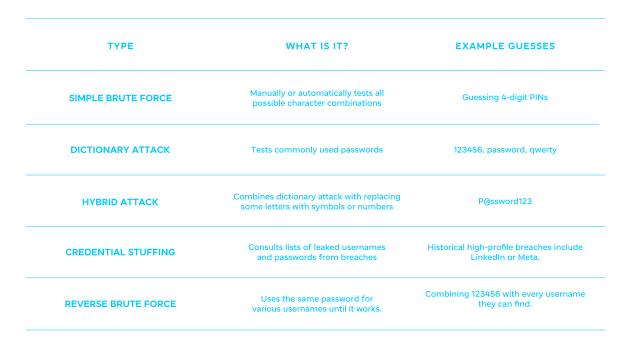
Aunque el propósito de todos los ataques de fuerza bruta es esencialmente el mismo, la forma en que los hackers los llevan a cabo puede variar. Revisa la siguiente tabla para familiarizarte con los diferentes tipos de ataques de fuerza bruta y lo que implican.
¿Por qué son peligrosos los ataques de fuerza bruta?
Como cualquier ciberataque, los ataques de fuerza bruta pueden dejar vulnerables a los usuarios de Internet y a los negocios en línea de múltiples maneras, entre ellas:
Riesgo de toma de control de cuentas – para los usuarios, esto puede resultar en robo de datos y pérdidas financieras, mientras que las empresas enfrentan daños reputacionales y económicos.
Robo de identidad – si los hackers acceden a la información personal de alguien, pueden usarla para cometer fraude en su nombre, desde abrir cuentas hasta obtener préstamos.
Brechas de red (fuerza bruta RDP) – los actores de amenazas pueden obtener acceso a múltiples computadoras, propagando malware o ransomware por toda la red.
Costo de respuesta – las brechas de datos empresariales suelen provocar tiempo de inactividad operativa, investigaciones costosas, multas y más.
Cómo prevenir un ataque de fuerza bruta
Aunque las consecuencias de un ataque de fuerza bruta pueden ser graves, afortunadamente pueden prevenirse con algunas medidas de protección simples.
1. Protección de inicio de sesión
La prevención de ataques de fuerza bruta comienza en la página de inicio de sesión. Estas son algunas medidas clave que debes tomar:
Activa 2FA/MFA – si los hackers logran adivinar correctamente una contraseña, esta capa adicional de protección evitará que avancen más.
Usa CAPTCHA después de inicios de sesión fallidos – para intentos automatizados de fuerza bruta, CAPTCHA puede evitar que bots y software obtengan acceso a las cuentas.
Bloquea intentos repetidos de inicio de sesión – usa limitación de tasa, que limita los intentos de inicio de sesión en un periodo específico, o bloqueo de IP, que bloquea IPs por comportamiento sospechoso.
2. Seguridad de contraseñas
La higiene de contraseñas es un elemento vital, aunque con demasiada frecuencia descuidado, de la seguridad en línea. Contraseñas como “123456” y “password” ya no son suficientes en el panorama digital actual. Así que asegúrate de:
Aplicar políticas de contraseñas seguras
Exigir frases de contraseña o contraseñas aleatorias largas
Usar una combinación de números, caracteres, símbolos y mayúsculas y minúsculas
No incluir información personal, como el nombre de una mascota o una fecha de cumpleaños
Evitar reutilizar contraseñas en múltiples plataformas
Usar un buen administrador de contraseñas para almacenarlas de forma segura y llevar su control
3. Defensas a nivel de red
También es esencial contar con medidas de protección más allá de la página de inicio de sesión.
Usa un firewall de aplicaciones web (WAF) – mecanismos como la limitación de tasa, la detección de bots y el bloqueo geográfico identifican y mitigan los intentos de fuerza bruta.
Limita el acceso a los portales de inicio de sesión – algunas formas de hacerlo incluyen restringir el acceso a IPs específicas o permitir solo acceso por VPN.
Supervisa los intentos fallidos de inicio de sesión – usa herramientas de gestión de información y eventos de seguridad (SIEM) para supervisar, analizar y alertarte sobre cualquier cosa sospechosa.
¿Qué herramientas ayudan a detener los ataques de fuerza bruta?
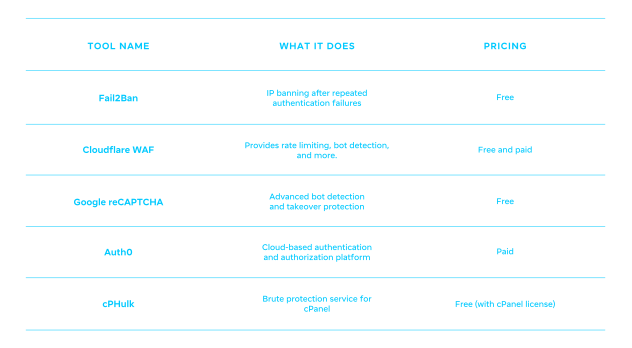
Aquí te mostramos cómo detener un ataque de fuerza bruta usando una variedad de herramientas gratuitas y de pago.
Cómo detectar si estás bajo un ataque de fuerza bruta
Si usas una plataforma con funciones de seguridad integradas e implementas las herramientas correctas, deberías poder detectar si estás bajo ataque o si se ha intentado un ataque de fuerza bruta. Presta atención a señales como:
Un aumento repentino en los intentos fallidos de inicio de sesión.
Anomalías en los registros, como la misma IP intentando varias veces.
Alertas de seguridad de tu hosting o CDN.
Cómo elegir la defensa adecuada contra fuerza bruta para tu sitio web
Seleccionar la defensa adecuada contra fuerza bruta para tu sitio dependerá de algunos factores. Aquí tienes algunos pasos para proteger tu sitio de manera apropiada:

1. Evalúa tu plataforma
¿Tu sitio está alojado en WordPress, en una plataforma de creador de sitios/software como servicio (SaaS), o en un backend personalizado creado completamente por ti? Esto afectará el tipo de protección que puedes implementar y cuánto control tienes sobre ella.
2. Elige la protección adecuada
Conoces tu plataforma, así que esto es lo que mejor funciona:
WordPress – agrega fácilmente plugins para proteger tu sitio, como plugins de seguridad que incluyen WAF, CAPTCHA y limitación de inicio de sesión. También puedes cambiar la URL de tu página de inicio de sesión.
Creador de sitios/SaaS – estas plataformas normalmente se encargan de la seguridad y la protección del inicio de sesión, así que asegúrate de que esté activada. La personalización suele ser limitada.
Backend personalizado – tendrás que agregar código tú mismo, como limitación de tasa, a nivel del servidor. Tienes control total sobre lo que puedes implementar.
3. Agrega MFA para todos los usuarios
Sea cual sea la plataforma de tu sitio web, la capa adicional de protección que aporta MFA es esencial para la protección contra fuerza bruta.
WordPress – Algunos plugins, como WP 2FA y Wordfence, te permiten hacer que MFA sea un requisito para todos los usuarios.
Creador de sitios/ SaaS – la mayoría de las plataformas modernas deberían ofrecer una forma de implementar esto en la configuración de la cuenta.
Backend personalizado – usa apps de autenticación o WebAuthn, como passkeys.
4. Supervisa los registros con regularidad
Todos los programas, software, sistemas y apps generan registros de eventos conocidos como logs. Supervisar ciertos tipos de logs, como los intentos de inicio de sesión y las actividades del sistema, puede ayudarte a mantenerte al tanto de cómo está funcionando todo.
Para WordPress, un plugin como WP Security Activity Log facilitará la supervisión de logs. Para los creadores de sitios web, tendrás que investigar su sección particular de registro de actividad, aunque el nivel de detalle variará. Para backends personalizados, configura logs estructurados de inicio de sesión que registren inicios de sesión exitosos y fallidos con IP y nombre de usuario, y luego centraliza esos logs. Activa alertas o bloqueo automático cuando aparezcan patrones sospechosos, como aumentos repentinos en fallos repetidos desde una IP específica.
Párrafo final
Ahora ya deberías tener una buena idea de qué es un ataque de fuerza bruta y qué implica. Afortunadamente, aunque las consecuencias de estos ataques pueden ser graves, son fáciles de prevenir. Usando la guía de este artículo, tómate el tiempo para revisar tus configuraciones y hábitos actuales de seguridad de inicio de sesión y haz mejoras según sea necesario. Si te interesa una plataforma con protección integrada, desde firewalls hasta prevención de intrusiones, explora cómo Spaceship protege todas las cuentas de hosting.
Preguntas frecuentes
Un ataque de fuerza bruta prueba todas las combinaciones posibles de caracteres para adivinar una contraseña. En cambio, un ataque de diccionario usa una lista predefinida de credenciales filtradas, así como palabras, frases y nombres comunes. Aunque una fuerza bruta normal puede llevar tiempo, es más efectiva contra contraseñas complejas. Los ataques de diccionario son más efectivos contra contraseñas débiles y predecibles.
Es imposible hacer que tu sitio sea completamente imposible de hackear, y eso también aplica a los ataques de fuerza bruta. Sin embargo, pueden volverse prácticamente imposibles con defensas en capas, como protección de inicio de sesión, buena higiene de contraseñas y buena seguridad de red.
Sí, intentar un ataque de fuerza bruta es ilegal en la mayoría de los países. Sin embargo, los profesionales de seguridad autorizados pueden hacerlo legalmente si el propietario de un sistema les permite usar fuerza bruta para probar qué tan seguro es su sitio web o sistema.
Esto depende de la complejidad de tu contraseña. Una contraseña débil como “password” tomaría solo unos minutos. Algo con diferentes símbolos y caracteres podría tomar un par de horas. Pero si tienes una capa adicional de protección como cifrado o autenticación multifactor, podría tomar años.

Comparte tus pensamientos