
Make sure your AI-built website has all the features it needs
Every business needs a website. From brick-and-mortar takeaways to charity shops, at its most basic, a website is an entry in the modern-day Yellow Pages and, at its best, an entire revenue stream and customer base.
But for the uninitiated, setting up a website can be a daunting prospect. There’s the technical ‘how do I even get something online?’ followed by the ‘how do I build my vision?’ and then, the inevitable, ‘how do I talk about my business?’
As we looked at in our previous article, AI website builders are a great way for those with little or no experience to create a website. Simply describing what you want to an AI, in plain English, can create a website that's not only passable, but genuinely good.
But how do you know what to include in your prompt if you don't know what makes a good business website?
By sparing a few minutes of your time and reading on, you’ll learn what elements good websites have, and at the end, you’ll be able to get the absolute best from your chosen AI website builder.
Chatting your way to a website
Before we get down to the finer details, it’s worth noting that most AI builders don’t expect you to rattle off a giant prompt describing every single element of your website in detail.
For example, Alf Website Studio, our own AI builder, only needs a single line to get the ball rolling. I tried: ‘Build me a site for my comic book store’.
On receiving such a straightforward prompt, Alf came back with questions to help it get the website right the first time.
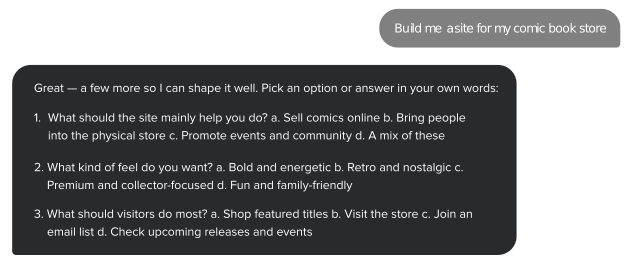
As you can see, this guided approach helps shape the result. Alf doesn’t just fill in the blanks. It actively invites the user to shape the result by answering the questions it deems most important for success.
Crucial sections for your website
Let’s take a brisk walk through the parts all good small business websites need.
Whether or not you choose to use an AI builder, this list is a useful checklist for anyone working on their first website.
Essentials
Logo – a visual that perfectly encapsulates your business.
About section – a short summary of what you do and why you do it.
Contact box – a reliable form visitors can use to reach you, every time.
Frequently Asked Questions – a section that includes common things your customers might need to know (like opening times and your returns policy). A well-written FAQ gives visitors clear answers to common questions and creates focused passages that search and generative systems can interpret. Research into generative engine optimization has found that relevant citations, quotations, and statistics can improve a source’s visibility in AI-generated answers, although no particular page format guarantees inclusion.
Terms & Conditions – the minutiae that people need to know. Essential for any site selling products, but they can be omitted from more basic sites.
Nice-to-haves
Business news/articles – a section of articles that might cover anything from upcoming plans to new products and special deals. You might also include articles about your area of expertise to boost SEO. Google recommends creating helpful, reliable, people-first content rather than publishing primarily to manipulate search rankings.
Testimonials and awards – a section that features some of your best praise from customers.
Social links – a section that features links to all your business’s social profiles. You could also consider featuring some multimedia content if you have any.
Maps/directions – a section showing your physical location, especially for brick-and-mortar businesses, is useful. Add public transport routes and nearby parking if you can!
Purchasable products – product pages that allow purchases to be made in a fully automated, secure environment.
But even with an AI builder, how do you get the best from each section? Let’s find out.
Logo
It's highly possible that the first thing people see of your business is your logo.
If you're an existing business, you'll almost certainly already have one. The good news is, you can absolutely incorporate it into an AI-generated site.
In this case, the best thing to do is add it after the AI has produced a first draft of your site.
If you don't have a logo yet, you may be surprised at just how well an AI website builder can generate a logo. I put Alf to the test, adding a lot of detail about the logo to my prompt, and it really rose to the challenge.
For my imaginary comic book store, I asked for “JL Comics” to appear on a typical comic book, and asked for a Martian to appear on the logo too (for no reason apart from to see if it worked). It worked.

The result reflects the details included in the prompt.
And it's a good example of how adding more detail about a section in the prompt can yield surprisingly sophisticated results.
But don't worry about getting everything in your initial prompt. The great thing about Alf is that the conversation keeps going after the first draft is generated, and you can ask for revisions and watch them take effect in real time.
About section
Your About section is one of the most important parts of your site. It tells potential customers what you do and gives search engines and AI systems clear information about the organization behind the website. Google also recommends providing accurate authorship and organizational information to help visitors assess the site’s experience, expertise, authoritativeness, and trustworthiness. Businesses can reinforce this information by adding Organization structured data to their homepage or About page.
Your About section (along with the FAQs) gives a sense of what you do in your own words.
To write an About section, simply answer all the basic question types: What you do, why you do it, how you’re different, who you are. Prioritize the “what” as this is the most important part.
Unlike the sections we'll cover shortly, I suggest writing a rough version of the About page before you build your site, and including it in the initial prompt. This way, it will help shape all other content, especially written content, which should save you a lot of time rewriting it all later.
Contact form
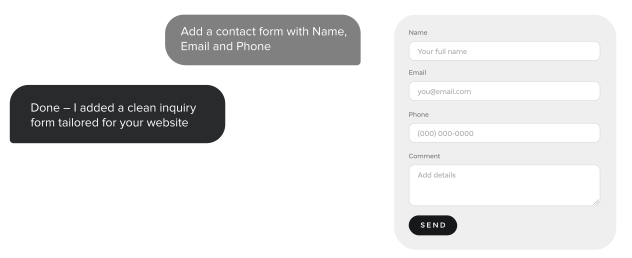
A contact form is an essential component of any website. Whether or not you're selling something, the whole reason for having a business website is to get your business out there for people to find. You're going to want the people it resonates with to be able to reach you, whether that means placing an order, making a booking or reservation, or just to connect generally.
Your form should also have clear labels, instructions, validation messages, and an accessible confirmation process. The W3C’s accessible forms guidance provides a useful checklist.
Many website builders either have a native contact form or support a third-party integration.
As someone who has used many sub-par email plugins over the years (mostly on WordPress), I'm always struck by how often they fail, or are simply unfit for purpose. They seem especially prone to breaking over time, likely because of the way they must interact with themes, browsers, and external inboxes all at the same time.
Regular updates are needed to keep them functioning. For this reason, having a contact form included in the site builder is always a bonus. It means it is natively designed to work with your theme and will be maintained and updated at the same time as everything else, ensuring it stays functional.
Alf includes a native contact-form option. It simply incorporates a contact form into any site you generate, so it's one less thing to worry about. Alf will add a contact form for the first generation most of the time, but if it doesn't, you can simply ask for one to be added in the chat.
FAQs and Terms & Conditions
Like having a detailed About section, a good FAQ can make it easier for search engines and AI systems to understand and interpret information about your business. Generative AI can literally pull from your wording when people ask it common questions.
Setting your internal processes out in detail may also help you refine things further, as you may notice gaps in your planning. Go through your order process, step by step, and at every junction, think of a set of questions a customer might have.
Terms and conditions, meanwhile, should cover the nuts and bolts of how your business deals with issues - like warranties, postage, and refunds. For both FAQs and T&Cs, it's useful to check other sites similar to yours to see how they're tackling it.
In terms of AI prompts, unlike your About section, it's a good idea to leave this kind of detail until later. Just ensure you ask the AI to include them both in the structure, and remember to spend some time editing whatever it spits out later.
Maps, social links, testimonials, and business news
While it's fairly clear to you what you'd want to see in these sections, they are only going to be placeholders in terms of what an AI generator can give you.
For example, you wouldn't want it to pull in entire news articles or invent a map that doesn't show your business's accurate location. But you might want to ask for a section that includes social links, then elaborate on the look and feel you want.
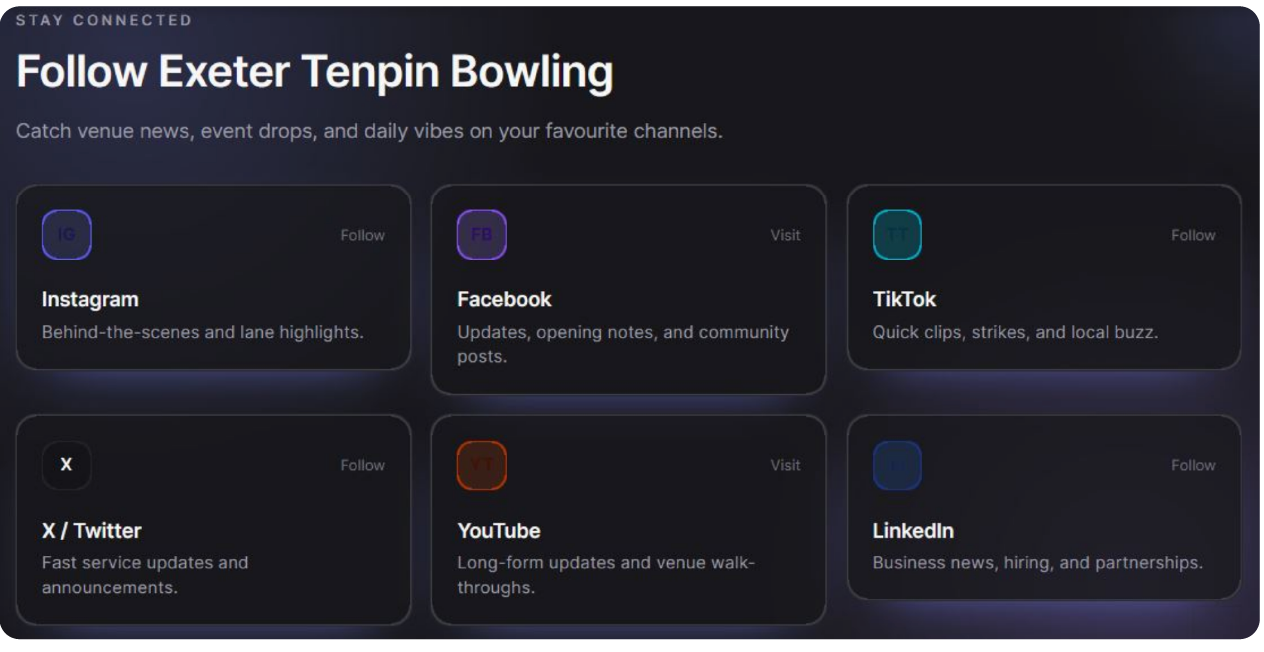
For example, I generated the following section for an imaginary ten-pin bowling business, and asked for an equal text-to-image ratio that included the date, title, preview, and link to the article.

The point is, you'll need to review all this afterward. This social section is another useful example. It gives each channel its own unique, eye-catching space, and all I have to do is add the right links and maybe adjust the copy to reflect what I do.
Don’t be tempted by fake testimonials. AI will happily generate fictional endorsements, but they should never be published as genuine customer comments. In the United States, the FTC’s rule on fake reviews and testimonials specifically covers AI-generated reviews attributed to people who do not exist.
Keeping fake reviews up will never lead anywhere good. And while we’re removing things, if any extraneous sections have popped up that you don't need, it's easy to get rid of them.
With Alf, you can simply say, ‘Can you remove the social section?’ and does so. Or you can edit using the tools.
Additional content pages
AI website builders are about more than just simple single-page sites. For example, Alf now lets you choose a more complex multi-page site if you prefer.
You can also change your mind later and switch between them.
Both ways have their virtues. A single content page is easy to navigate, looks minimalist, and optimizes efficiency in every way.
Meanwhile, multi-page sites are better for longevity. Additional content pages serve two main purposes.
They allow you to create focused pages with useful, topic-specific content and descriptive URLs, making it easier for visitors and search engines to understand what each page covers.
They stop your homepage from becoming too long and cluttered.
Most sites, especially ones with ever-expanding product catalogs, tend to sprawl, and a single-page site would ultimately just become too impractical.
Additionally, an out-of-stock product page you don't want to feature on the homepage (for obvious reasons) can still generate traffic quietly in the background. I see this a lot on my own site, where products I created years ago generate traffic because of individual page SEO, and, utilized correctly, these pages can send visitors that land on them towards in-stock products.
Purchasable products
Which brings us nicely to products you can buy: The final bastion for the small business owner is surely being able to process transactions (take payment) directly on your site without any manual intervention. That 1 AM sale when you’re fast asleep, and the site is just doing it for you.
Surely this is asking too much from an AI Website Builder? Actually, no.
Since May this year, Alf has had a Stripe integration that lets you add products for sale on your site. You can create custom product listings that customers can buy one by one. There is currently no cart mode or separate postage function, but these are in development, and it’s already a useful way to take payment for simple products by adding postage to the price.
More than just the basics
This brief foray into how you can use AI to construct a whole business website is just the start.
AI builders are now about more than just the bare minimum. They can crunch detailed, specific prompts into dynamic, intuitive sites with all the vital sections a good site needs.
We’re already starting to see integrated contact forms, and even product pages, so watch this space. In the next year, the websites that AI Builders like Alf create will go from strength to strength.
Now, you can test Alf just by writing your prompt, no login or account required. So why not give it a go and see what you can create?
Frequently asked questions
At a minimum, a small business website should include a logo, an About section, a reliable contact form, FAQs, and, where appropriate, Terms & Conditions. Other useful features include social links, testimonials, maps and directions, business news, additional content pages, and purchasable products.
You don't need to provide a huge, detailed prompt. AI website builders can start with a simple description of what your business does and then ask follow-up questions. However, providing useful details about your business, particularly in an About-style section, can help the AI produce a result that is more accurate and closer to your vision.
Longer-form question-and-answer content is particularly useful for helping Generative AI understand your site, which can make its answers more accurate when people ask about your business.
AI can provide a useful starting point by suggesting common questions and populating sections, but you should always review and edit what it produces. AI can make inaccurate claims about your business and may even generate fake testimonials, so all content should be checked before publication.
A one-page website can be sufficient for a simple business, but additional pages can provide important benefits. They give you space for bespoke content that can support SEO while preventing your homepage from becoming too long and cluttered.

Suggested articles




Share your thoughts