
W dzisiejszym szybko zmieniającym się świecie biznesu e-mail pozostaje podstawą profesjonalnej komunikacji. Dla przedsiębiorców, freelancerów i właścicieli małych firm opanowanie sztuki pisania profesjonalnych e-maili może oznaczać różnicę między dopięciem transakcji a utratą klienta.
Dobrze skonstruowane e-maile budują zaufanie, zwiększają produktywność i zapobiegają nieporozumieniom — to kluczowe korzyści dla każdego, kto chce zrobić dobre wrażenie. Ale od czego zacząć?
Zaczyna się od wyboru odpowiednich biznesowych i prywatnych adresów e-mail — coś tak prostego jak zagracony lub nieprofesjonalny adres może podważyć Twoją wiarygodność. Typowe błędy, takie jak niejasne tematy wiadomości czy rozwlekłe treści, również mogą prowadzić do nieporozumień lub słabych odpowiedzi.
Ten przewodnik przeprowadzi Cię przez wszystko, co musisz wiedzieć o pisaniu profesjonalnego e-maila, który przynosi rezultaty.
Czym jest profesjonalny e-mail?

Definicja profesjonalnego e-maila
Czym właściwie jest profesjonalny e-mail? Pomyśl o nim jak o swojej cyfrowej wizytówce — to dobrze uporządkowana, jasna i uprzejma wiadomość używana w komunikacji biznesowej lub formalnej.
W przeciwieństwie do wiadomości „co tam?” wysyłanych znajomym, profesjonalny biznesowy e-mail opiera się na jasności i szacunku. To różnica między „Hej, możesz pomóc?” a „Szanowna Sarah, będę wdzięczny za Twoją opinię na temat raportu za Q2 do piątku”.
Profesjonalne e-maile zachowują odpowiedni poziom formalności, dzięki czemu nadawca przekazuje swoją wiadomość skutecznie i z szacunkiem. W świecie kariery te e-maile to nie tylko komunikacja — to Twoja reputacja w działaniu.
Przygotowanie przed napisaniem e-maila
Zanim zaczniesz pisać, poświęć chwilę na zaplanowanie wiadomości. Oto, co musisz wziąć pod uwagę:
Określ odbiorcę— oceń, do kogo piszesz, i dobierz odpowiedni ton oraz poziom formalności. Na przykład e-maile do potencjalnego klienta będą różnić się od tych wysyłanych do współpracownika
Wybierz właściwy kanał komunikacji— czasami e-mail nie jest najlepszą opcją. Jeśli temat jest pilny lub złożony, rozmowa telefoniczna, spotkanie wideo albo rozmowa twarzą w twarz mogą być skuteczniejsze
Określ cel wiadomości— jasno sprecyzuj, co chcesz osiągnąć. Czy prosisz o informacje, umawiasz spotkanie czy przekazujesz aktualizację? Doprecyzowanie celu pomoże Ci pisać zwięźle.
Kluczowe elementy profesjonalnego biznesowego e-maila
Profesjonalny biznesowy e-mail opiera się na tym, że wszystkie jego elementy współgrają ze sobą bezproblemowo. Przyjrzyjmy się im bliżej.
A. Temat wiadomości – jak tworzyć jasne i przekonujące tematy
Temat wiadomości to drzwi wejściowe do Twojego e-maila — to pierwsza rzecz, którą widzą odbiorcy, i często decyduje o tym, czy go otworzą. Jasny, bezpośredni i nastawiony na działanie temat to nieodzowny element pisania e-maila.
Niejasne tematy, takie jak „Cześć” czy „Pytanie”, łatwo zignorować, podczas gdy konkretne, jak „Przegląd propozycji potrzebny do piątku”, sygnalizują wagę i cel wiadomości.
Dlaczego to ma znaczenie? Przedsiębiorcy przedstawiający oferty klientom lub freelancerzy walczący z terminami nie mogą sobie pozwolić na bycie przeoczonymi. Mocny temat przebija się przez szum skrzynki odbiorczej. Celuj w 6–10 słów — na tyle krótko, by dało się szybko przeczytać, i na tyle szczegółowo, by przekazać informacje. Gdy to istotne, uwzględniaj terminy lub kluczowe działania.
Przykłady:
Słaby — „Spotkanie” (Zbyt ogólne — o czym? Kiedy?)
Mocny — „Ustalmy spotkanie strategiczne na Q2 – potrzebna Twoja opinia” (Jasny i konkretny)
Słaby — „Aktualizacja” (Co jest aktualizowane?)
Mocny — „Aktualizacja harmonogramu projektu – opinia potrzebna do jutra” (Konkretny i pilny)
Wskazówka: Jeśli odpowiadasz w istniejącym wątku, zachowaj oryginalny temat, chyba że temat znacząco się zmieni — spójność pomaga odbiorcom śledzić rozmowę.
B. Powitanie – wybór odpowiedniego zwrotu grzecznościowego w różnych sytuacjach
Powitanie to uścisk dłoni Twojego e-maila — nadaje ton i okazuje szacunek. W przykładzie biznesowego e-maila właściwy zwrot grzecznościowy zależy od Twojej relacji z odbiorcą i kontekstu. Ogólne „Do wszystkich zainteresowanych” brzmi chłodno i zdystansowanie, podczas gdy „Hej” może być zbyt swobodne dla nowego kontaktu.
Oto podział:
Formalne— „Szanowny/a [Name]” lub „Szanowna Pani Smith” sprawdza się w kontaktach z klientami, przełożonymi lub przy pierwszym kontakcie. Używaj tytułów (Pan, Dr itd.), chyba że masz pewność co do tytułu danej osoby albo nie są one potrzebne.
Półformalne — „Cześć [Name]” zachowuje równowagę — profesjonalne, ale przystępne — dla współpracowników lub stałych klientów.
E-maile do zespołu — „Witajcie, zespole” lub „Cześć wszystkim” pozwala zachować inkluzywność bez wymieniania każdego odbiorcy z osobna.
Jakich błędów unikać? Nie zgaduj płci (np. „Szanowny Panie” dla „Sam”, która jest kobietą) i nie pomijaj powitania całkowicie — to brzmi zbyt oschle. Jeśli nie znasz imienia, sprawdź je (LinkedIn jest tu pomocny) albo użyj określenia roli, np. „Szanowny Kierowniku ds. Rekrutacji”. Dla przedsiębiorców piszących do potencjalnych partnerów dopracowane powitanie sygnalizuje profesjonalne podejście.
C. Treść e-maila – jak uporządkować wiadomość dla jasności i skuteczności
Treść wiadomości to serce Twojej misji „pisania profesjonalnych e-maili”. To tutaj przekazujesz swoją wiadomość i musi ona być jasna, uporządkowana oraz skuteczna, zwłaszcza dla zapracowanych profesjonalistów, takich jak właściciele małych firm czy freelancerzy obsługujący wielu klientów. Oto jak zrobić to dobrze:
1. Zacznij od krótkiego wstępu (jeśli to potrzebne) — jeśli odbiorca Cię nie zna, jednozdaniowy wstęp buduje kontekst. Przykład: „Jestem [Your Name], nowym opiekunem konta dla [Project]”. Znane kontakty? Pomiń to — przejdź od razu do sedna.
2. Od razu określ cel — czas jest cenny, więc nie ukrywaj sedna w rozwlekłym wstępie. Zacznij od intencji: „Piszę, aby potwierdzić godzinę naszego spotkania w przyszły wtorek”. Unikaj rozwlekłych wstępów typu „Mam nadzieję, że u Ciebie wszystko dobrze, i chciałem się odezwać, bo w zeszłym tygodniu myślałem…” — to rozmywa przekaz.
3. Uwzględnij kluczowe szczegóły bez przeciążania odbiorcy — kluczowe jest zachowanie właściwej równowagi — przekaż tyle, by poinformować, ale nie tak dużo, by przytłoczyć. Skup się na tym, co jest bezpośrednio związane z Twoim celem
Na przykład, jeśli umawiasz rozmowę, wspomnij temat, czas trwania i kilka propozycji godzin: „Chciałbym omówić budżet na Q2 przez 30 minut — czy środa o 10:00 lub 14:00 Ci odpowiada?”. Dzięki temu wiadomość pozostaje zwięzła, a jednocześnie kompletna.
Jeśli potrzebne jest działanie, wyraź to jasno i przystępnie: „Sarah, czy możesz przesłać zaktualizowany harmonogram do piątku rano? Daj znać, jeśli to zbyt krótki termin”. Unikaj dokładania niepowiązanych szczegółów i dawaj odbiorcom dokładnie to, czego potrzebują, by skutecznie odpowiedzieć, zachowując pomocny, a nie wymagający ton.
4. Używaj formatowania dla przejrzystości — duży blok tekstu może przytłaczać i być trudny do szybkiego przejrzenia — formatowanie pomaga odbiorcy szybko uchwycić najważniejsze punkty. Zachowaj prostotę i czytelność, dzieląc wiadomość na mniejsze części.
Używaj krótkich akapitów (maks. 2–3 zdania), aby zachować naturalny przepływ, i dodawaj wypunktowania lub listy numerowane, gdy przekazujesz wiele elementów, takich jak zadania, opcje czy aktualizacje.
5. Płynnie przejdź do CTA — zanim zakończysz, wskaż odbiorcy kolejny krok. „Daj mi znać, czy ten harmonogram Ci odpowiada” albo „Śmiało zaproponuj poprawki, zanim przejdziemy dalej” podtrzymuje rozmowę. Unikaj nagłych zakończeń — sprawiają wrażenie lekceważących.
D. Zakończenie & podpis – profesjonalne sposoby kończenia e-maila
Twoja końcowa wiadomość i podpis spinają wszystko w całość, pozostawiając dopracowane końcowe wrażenie w poprawnym e-mailu. Formuła zakończenia powinna odpowiadać formalności i celowi wiadomości, a podpis wzmacnia Twoją tożsamość i dostępność.
Wybór zakończenia:
Formalne — „Z poważaniem”, „Z wyrazami szacunku” lub „Dziękuję” pasuje do e-maili do klientów lub podań o pracę.
Półformalne — „Pozdrawiam”, „Dzięki” lub „Czekam na Twoją odpowiedź” sprawdza się w kontaktach ze współpracownikami lub przy trwających projektach.
Lekkie, ale profesjonalne — „Trzymaj się” lub „Do usłyszenia” pasuje do znajomych kontaktów — ale używaj oszczędnie.
Unikaj „Love” lub „Yours truly”, chyba że piszesz wiktoriańską powieść. Przykład: właściciel małej firmy może zakończyć e-mail do klienta słowami „Dziękuję za poświęcony czas — odezwę się w przyszłym tygodniu.”
Tworzenie podpisu — to Twoja cyfrowa wizytówka. Uwzględnij:
Mocne zakończenie zachęca do odpowiedzi — podpis buduje zaufanie. Wyobraź sobie freelancera kończącego wiadomość tylko „-J” — to niejasne i łatwe do zapomnienia. Porównaj to z „Pozdrawiam, Jane Doe, Graphic Designer, janedoe.com, (555) 123-4567” — to miniwizytówka marki. Użytkownicy Spacemail mogą łatwo to skonfigurować.
Opanuj te elementy, a format Twojego biznesowego e-maila będzie za każdym razem robił świetne wrażenie.
Typowe błędy, których należy unikać w profesjonalnym e-mailu

Nawet najbardziej doświadczeni profesjonaliści mogą się potknąć podczas pisania profesjonalnego e-maila. Te błędy mogą osłabić Twoją wiadomość, a co gorsza — Twoją wiarygodność. Oto rozszerzone spojrzenie na to, czego unikać, wraz z praktycznymi rozwiązaniami.
Używanie nieprofesjonalnych powitań lub zakończeń — rozpoczęcie od „Yo” lub zakończenie „Na razie” krzyczy swobodą, gdy potrzebujesz elegancji. Trzymaj się „Szanowny/a [Name]” lub „Cześć [Name]” na powitanie oraz „Z poważaniem” na zakończenie. Przedsiębiorca piszący do potencjalnego inwestora powinien za wszelką cenę unikać „Hej stary”. To szybka droga do kosza.
Pisanie niejasnych lub mało konkretnych tematów wiadomości — temat taki jak „Rzeczy” lub „Aktualizacja” pozostawia odbiorców w domysłach, zmniejszając szansę, że szybko otworzą wiadomość. Wyobraź sobie freelancera wysyłającego „Pliki” zamiast „Wersje robocze projektu do przeglądu do środy” — to drugie wygrywa za każdym razem. Bądź konkretny i nastawiony na działanie, aby przyciągnąć uwagę.
Zapominanie o załącznikach lub ważnych szczegółach — wspomnienie „Zobacz załączony raport” bez faktycznego dołączenia go to początkujący błąd, który frustruje odbiorców. Zanim klikniesz wyślij, jeszcze raz sprawdź pliki i kluczowe informacje, takie jak daty czy nazwiska. Jeden trik? Dołącz pliki przed napisaniem e-maila, aby uniknąć tej wpadki.
Nadużywanie skrótów lub emoji — „Dzięki” w skrócie lub ciąg 😊👍 może działać w rozmowie ze znajomymi, ale w poprawnym e-mailu osłabia profesjonalizm. Właściciel firmy piszący do klienta o umowie nie powinien opierać się na „LOL”, by rozluźnić atmosferę, bo może to wyglądać lekceważąco. Zachowaj skróty dla wiadomości tekstowych, a emoji ogranicz do minimum, jeśli w ogóle ich używasz.
Przeładowywanie wiadomości zbędnymi informacjami — rozwodzenie się nad niepowiązanymi szczegółami ukrywa sedno. Jeśli prosisz o spotkanie, nie odbiegaj w historię projektu, chyba że to naprawdę istotne. Trzymaj się tego, co ważne, i usuń zbędne elementy.
Niepotrzebne używanie „Odpowiedz wszystkim” — kliknięcie „Odpowiedz wszystkim” w grupowym wątku, gdy tylko jedna osoba potrzebuje Twojej opinii, zapycha skrzynki i irytuje współpracowników. Zatrzymaj się i zastanów, kto naprawdę musi zobaczyć Twoją odpowiedź, zanim klikniesz wyślij.
Pisanie profesjonalnego e-maila: najlepsze praktyki
Teraz, gdy wiesz już, czego nie robić, przejdźmy głębiej do najlepszych praktyk pisania e-maila, który się wyróżnia. Te wskazówki pomogą tworzyć wiadomości, które są jasne, skuteczne i profesjonalne.
Formatuj e-maile z myślą o czytelności — ściana tekstu to koszmar dla czytelnika. Podziel e-mail na krótkie akapity (po 2–3 zdania) i używaj wypunktowań lub pogrubionych nagłówków dla kluczowych elementów. Na przykład freelancer wysyłający aktualizację projektu może wypisać elementy do dostarczenia tak:
Makiety projektu — gotowe do przeglądu do piątku.
Wersja robocza treści— termin na poniedziałek.
Unikaj żargonu i zbyt złożonych zdań — branżowe modne słówka lub zawiłe sformułowania mogą dezorientować odbiorców. Zamiast „Zsynchronizujmy nasze deliverables” spróbuj „Ustalmy wspólnie kolejne kroki.” Unikaj też wyzwalaczy spamu takich jak „PILNE!!!” lub „WYGRAJ DUŻO”— mogą sprawić, że Twój e-mail trafi do folderu spam.
Sprawdź wiadomość przed wysłaniem — literówki, błędne nazwiska lub niezrozumiałe zdania mogą pogrążyć Twoją wiadomość. Wyobraź sobie osobę ubiegającą się o pracę, która pisze „Szanowny Panie Smith” do pani Jones — to natychmiastowy cios w wiarygodność. Jasny i poprawny język sygnalizuje kompetencję, szczególnie w profesjonalnym biznesowym e-mailu.
Wskazówki:
W przypadku e-maili o dużej wadze, takich jak oferta dla dużego klienta — poproś zaufanego współpracownika lub przełożonego o sprawdzenie wiadomości.
Najpierw wpisz w szkicu „Załączam [file name]”, a potem dodaj plik, aby uniknąć zapomnienia.
Poświęć dodatkową minutę na sprawdzenie albo użyj narzędzi takich jak Grammarly, aby wychwycić literówki.
Mądrze używaj CC/BCC — CC informuje odpowiednie osoby — na przykład lidera zespołu w wątku z klientem. BCC chroni prywatność, na przykład gdy wysyłasz wiadomość do wielu odbiorców, którzy się nie znają. Nadużywanie obu opcji może zaśmiecać skrzynki, więc używaj ich świadomie.
Etykieta follow-upu — brak odpowiedzi po tygodniu? Wyślij uprzejme przypomnienie: „Cześć [Name], tylko wracam do mojego e-maila z [date] dotyczącego [topic]. Daj znać, czy miałeś/aś już okazję go przejrzeć.” Unikaj wyrzutów typu „Dlaczego nie odpowiedziałeś/aś?” — zachowaj przyjazny i profesjonalny ton. Jeśli sprawa jest pilna, dostosuj czas (np. 48 godzin), ale nie bądź natarczywy/a.
Zachowuj spójny ton — dopasuj ton do kontekstu. Formalne „Szanowna Pani Carter” nie powinno kończyć się „Na razie”. Sprawdź ton, pytając siebie: „Czy powiedziałbym/powiedziałabym to osobiście?”. Jeśli nie, popraw to.
Szanuj strefy czasowe — piszesz do globalnego klienta? Sprawdź jego lokalny czas, zanim zaczniesz oczekiwać szybkiej odpowiedzi. Narzędzia takie jak World Time Buddy mogą pomóc. W razie potrzeby wspomnij o czasie: „Wiem, że jesteś w PST, więc jeśli to możliwe, odpowiedz do końca dnia w czwartek według Twojego czasu.”
Te nawyki podniosą Twoje umiejętności pisania biznesowych e-maili, sprawiając, że każda wiadomość będzie krokiem w stronę sukcesu.
Przykład profesjonalnego e-maila & szablony biznesowych e-maili
Przykład biznesowego e-maila:
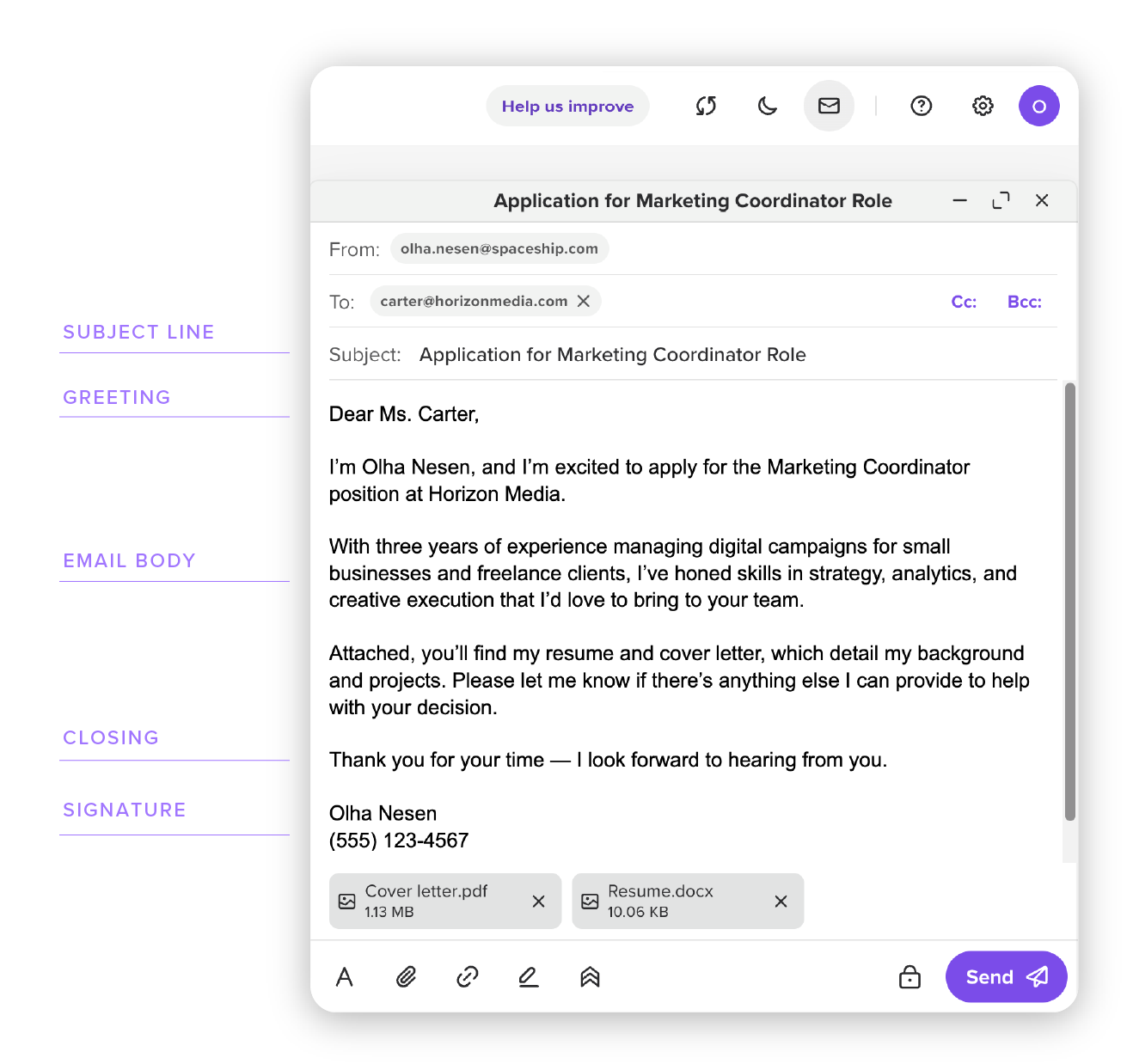
Zobaczyć to uwierzyć. Oto szablony profesjonalnych e-maili, z których możesz korzystać zgodnie ze swoimi potrzebami.
A. Przykład profesjonalnego e-maila do aplikacji o pracę
Użyj tego szablonu podczas ubiegania się o pracę, niezależnie od tego, czy jesteś freelancerem przechodzącym na etat, profesjonalistą szukającym zmiany kariery, czy przedsiębiorcą odkrywającym nowe możliwości w firmie.Temat: Aplikacja na stanowisko Marketing Coordinator – [Your Name]
Powitanie: Szanowny/a [Hiring Manager’s Name],
Treść: Nazywam się [Your Name] i z entuzjazmem aplikuję na stanowisko Marketing Coordinator w [Company]. Mam trzyletnie doświadczenie w kampaniach cyfrowych i chętnie wykorzystam swoje umiejętności w Twoim zespole. W załączniku przesyłam moje CV i list motywacyjny. Daj znać, jeśli potrzebujesz dodatkowych materiałów.
Zakończenie: Dziękuję za poświęcony czas — czekam na wiadomość od Ciebie.
Podpis: [Your Name], [Phone], [Email]
B. E-mail follow-up po spotkaniu
Użyj tego po rozmowie z klientem lub dyskusji zespołowej, aby podsumować ustalenia i utrzymać tempo działań — świetne rozwiązanie dla przedsiębiorców lub profesjonalistów zarządzających projektami.
Temat: Podsumowanie & kolejne kroki po dzisiejszym spotkaniu dotyczącym [Topic]
Powitanie: Cześć [Name or Team],
Treść: Dziękuję za owocne dzisiejsze spotkanie dotyczące [Topic]! Oto krótkie podsumowanie:
Uzgodniono — [Kluczowa decyzja, np. uruchomienie kampanii w Q2].
Działanie — [Name] przygotuje budżet do piątku.
Pytanie — czy jesteśmy zgodni co do [specific detail, e.g., the new branding]?
Daj znać, jeśli coś pominąłem/pominęłam lub jeśli trzeba coś dodać. Cieszę się na dalsze działania!Zakończenie: Z poważaniem,Podpis: [Your Name], [Title], [Company], [Phone]
C. Prośba o opinię lub akceptację

To sprawdzony wybór dla freelancerów przesyłających swoją pracę lub właścicieli małych firm szukających opinii interesariuszy — ten szablon łączy uprzejmość z jasną prośbą.
Temat: Potrzebna opinia na temat [Deliverable] do [Date]
Powitanie: Cześć [Name],
Treść: Mam nadzieję, że wszystko u Ciebie dobrze! Załączyłem/załączyłam [Deliverable, e.g., the website mockup] do Twojego wglądu. Czy możesz podzielić się swoją opinią do [Date, e.g., Thursday]? Szczególnie interesuje mnie [specific aspect, e.g., the color scheme] — śmiało zaproponuj wszelkie poprawki. Daj znać, jeśli potrzebujesz więcej kontekstu!
Zakończenie: Bardzo dziękuję za Twój wkład,
Podpis: [Your Name], [Title], [Company], [Phone]
Podsumowanie: opanuj sztukę pisania profesjonalnych e-maili
I oto masz — mapę drogową do tworzenia profesjonalnych e-maili, które przynoszą rezultaty. Od stworzenia jasnego tematu, przez zwięzłą treść wiadomości, po dopracowane zakończenie — te kroki sprawią, że Twoja komunikacja będzie bardziej precyzyjna i skuteczna.
Dlaczego by nie spróbować? Wybierz wskazówkę lub szablon z tego przewodnika i napisz dziś biznesowego e-maila — może krótki follow-up albo dopracowane przedstawienie się komuś nowemu. To niesamowite, o ile płynniej wszystko przebiega, gdy Twoja wiadomość jest konkretna i celowa. A oto mały sekret: przejrzyste, wolne od rozpraszaczy środowisko poczty e-mail może jeszcze bardziej ułatwić ten proces.
Blog Spaceship Ci pomoże, więc jeśli masz współpracownika, który kiedykolwiek westchnął nad źle napisanym e-mailem, udostępnij mu ten artykuł. Lepsze e-maile sprawiają, że dzień każdego staje się trochę jaśniejszy!
Najczęściej zadawane pytania
Prawidłowy e-mail ma przejrzysty, uporządkowany układ, dzięki któremu wiadomość jest łatwa do przeczytania i profesjonalna w odbiorze. Pomyśl o nim jak o dobrze zorganizowanej notatce:Temat — krótki, konkretny i nastawiony na działanie (np. „Aktualizacja projektu – opinia do piątku”).Powitanie — uprzejme rozpoczęcie, takie jak „Cześć [Imię]” lub „Szanowny/a [Imię]”, dopasowane do odbiorcy.Treść — zacznij od celu („Piszę, aby potwierdzić nasze spotkanie”), następnie podaj kluczowe szczegóły w krótkich akapitach lub punktach oraz wyraźnie wskaż kolejny krok („Proszę odpowiedzieć, kiedy jesteś dostępny/a”).Zakończenie — formuła pożegnalna, taka jak „Dziękuję” lub „Z poważaniem”.Podpis — Twoje imię i nazwisko, stanowisko oraz dane kontaktowe.
Krótko i na temat to złota zasada — celuj w 100–200 słów, czyli około 3–5 zdań na sekcję (wstęp, szczegóły, CTA). Profesjonalny biznesowy e-mail to nie powieść — to szybka, konkretna wymiana informacji.Zajęci odbiorcy, tacy jak klienci czy rekruterzy, doceniają zwięzłość, która nadal jasno przekazuje sens. Na przykład podanie o pracę może mieć około 150 słów, aby przedstawić Twoją kandydaturę i załączniki, podczas gdy wiadomość follow-up może mieć 80 słów, by podsumować i delikatnie przypomnieć. Jeśli przekraczasz 300 słów, usuń zbędne treści.Trzymaj się tego, co najważniejsze, a dłuższe rozmowy zostaw na spotkania lub rozmowy telefoniczne.
To zależy od tego, kto jest po drugiej stronie. „Szanowny/a [Imię]” brzmi bardziej formalnie i świetnie sprawdza się przy pierwszym kontakcie, w komunikacji z klientami lub w podaniach o pracę (np. „Szanowna Pani Carter”). To bezpieczny, pełen szacunku wybór, gdy nie masz pewności.„Cześć [Imię]” brzmi bardziej przyjaźnie i dobrze pasuje do współpracowników, stałych klientów lub mniej formalnych sytuacji (np. „Cześć Sarah”). Unikaj „Hej”, chyba że jesteście w swobodnych relacjach — w przykładzie profesjonalnego e-maila może brzmieć zbyt nieformalnie.
Aby zwiększyć szansę na odpowiedź, spraw, by Twojego e-maila nie dało się zignorować — w pozytywnym sensie. Zacznij od jasnego, przekonującego tematu („Zatwierdzenie budżetu projektu do wtorku”). Od razu określ cel („Potrzebuję Twojej opinii na temat załączonego planu”) i zachowaj zwięzłość, używając punktów, jeśli to potrzebne:Co — przejrzeć propozycję.Kiedy — do końca dnia we wtorek.Dlaczego — aby dotrzymać terminu uruchomienia.Zakończ konkretną, uprzejmą prośbą („Czy możesz potwierdzić, że to pasuje?”) zamiast ogólnego „Daj znać”. Przeczytaj wiadomość przed wysłaniem, aby uniknąć nieporozumień, i w razie potrzeby wyślij przypomnienie po tygodniu.

Sugerowane artykuły



Komentarze (4)
emir
29 mar 2026
Anastasiia Vasylenko
30 mar 2026
STRATOS
26 sie 2025
Olha Nesen. Product and Marketing Coordinator
26 sie 2025