
Ce n’est pas exagéré de dire que le monde a beaucoup changé ces dernières années. Les lieux de travail se sont détachés des emplacements physiques et, dans de nombreux cas, sont devenus virtuels. L’essor du travail à distance, la révolution Zoom, appelez cela comme vous voulez, mais la liberté est le nouveau mot d’ordre. L’application Spacemail vise à offrir exactement cela.
Retrouvez Spacemail sur le Google Play Storeou l’ App Store et installez-la sur votre appareil.
Désormais disponible sur iOS et Android, elle reprend l’expérience sécurisée, intelligente et fluide de Spacemail et la réinvente dans une application portable au format poche - (ou tablette). Cela signifie que lorsque l’occasion se présente, à l’intérieur comme à l’extérieur, vous pouvez la saisir… et Spacemail peut vous accompagner. Et ce n’est qu’un début. L’application continuera de s’améliorer grâce à vos retours.
Libérez votre boîte de réception
Le travail ne peut pas toujours rester collé au bureau. La vie va vite, les affaires vont encore plus vite, et il est utile que votre boîte de réception puisse suivre. Parfois, nous devons envoyer des e-mails en déplacement, emmener le bureau à l’extérieur et travailler sans limites. Avec l’application Spacemail, c’est possible.
La même excellence, des règles différentes
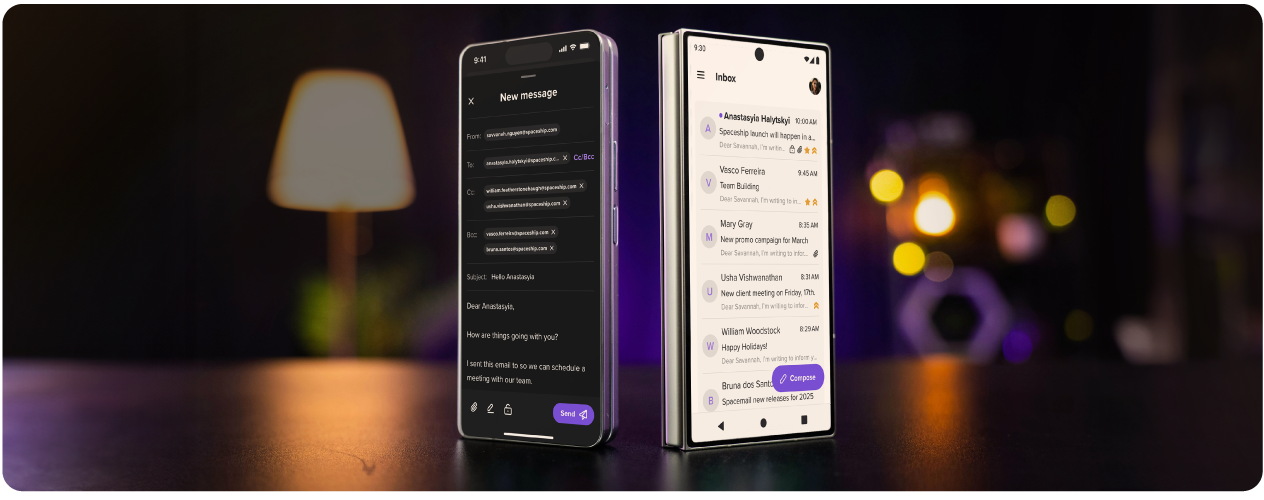
L’application Spacemail reprend les mêmes fonctionnalités d’e-mail professionnel, des mises à jour intelligentes et bien pensées, une interface épurée et minimaliste pour une concentration maximale, ainsi qu’une sécurité éprouvée, sauf que cette fois, nous avons un peu desserré les chaînes.
Voici ce que l’application Spacemail peut faire :
Sécurité renforcée avec la 2FA – Emporter votre boîte de réception avec vous ne devrait pas signifier qu’elle est moins protégée. La 2FA entoure votre application Spacemail de deux couches d’authentification avant que l’accès ne soit accordé.
Rédaction ultra-rapide – Si vous êtes pressé, la rédaction rapide vous aide à suivre le rythme. Une fenêtre de rédaction dédiée vous aide à écrire un e-mail aussi vite que vos doigts le permettent.
Boîte de réception intuitive –L’application Spacemail crée une sensation de familiarité dans votre boîte de réception. L’interface épurée semble familière, la navigation est fluide et tout permet d’envoyer des e-mails simplement.
Mode clair ou sombre –Passez d’un thème clair, sombre ou système selon votre environnement et gardez une boîte de réception agréable pour les yeux.
Actualisation instantanée –Faites glisser vers le bas pour mettre à jour votre boîte de réception en quelques secondes et voir chaque nouveau message apparaître dès son arrivée, afin d’être toujours à jour.
Les pièces jointes en toute simplicité – Ajouter et supprimer des pièces jointes n’a jamais été aussi simple. En plus, un aperçu rapide pratique vous permet de vérifier vos fichiers une dernière fois avant l’envoi.
Signatures en un seul geste –Les signatures ajoutent une touche pro à la fin de chaque e-mail. Choisissez simplement la bonne signature pour le bon message et ajoutez-la d’un geste.
Brouillons intelligents – Reprenez là où vous vous êtes arrêté grâce aux brouillons intelligents. Si vous êtes interrompu au milieu d’un e-mail, enregistrez simplement un brouillon et revenez-y quand vous êtes prêt.
La sécurité reste la norme
Spacemail est conçu pour votre tranquillité d’esprit. Quand votre boîte de réception semble surchargée, votre esprit suit, c’est pourquoi nous avons conservé les derniers protocoles de sécurité de la version web de Spacemail et les avons intégrés à l’application.
Toujours en mouvement, toujours synchronisé
Peu importe à quelle distance vous vous trouvez de votre ordinateur, les versions web et application de Spacemail resteront toujours synchronisées. Donc, à moins de prendre le nom de Spacemail au pied de la lettre et de quitter l’orbite, tous vos messages, entrants ou sortants, brouillons, signatures, paramètres, dossiers spam ou courrier indésirable, restent synchronisés entre les deux versions.
Cela signifie que vous pouvez terminer votre travail et reprendre exactement là où vous vous êtes arrêté, que vous utilisiez la version web ou l’application de Spacemail.
Conçu pour vous
Ce n’est que le début pour l’application Spacemail. Nous voulons apporter de vrais changements, pas seulement des mises à jour pour le principe. C’est pourquoi nous continuerons à proposer des mises à jour de Spacemail en nous appuyant sur tous les retours que nous recevons de nos utilisateurs. Donner vie à vos idées, c’est ce qui rend la communauté Spacemail et tout ce que nous construisons si spécial.
L’objectif de Spacemail est d’offrir toutes les performances et toute la sécurité dont vous avez besoin dans une application e-mail, présentées de manière claire et simple. L’application Spacemail ne nécessite aucune expérience technique, il suffit de créer un compte, de télécharger l’application et de commencer à envoyer.
Une disponibilité de 99,9 % est garantie, sans aucune perte de données. Cela signifie que chaque partie de votre boîte de réception est conçue pour offrir des performances constantes. Votre boîte de réception reste accessible, vos messages restent en sécurité, et vous pouvez améliorer la productivité des e-mails où que vous soyez.
Trois étapes simples pour accéder à Spacemail partout
Vous pouvez commencer à utiliser l’application Spacemail en trois étapes simples.
1. Téléchargez l’applicationRetrouvez Spacemail sur le Google Play Store ou l’App Storeet installez-la sur votre appareil.
2. Connectez-vous ou créez un compteSi vous utilisez déjà Spacemail sur le web, connectez-vous avec les mêmes identifiants. Nouveau sur Spacemail ? Créez d’abord votre compte e-mail professionnel.
3. Synchronisez et commencez à envoyerVotre boîte de réception, votre calendrier et vos paramètres se synchroniseront automatiquement, afin que vous puissiez envoyer des e-mails et vous organiser partout
Commencez à explorer
L’application Spacemail réunit e-mail professionnel, sécurité intelligente et personnalisation sans effort dans une application puissante. C’est tout ce dont vous avez besoin pour gérer votre boîte de réception en déplacement. Découvrez l’application Spacemail dès maintenant.
Questions fréquemment posées
Oui, l’application Spacemail est disponible au téléchargement sur Android et iOS. Elle combine un e-mail professionnel, la même sécurité intelligente que le Webmail Spacemail et une personnalisation intelligente dans une seule application d’e-mail puissante pour les entreprises. Pour commencer à utiliser l’application Spacemail, créez un compte sur Spacemail.com, téléchargez l’application et connectez-vous avec votre nom d’utilisateur et votre mot de passe.
Oui, l’application Spacemail est une solution d’e-mail professionnel sécurisée qui fonctionne en synchronisation avec le Webmail Spacemail. Cela signifie que vous pouvez commencer à travailler sur un appareil et terminer sur un autre. Votre compte Spacemail restera automatiquement synchronisé sur tous vos appareils.
Spacemail convient le mieux aux particuliers ou aux entreprises qui veulent privilégier la simplicité, la rapidité et le rapport qualité-prix. Alors que Google Workspace peut convenir aux grandes entreprises qui utilisent des outils avancés de productivité pour les e-mails, Spacemail est parfait pour un usage personnel, les startups et les entreprises en croissance. Si vous recherchez une application mobile pour les entreprises, Spacemail mise sur un design épuré, la facilité d’utilisation et un prix abordable, sans complexité excessive.

Articles suggérés




Partagez vos pensées