
If you're here, you've already made one good decision: choosing to set up a business email. A professional email address can be rocket fuel for your brand and the trust you build with customers.
This article is about helping you make your second good decision and choose the best cheap business email service in 2026.
What is business email hosting?
From time to time, you may receive an email from an address that makes you take notice. 10 times out of 10, that email address doesn’t end in @yahoo.com or @gmail.com. That’s because free emails don’t carry the same weight or impact as business emails.
Business emails like @mybusiness.com create a direct link between your brand and your email address every time your email lands in a customer's inbox. The customer sees your email and instantly knows who you are. It looks more trustworthy and helps with brand recognition.
It also leads to better deliverability. Spam filters are increasingly tuned to flag free-domain senders who are trying to sell something over email. Plus, free emails don’t give you the same level of control over your security. If you want real protection with features like 2FA and activity tracking, then you’re probably going to have to fork over more cash.
What to look for in a cheap business email provider
Before you hand over your credit card details, here’s what you should be looking for in a business email provider.
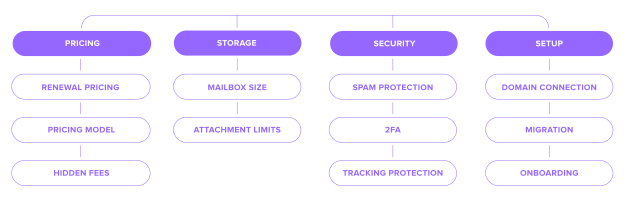
Pricing
If you found professional business email for 1 dollar a year, maybe hold up before you celebrate. The advertised price might not be the price you'll actually pay. Here’s why.
Renewal pricing – This is where most providers make their real money. A $3/month low cost business email might jump to $10/month after the initial term. Always check the renewal rate before you buy, not after.
Pricing model – Per-user pricing scales painfully with every contractor, every alias, and every shared inbox you add. Per-domain pricing can be far more economical if you need multiple addresses.
Hidden fees – Security add-ons, threat protection, and compliance features can add $3–10/user/month. Add this to setup, migration, and storage overuse charges, and it can really add up.
Storage
If you run out of mailbox storage, new emails will bounce back to senders with a "mailbox full" message. Not a great look when a client is trying to reach you.
Mailbox size – 10GB per mailbox is a solid, safe starting point. If you’re a light user, you may need 3–5GB/year, but heavy file-sharing can push that to 10–20GB.
Attachment limits – Most providers cap at 20–25MB per message. If you send large files regularly, check whether higher limits or cloud-linked attachments are included before you buy.
Security
A cheap price tag should not mean cutting corners on security. If your business has something worth emailing about, it also has something worth protecting.
Spam protection – Basic filtering should be included, but quality varies. It's important to check that SPF, DKIM, and DMARC are included. They should be standard, not extras.
2FA – 81% of hacking-related breaches come from weak or stolen passwords. That makes 2FA one of the most important things to check for in any email provider.
Tracking protection – Senders can use invisible pixels to track when you open emails. Look for a provider that blocks them by default and has a clean privacy policy.
Setup
Getting business email up and running involves more than creating an account.
Domain connection – You'll need to update your DNS records to connect your domain. Check that your provider walks you through this, including SPF, DKIM, and DMARC setup.
Migration – A good provider will migrate your emails, contacts, and calendars, but not all cheap plans will cover all three. Check what's included and whether support is available during the move.
Onboarding – Setup time can vary between providers. Some will get you running in 30 minutes. Others take hours. Check what support is available during setup, not just after.
Cheapest business email providers compared

The best cheap business email for you depends entirely on the size of your business and what you plan to use it for. Lucky for you, we’ve done a breakdown of the main contenders.
Provider | Starting price | Storage per mailbox | Custom domain | AI tools | Best for |
|---|---|---|---|---|---|
Hostinger | from $0.59/month for a 1-year plan | 5GB (entry) | Yes | Yes (AI mailbox assistant Kodee, only premium plans) | Building a website and email at once |
Neo Mail | from $1.25/month for a 1-year plan | 15GB (entry) | Yes | Yes (Smart Write and AI Summary) | Freelancers and small businesses that want email plus client communication tools |
Spacemail by Spaceship | from $0.98/month for a 1-year plan | 5GB (entry, possibility to expand) | Yes | Yes (AI assistant, all plans) | Solopreneurs up to growing businesses |
Namecheap Private Email | from $0.99/month for a 1-year plan | 5GB (entry) | Yes | Yes (AI assistant, all plans) | Users wanting a simple, reliable inbox |
IONOS | from $1.10/month for a 3-year plan | 2GB (entry) | Yes | Paid add-on | Bundled domain, hosting + email |
Zoho Mail | from $0.95/month for a 1-year plan | 5GB (entry) | Yes | Yes (Zia, all plans) | Solo operators who want room to grow |
Proton Mail | from $3.99/month for a 1-year plan | 15GB (entry) | Yes | Yes (Proton Scribe writing assistant) | Handling sensitive or confidential data |
Best cheap business email for small businesses and startups
Starting a business means keeping costs low without cutting corners where it matters. Email is one of those places where the wrong choice early on creates problems later. Here are the best cheap email hosting for startups that make the most sense if you are just getting started.
1. Spacemail by Spaceship
Good for: Startups that want a complete professional email setup from day one, without technical overhead.
Spacemail feels lightweight and fast but covers a lot of ground. Unbox™ handles initial setup automatically in one tap, emails are encrypted in transit and at rest, and spam is managed by Jellyfish, which learns how you work and updates itself.
What you get:
30-day free trial for all plans
Custom domain email with automatic DNS setup via Unbox™
Built-in calendar and mobile access on iOS and Android
Integrated migration tool at no cost
AI writing assistant and 2FA included as standard
Password protection for sensitive messages
Jellyfish anti-spam protection on all plans
2.Neo Mail
Good for: Startups and small businesses that want professional email, AI tools, and simple growth features without paying for a full office suite.
Neo Mail keeps things straightforward. You can connect a domain you already own or start with an included free domain option. It also lets you get a business email without a domain. Beyond the inbox, it gives small teams useful tools for writing emails, following up with leads, booking meetings, and building a professional online presence.
What you get:
Plans from $1.25 per mailbox per month, billed annually
15GB storage on Starter, 50GB on Standard, and 100GB on Max
Custom domain email or an included domain option if you do not own one
Free AI website builder
Smart Write and AI Summary
Read receipts, email templates, send later, email backup, and follow-up reminders
Built-in calendar, mobile apps, and POP/IMAP support
Two-factor authentication, antivirus, and advanced spam protection
Additional tools for email campaigns, appointment booking, and email signatures
3. Namecheap Private Email
Good for: Startups already using Namecheap for their domain, who want a familiar, low-cost setup.
Namecheap Private Email sits in a comfortable middle ground. You get email on your own domain alongside a calendar, AI email assistant, and anti-spam protection. There are no ads or inbox scanning, and it scales cleanly if you need to add users later.
What you get:
Plans from $0.99 per month with a 30-day free trial
Custom domain email with no ads or inbox scanning
Calendar, AI email assistant, and anti-spam protection
Security encryption and 2FA built in
Full IMAP, POP3, and SMTP support
4. Hostinger
Good for: Startups building a website and setting up email at the same time.
Hostinger's email offering is designed to sit alongside its hosting plans, with two tiers that cover most startup needs.
What you get:
Starter from $0.39 per month, renewing at $1.59/month (2-year term)
Premium from $1.59 per month, renewing at $3.99/month (2-year term)
10GB storage on Starter, 50GB on Premium
10 aliases on Starter, 30 on Premium
1,000 emails per day on Starter, 3,000 on Premium
Kodee AI Mailbox Assistant (on Premium only)
5. IONOS
Good for: Those who want domain, hosting, and email in one place, or small teams that need multiple mailboxes from the outset.
IONOS bundles domain, email, and SSL across all plans. It’s a good option for small teams that need multiple mailboxes without paying per user.
What you get:
Mail Basic 1 from $1.10 per month; Mail Basic 25 from $2 per month (3-year term)
Free custom domain on all plans
2GB storage on Basic plans, 50GB on Mail Business
Premium virus protection and team collaboration tools on Mail Business
Personal consultant assigned to every account at no extra cost
AI Email Assistant available as an optional paid add-on
30-day money-back guarantee
Best cheap business email for freelancers
Freelancers need one thing above all else: a professional address under their own domain that is simple to manage and cheap to run. These are the providers that deliver that without overcomplicating things.
1.Neo Mail
Good for: Freelancers who want to manage proposals, follow-ups, and client communication from one professional inbox.
Neo Mail goes beyond simply sending and receiving messages. Read receipts help you see when a proposal has been opened, follow-up reminders keep client conversations from slipping through the cracks, and Smart Write helps you draft replies faster when work gets busy.
What you get:
Plans from $1.25 per mailbox per month, billed annually
Professional email using your own domain or an included free domain option
Business email without a domain option
Smart Write and AI Summary
Free AI website builder
Read receipts, email templates, send later, and follow-up reminders
Built-in calendar and appointment booking
Signature Designer for professional client emails
Mobile apps, two-factor authentication, and spam protection
2. Zoho Mail
Good for: Solo operators who want a clean, affordable inbox under their own domain with room to grow.
Zoho Mail gives you a custom domain, no ads, and a solid set of admin controls without pulling you into a larger suite. It works well for solo users who want the option to add team features later without switching providers.
What you get:
Mail Lite from €0.90 per user per month, billed annually
5GB storage on Mail Lite
Zia AI assistant on all plans
Migration assistance included
Mobile and desktop apps included
Clean, ad-free interface
3. Namecheap Private Email
Good for: Freelancers who want a simple, reliable inbox under their own domain without paying for features they will not use.
Namecheap Private Email keeps things simple. You get email on your own domain, a clean, intuitive dashboard, and everything you need to stay professional without being pushed towards tools you will never open.
What you get:
Plans from $0.99 per month with a 30-day free trial
One mailbox with 5GB storage on the entry plan
Full IMAP/SMTP/POP3 access on all plans
Clean, easy-to-navigate dashboard
Security encryption and 2FA built in
4. Spacemail by Spaceship
Good for: Freelancers who want the fastest possible setup and a complete toolkit in one place.
Spacemail is a good fit for freelancers who want to get up and running quickly without dealing with multiple tools or a complicated dashboard.
What you get:
Plans from $0.79 per month with a 30-day free trial
Unbox™ removes all DNS setup friction
AI writing assistant built into the composer
Integrated calendar included as standard
2FA and Jellyfish anti-spam on all plans
Mobile apps for iOS and Android
Best cheap secure business email
Security matters for every business, but it matters more for some than others. If you handle sensitive client data, NDAs, legal correspondence, or financial information, the provider you choose needs to do more than filter spam.
1. Proton Mail
Good for: Privacy-conscious businesses and anyone handling sensitive client data, legal documents, or confidential communications.
Proton Mail offers zero ads and no scanning of your emails for advertising, profiling, or data mining, backed by end-to-end encryption and Swiss privacy law. Aliases let you hand out different email addresses for different purposes and shut them off instantly if one starts receiving spam.
What you get:
Free plan with 1GB storage and one encrypted address
Mail Plus from $3.99 per month with 15GB storage and 10 encrypted addresses
End-to-end encryption on all plans
Zero-access architecture; email content cannot be accessed even under legal order
Custom domain support on Mail Plus and above
Priority customer support on Mail Plus and above
2.Neo Mail
Good for: Small businesses that want everyday email security along with useful productivity tools.
Neo Mail includes essential security features without making setup complicated. It protects accounts with two-factor authentication, antivirus scanning, advanced spam filtering, and custom DKIM.
What you get:
Two-factor authentication
Inbound and outbound antivirus protection
Advanced spam protection
Custom DKIM support
Email backup
Mobile apps and secure webmail
3. Spacemail by Spaceship
Good for: Businesses that want solid everyday security included as standard without managing it themselves.
Spacemail handles security behind the scenes. Emails are encrypted in transit and at rest, authentication records are configured automatically, and suspicious activity is flagged without you having to set anything up.
What you get:
Plans from $0.79 per month with a 30-day free trial
2FA, SPF/DKIM/DMARC, and spam filtering included as standard
Suspicious login monitoring and activity logs built in
Password protection for sensitive messages
Jellyfish anti-spam on all plans
Aliases included with every plan
Mobile apps for iOS and Android
4. IONOS
Good for: Businesses that want stronger-than-average security without the premium price tag of a fully privacy-first provider.
IONOS includes solid access controls and anti-spam protection across all plans. A personal consultant is assigned to every account, which can make a difference if something goes wrong.
What you get:
Mail Basic 1 from $1.10 per month
Free custom domain on all plans
Solid access controls
Premium virus protection on Mail Business
Personal consultant assigned to every account at no extra cost
30-day money-back guarantee
Cheap business email vs free email services

It's free. You've already got one. And it works. So why not run your business off a personal email? Because "free" also has a price, it's just hidden. And it won't show up until it starts costing you customers, security, and credibility. By then, the damage is done.
Let's look at why a free inbox is one of the most common and costly mistakes new businesses make.
The branding problem
Your email address isn't just where mail lands. It's a first impression. Often, it's the very first thing a client sees before they've read a single word you've written. And a gmail.com or outlook.com address says something. Just not what you want it to be.
The numbers back it up. 75% of consumers trust a business more when its email is branded. Free-domain emails? 35% more likely to be ignored completely. That means they’re working against you before your email is even opened.
Your domain is your digital identity. Everything tied to it either builds that identity or chips away at it.
The deliverability problem
Here's a number to sit with: in 2026, 32% of emails land in spam. Nearly one in three. Gone. And with a free account, you've got almost no say over whether yours is one of them.
Through 2025 and into 2026, Gmail, Microsoft, and Yahoo cranked up their authentication rules. Emails without properly configured SPF, DKIM, and DMARC records aren't filtered anymore, they're rejected outright. Free accounts give you no real way to manage any of it. You're sending from shared infrastructure, with a shared reputation. And that reputation isn't yours to protect.
The security problem
Business email compromise cost $2.9 billion in reported losses in 2025. Attacks climbed 15% year on year. And free webmail? 73% of business email compromise attacks start from free webmail services.
A compromised gmail.com address is harder to verify, easier to spoof, and quicker to get flagged. Worse, if you're locked out or hacked, free services offer no live support. You're on your own, usually at the exact moment your business can't afford it.
The scaling problem
Free email was built for one person. So adding a team means stacking up separate, disconnected inboxes. That means no shared management, no admin controls, no audit trail, no quick way to cut access when someone leaves.
Business email hands you a single dashboard where you can add and remove users in seconds. Set permissions across the board. Monitor activity from one place.
The cost?
Here's the part most people get wrong. They assume quality email is expensive. It isn't. Reputable paid providers start under $1 per mailbox, per month.
For a freelancer or small business, a small outlay in exchange for credibility, security, and control should be an easy one to justify.
The right email for the way you work
Every provider in this list does something well, but the right choice depends on what you actually need. Here is a quick breakdown to help you decide.
Value plus features
Spacemail by Spaceship – From $0.79/month. Automatic DNS setup, aliases, built-in calendar, 2FA, and AI writing assistant are all included as standard.
Tight budget
Hostinger – Starter plan from $0.39/month on a 48-month term. 10GB storage, 10 aliases, and 1,000 emails per day per mailbox.
Startup-friendly
Spacemail by Spaceship – From $0.59/month. Unbox™ handles all DNS setup automatically. Integrated migration tool, built-in calendar, 2FA, and a 30-day free trial.
Client communication
Neo Mail- From $1.25 per mailbox per month, billed annually. Read receipts, follow-up reminders, email templates, AI writing, appointment booking, and a built-in calendar make it a practical option for freelancers and small teams that regularly communicate with clients.
Privacy first
Proton Mail – End-to-end encryption built into the platform. Swiss privacy law jurisdiction. Plans from $3.99/month with custom domain support.
Power user
Zoho Mail – Workplace Standard bundles email, calendar, office apps, file storage, and a password manager. Everything in one place from €0.90/user/month.
Simple setup
Namecheap Private Email – From $0.99/month with a 30-day free trial. Clean dashboard, Jellyfish anti-spam, and full IMAP access from day one.
Frequently asked questions
The cheapest email hosting depends on your needs. Hostinger costs $0.39 a month, but that price only applies on a 48-month term. Spacemail is also a great everyday value at $0.98 a month with no long lock-in.
Yes. A custom domain email lets you send messages from an address like you@yourbusiness.com instead of a generic gmail.com or outlook.com address. This makes your email look more professional and connects every message directly to your brand. Providers such as Neo Mail let you create business email using your own domain. Neo Mail also lets you start with an included domain if you do not already own one.
The key is knowing what to look for. Spam filtering should come as standard, along with SPF, DKIM, and DMARC to verify your emails. Two-factor authentication matters too, since most breaches start with a weak or stolen password. If you handle sensitive data, look for stronger features like end-to-end encryption.
Google Workspace is a full office suite. You pay for docs, sheets, drive, and meet, even if you only want email. Standalone email hosting gives you a professional inbox and the basics for a fraction of the price.
The best provider depends on the tools your startup needs. Neo Mail is a good choice for startups that want business email, AI tools, read receipts, follow-up reminders, and appointment booking. Spacemail is a strong all-round option if you want simple setup, aliases, a built-in calendar, two-factor authentication, and AI writing tools.
Usually, yes. Most providers let you move your existing emails, contacts, and calendars, although what is included can vary by plan. Neo Mail offers one-click import for existing emails and contacts, making it easier to bring your current inbox over.
Most do, but the quality varies. Basic filtering should always be standard, even on the cheapest plans. Some providers go further with machine-learning filters that catch more threats. Before you buy, confirm that SPF, DKIM, and DMARC are included too. These verify your emails and keep both junk and spoofed messages in check.
It can work at the very start, but it has real limits. A free address looks less professional and gets ignored more often. Emails from free domains are 35% more likely to be skipped. Free accounts also give you little control over security or deliverability, and no shared admin tools as you add people. A paid inbox starts under $1 a month. For most small businesses, the upgrade pays for itself quickly.

Suggested articles




Share your thoughts