
The first spam email was sent by Gary Thuerk in 1978 to around 400 people. The email included a brochure for the DECSYSTEM-20 computers. It was insanely successful and generated around $13 million in sales. It also unlocked email as a new channel to reach customers and sell products.
There are two ways of looking at email spam.
It lands in your inbox, you click delete, what’s the big deal?
An international game of cat and mouse, where your inbox, and what lands in it, sits on the front line as big tech, government agencies, and criminal organizations do battle for your safety, your attention, and your bank account.
The second view might sound dramatic, but if it saves you a few headaches and maybe even some money, it’s worth understanding, right?
Well… it all starts with a joke about a can of tinned meat.
What is a spam email, and why is it called spam?
There are many things that spam is, advertisements, scams, junk newsletters, the list goes on. But the one thing spam isn’t is invited. Like a swarm of mosquitoes arriving at the first mention of summer, spam almost always arrives in bulk. It’s unsolicited, unwanted, and pretty darn annoying.
But why does it share its name with a can of tinned meat made from pork shoulder and ham? For that, we can thank a famous Monty Python sketch, where the word “spam” was repeated over and over, almost to the point of madness. This cemented “spam” as a symbol of the incessant and unwanted. In 1993, one savvy internet user took this idea and described a flood of repeated posts as spam, and voilà, the name stuck.
But, despite its quirky origins, the word itself doesn’t capture how damaging spam can be – or how difficult it is to get rid of. Like mosquitoes, spam emails often carry dangerous materials that can wreak havoc on your devices. Not to mention the risk to your personal data, and the migraine that can come with having your inbox flooded by shady advertisements. But understanding the history helps. If you can understand how spam finds its way into your inbox, you’ll do a better job of keeping it out.
Spam Type | Example |
Advertising spam | Promotional emails |
Phishing | Fake banking login emails |
Malware spam | Malicious attachments |
Scam emails | Fake lottery or inheritance scams |
When was the first spam email sent?

So where does spam mail come from? You might be surprised to learn that the first spam email was sent before the internet even existed. It didn’t come from some shadowy criminal group, it came from a single marketer trying to sell a new line of computers, and believe it or not, it made millions.
Back in 1978, marketing manager Gary Thuerk sent an email to around 400 people through ARPANET, the military network that came before the internet. His message was a pitch for a presentation on the new DECSYSTEM-20 computers. The email pulled in about $13 million in sales, but also annoyed nearly everyone who got it.
The most interesting part of this story from spam history is not when the email was sent, but the double-edged sword that sits behind email spam. On the one hand, there are eye-watering amounts of money to be made from advertisements sent to hundreds, thousands, or even millions of people. But, spam is very obviously annoying. Unfortunately, this is the push and pull relationship that will follow spam through its turbulent history.
How has spam evolved over the decades?
If you’re lucky enough to grow up in the era of Google and Microsoft protection, you might not remember the early days of the internet, where getting spam out of your inbox was more of a manual task.
Timeline of email spam evolution
Year | Event |
1978 | Gary Thuerk sends first spam email |
1994 | “Green Card Lottery” spam campaign |
1996 | MAPS launches blackhole lists |
2003 | CAN-SPAM Act introduced |
2000s | Botnets and phishing explode |
2010s | AI filtering improves |
2020s | AI-generated phishing and spam rise |
1980s–1990s: The wild west of email
1983, one year before George Orwell’s prediction of a totalitarian superstate, something very different was taking shape. For the first time, it was made possible for multiple independent networks to connect with each other, creating the foundation for today’s global network of networks, or the internet as we like to call it.
Over the next decade, millions of new users came online and started setting up email addresses. There was no central authority to say, “you can’t do that” and email could basically serve as a free advertising channel. One message blasted to thousands, even millions, of people at almost no cost.
What was the result? In the 1990s, spam exploded, and so did efforts to control it. In 1994, lawyers Canter & Siegel launched their infamous “Green Card Lottery” ad across thousands of Usenet groups, often seen as the first major commercial spam campaign. Defenses soon followed. The Mail Abuse Prevention System (MAPS) rolled out the first Real-time Blackhole List in 1996, blocking mail from known spam servers, and groups like Spamhaus built blocklists and shared intelligence to keep spammers out.
2000s: The decade spam went dark
The 2000s may have marked the end of the millennium, but for many, it was the true beginning of annoying emails flooding inboxes. Google, Yahoo, and Microsoft all jumped on the stop spam bandwagon. But it wasn’t cheesy ads or get-rich-quick schemes anymore, spam was turning darker. Spammers had begun using “botnets,” networks of infected computers, to send out spam on a massive scale.
Governments decided it was time to step in. In 2003, the US rolled out the CAN-SPAM Act (Controlling the Assault of Non-Solicited Pornography and Marketing). It forced spammers to honor opt-out requests and avoid deceptive subject lines, but the catch was that the responsibility still landed on recipients to unsubscribe. Europe, on the other hand, went stricter. The EU set up an opt-in system for email marketing, which meant companies couldn’t send commercial emails without getting permission first.
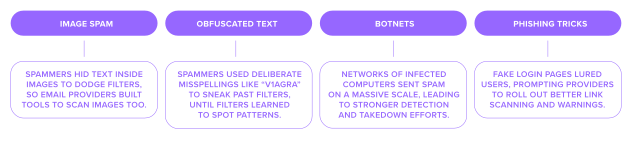
The 2000s marked the real explosion of the cat-and-mouse game that came to define spam. Spammers would invent new tricks, and defenders would find ways to counter them. Take Bayesian filtering, for example, it scans the words in an email, runs the probabilities, and decides if it’s junk or genuine. When it first came out, it was a breakthrough in how email providers could crack down on spam. In 2004, Bill Gates even predicted the spam problem would be solved within two years. But, as always, spammers were quick to adapt.
Examples of the spam back and forth in action:
The Modern era: When spam learned to think
Stephen Hawking once warned that humans could one day be to AI what dogs are to humans, a sobering thought. And while that may sound bleak, it’s no exaggeration to say the rise of AI could be as transformative as the invention of the steam engine. It’s no wonder then that AI is shaping the battle between those seeking to profit from spam and those trying to control it. The difference is that, unlike traditional spam filters, AI can learn and adapt.
The irony here is that scammers are using the same tools to improve their spam emails as college kids use to pass their exams. Before AI tools, spam emails were riddled with typos, grammar mistakes, and obvious red flags. Now, thanks to large language models, spam emails with flawless grammar, localized tone, and personalized hooks can be sent en masse. Instead of sending 10’000 identical emails, scammers can send 10’000 slightly different emails and avoid censors. By running text through models that simulate spam scoring, attackers can tweak their messages until they appear “safe.”
Email giants are doing the same. They use AI and machine learning not just to scan content, but to analyze sender behavior, network signals, and even the context of messages. Gmail, for example, can now spot suspicious patterns, like sudden bursts of emails from new domains or content that mimics known phishing lures, and adapt in real time to shut down new spam campaigns.
What impact has spam had on email and businesses?
If we go back to the spam mail origin story, and its Monty Python namesake, the theme was simple: annoying. Back then, that’s exactly how most spam was seen. But in the decades since, it’s become far more dangerous. Clicking the wrong link can now mean viruses or serious financial loss.
And it’s not just individuals at risk. Since the 2000s, scammers have cooked up elaborate ways to go after bigger targets. Many of these schemes even have catchy nicknames that downplay just how serious the consequences can be.
Examples of spam targeted at businesses:
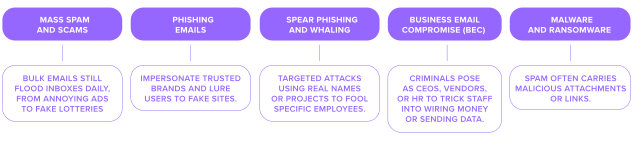
Mass spam and scams – Bulk emails still flood inboxes daily, from annoying ads to fake lotteries or “Nigerian prince” schemes. They’re low-level but clutter inboxes and can still trick employees.
Phishing emails – Impersonate trusted brands and lure users to fake sites. Once clumsy, these phishing emails are now polished, automated, and hard to tell from the real thing.
Spear phishing and whaling – Targeted attacks using real names or projects to fool specific employees. When aimed at execs, it’s called “whaling,” and the payoff can be massive.Business Email Compromise (BEC) – Criminals pose as CEOs, vendors, or HR to trick staff into wiring money or sending data.
Malware and ransomware – Spam often carries malicious attachments or links. One click can unleash viruses or ransomware, locking up entire systems and costing businesses millions.
But the real danger is in the scale of the consequences. Spam wastes time on an enormous level. Employees second-guessing emails or managers investigating false alarms. All of it chips away at productivity.
What spam really costs
The FBI estimates that Business Email Compromise alone drained over $50 billion between 2013 and 2022. That’s why the fight against spam keeps evolving. Filters now look beyond keywords to scan patterns, attachments, and even sender behavior. Laws like CAN-SPAM and GDPR set rules around consent and transparency. And email providers have added protections like SPF, DKIM, and DMARC, making it much harder for attackers to pose as someone they’re not.
How do we fight spam today?
Modern spam filters are powered by AI and machine learning. They can analyze sender behavior and the context of the message, and then adapt in real time.
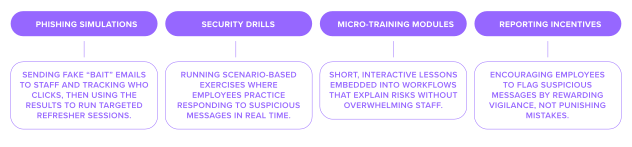
But, awareness is still important. Even with the best spam filters, employee training needs to become a key part of stopping spam.
How to protect yourself from spam emails
These days, companies run regular awareness programs that teach people to slow down and spot red flags, or verify requests before acting. Some of these include:
Think before you click
Tried-and-trusted advice still holds here. If you received an email you were not expecting and you don't know the sender, then do not click on a random link. You can hover over the link on desktop, or long-press on mobile to preview the real destination first. If the link address and the real address are different, that's a red flag.
If you do decide to click on an email link, don't be fooled by a padlock next to the URL, this doesn't mean the site is safe. The padlock only confirms that someone has encrypted the connection. Unfortunately, a phishing site can get an SSL certificate just as easily as a legitimate site.
Verify the sender
The display name on an email is not always the sender's real identity. That's because anyone can change it to something completely different. To verify the real identity, you need to check the exact email address the email came from.
Sometimes this is obvious, like if the email comes from a cheap, disposable free email. But it's not always that easy. Attackers often disguise emails by changing a few characters, like @p4ypal.com. If you are unsure about whether the email is genuine, it's best to reach out to the official communication channels.
Pick a provider with SPF, DKIM, DMARC
When it comes to spam, SPF, DKIM, and DMARC are the gold standard of email authentication. They're the best way to tell whether emails sent from your domain are really from you, or from an imposter. SPF checks that the email came from a server allowed to send on your behalf. DKIM adds a tamper-proof signature, so the message can't be quietly altered along the way. DMARC ties the two together and tells the receiving server what to do when a message fails the check.
The good news is you don't have to set any of this up by hand. A good email provider should do it for you. So when you're choosing where to host your email, look for one that supports SPF, DKIM, and DMARC as standard.
Use 2FA
2FA adds a second layer of security to your account. It stands for two-factor authentication and basically means proving who you are with two things instead of one. The first is your password, the second could be your phone, an authenticator app, a fingerprint, or a security key.
This means if your password is stolen, the attacker can't access your account without having the second form of authentication. Any 2FA beats no 2FA. Look for email providers that offer it and turn it on everywhere you can, starting with your email.
Be careful with attachments
Humans are curious, and attackers take advantage of that. The best way you can protect yourself is by avoiding opening email attachments you weren't expecting. This holds even if they're from someone you know. That's because accounts often get hijacked and senders get spoofed.
Always treat PDFs, Word and Excel docs, ZIP and RAR archives, HTML files, ISO disk images, and especially .exe files with extra care. When in doubt, confirm with the sender through a separate channel before opening anything.
Keep your team trained
Ultimately, humans are the last line of defence when it comes to attacks. Filters, authentication, and attachment scanning stop a lot, but any messages that get through are designed to fool a person.
This is where training can make a huge difference. Crucially, companies should train for today's attacks, not yesterday's. That means AI-written lures with no typos, deepfake voice and video, and scams across SMS, QR codes, and MFA prompts, not just email.
Frequently asked questions
The very first spam email was sent in 1978 on ARPANET, the internet’s predecessor. A marketer called Gary Thuerk sent an email to 400 people with a pitch for new computers. The email made millions of dollars but annoyed a lot of people.
Spam email started as a cheap way to advertise to lots of people at once via email. The early internet didn’t have many rules, and it was easy to hit thousands of inboxes for almost no spend.
The name comes from a Monty Python sketch where “spam” was repeated endlessly. Early internet users borrowed the term to describe the same kind of repetition in unwanted messages.
Spam began as advertisements and chain letters, and grew into phishing, malware, and large-scale scams. Today, AI helps spammers write polished, personalized messages, so filters have had to become more advanced to keep up.
By the early 2000s, spam made up nearly half of all email traffic worldwide. Governments stepped in with laws like the CAN-SPAM Act, and major providers like Yahoo, Microsoft, and Google built tougher defenses.
Modern spam filters use AI and machine learning to scan more than just keywords. They look at sender behavior, network signals, and message patterns, like a sudden burst of emails from a new domain or content that mimics known phishing lures, then adapt in real time to block new spam campaigns.
Phishing spam impersonates a trusted brand or contact to trick you into clicking a malicious link or sharing sensitive info. Phishing emails used to be full of typos and obvious red flags, now they are polished and hard to spot.
Spam is any type of unwanted bulk email, like ads, junk newsletters, or fake lottery offers. Phishing is a type of spam designed to steal your data or money by posing as someone you trust. All phishing is spam, but not all spam is phishing.

Suggested articles




Share your thoughts