Spaceship Blog

What is CC and BCC in email? A guide with examples

Email is a daily tool for most of us, but are you using it to its full potential? Two little fields — CC and BCC — can make a big difference in how you communicate, whether you’re firing off a quick team update or sending a mass invite.

If you’ve ever wondered what CC and BCC mean at the top of an email, you’re in the right place. This guide will break it all down with practical tips, relatable examples, and a dash of email etiquette to keep you from stepping on any digital toes.

CC and BCC meaning explained

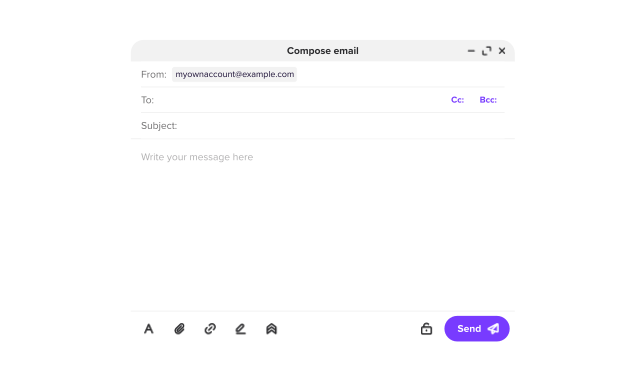
Before we get into the nitty-gritty, let’s start with the basics. CC and BCC are email features that let you include extra recipients beyond the person in the “To” field. They’re simple tools, but they serve different purposes — and knowing when to use them can save you from confusion or an awkward faux pas.

What does CC mean in email?

In an email message, CC stands for “Carbon Copy” — a throwback to the days of typewriters and carbon paper. (Yes, the CC full form is indeed “Carbon Copy”). When you CC someone, you’re sending them a copy of the email, and everyone else on the thread can see they’re included. It’s all about transparency.

CC shines in professional settings where you want to keep people in the loop. Think project updates, team announcements, or looping in a supervisor who needs to stay informed without being directly involved. It’s like saying, “Hey, this is for your info — no action required.”

What does BCC mean in email?

Let's talk about when you'd send a BCC email. Full form of BCC stands for “Blind Carbon Copy”, and it’s the stealthier cousin of CC. When you add someone to the BCC field, they get the email, but no one else knows they received it. It’s a privacy-first option.

Unlike CC, where everyone’s email address is visible, BCC keeps things under wraps. This is the core difference between CC and BCC: Visibility versus privacy.

How do CC and BCC work in email?

So, what happens behind the scenes when you use these fields? Let’s dig a bit deeper (without drowning you in tech jargon) and explore how CC and BCC function in your inbox.

When you CC a recipient, they’re added to the email header, visible to everyone in the “To” and “CC” fields. They can read the message, see who else got it, and hit “Reply All” if they want to chime in. It’s an open invitation to the conversation, and the system ensures everyone knows who’s involved.

BCC works differently. The email server sends a copy to the BCC’d person, but their address is stripped from the visible header. Only the sender knows they’re included. They can still reply, but only to the sender, not the group.

CC is public; BCC is private. This matters more than you might think. For instance, BCC can prevent a chain of unwanted “Reply All” responses in a mass email — a lifesaver for your inbox. Staying email-safe in a digital age means a lot.

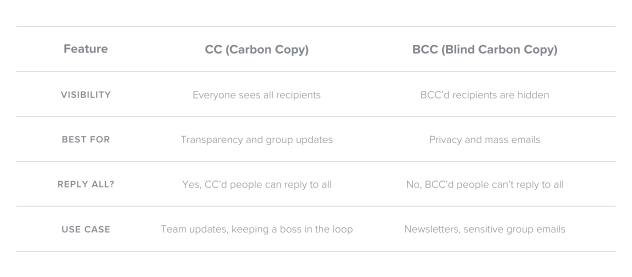
CC vs BCC: key differences at a glance

Here’s a quick comparison table to make it crystal clear:

This CC vs BCC breakdown should help you pick the right tool for the job, whether you’re looping in a colleague or shielding a client list.

Examples of using CC and BCC properly

Let’s bring this to life with some real scenarios. CC and BCC should be used correctly within professional emails to keep your communication polished and effective. These examples will show you how to utilize CC and BCC like a pro, whether at work or in your personal inbox.

CC example

Scenario: You’re a project manager sending a status update to your team. You want your department head to stay informed without needing to respond.

Example: You email your team in the “To” field: “Here’s the latest on Project X — due by Friday”. Then, you CC your boss. Everyone sees that the boss is copied, keeping things transparent.

BCC example

Scenario: Your company is sending a promotional offer to 50 customers. You don’t want them to see each other’s email addresses, or to trigger “Reply All” chaos.

Example: You write, “Enjoy 20% off this week!” and add all 50 customers to the BCC field. They each get the email, but their privacy stays intact. This is what BCC means in email at its finest — discreet and efficient.

Common mistakes to avoid

Even with the best intentions, CC and BCC can lead to unexpected hiccups if you’re not mindful. These features are powerful, but they come with a few quirks that are worth understanding. Here’s a rundown of common missteps, along with tips to sidestep them, so you can email with confidence:

1. Using CC when BCC might be a better fit — it’s easy to pop everyone into the CC field for a group email, but this can unintentionally share everyone’s email addresses with the whole list.

For example, imagine sending a company-wide announcement or an invite to a large event. Using CC means every recipient can see everyone else’s contact info. This might not be a big deal for a small team, but for larger groups or external contacts, it can feel like a privacy slip. Opting for BCC in these cases keeps things discreet and protects everyone’s inbox.

2. Overlooking how BCC limits replies — BCC is fantastic for privacy, but it has a catch: recipients in the BCC field can’t use “Reply All” to respond to the group.

If you BCC someone hoping they’ll jump into a team discussion, they’ll only be able to reply to you, the sender. This can lead to confusion if you’re expecting a broader conversation. Before you send, take a moment to consider whether BCC aligns with your goal, especially if collaboration is the aim.

3. Misjudging recipient expectations — sometimes, people don’t realize they’ve been CC’d or BCC’d and respond in ways that surprise you.

For instance, a CC’d recipient might “Reply All” with a casual comment that derails a professional thread, or a BCC’d contact might reach out separately, unaware of the bigger picture. Setting clear expectations in your email — like “FYI only” in the message — can help, but choosing the right field from the start is even better.

By keeping these pitfalls in mind, you’ll avoid the little traps that can turn a well-meaning email into a headache. It’s all about matching the tool to the task, and a little foresight goes a long way.

Wrapping up: Email smarter with CC and BCC

Getting the hang of CC and BCC is like unlocking a secret weapon for your inbox. These tools do more than just add recipients. CC keeps everyone on the same page; BCC ensures discretion when it counts.

Pair these habits with a secure email platform, and you’ve got a recipe for inbox success. Ready to take control? Your next email could be your best one yet!

Frequently asked questions

It depends on your goal. Use CC when you want transparency, like keeping a team or supervisor in the loop, with everyone aware of who’s included. Choose BCC when privacy matters, such as sending to a large group where recipients shouldn’t see each other’s email addresses. Just match the tool to the task.

The key difference is visibility. CC (Carbon Copy) shows all recipients to everyone in the email, promoting openness. BCC (Blind Carbon Copy) hides its recipients from others, ensuring privacy. CC is for sharing; BCC is for discretion.

Sort of! BCC is like a stealth version of CC. Both send copies of the email, but while CC displays all recipients, BCC keeps its recipients secret from everyone except the sender. It’s “blind” for a reason — privacy is the priority.

Not at all, BCC is a valuable tool when used correctly. It’s perfect for mass emails or sensitive situations where privacy is key. However, it might feel sneaky if misused, like secretly looping someone into a conversation they shouldn’t be part of. Context is everything.

No, they can’t. BCC recipients are invisible to everyone except the sender. CC recipients (and those in the “To” field) will see each other’s addresses but won’t know who’s been BCC’d — or even if anyone has.

Yes, absolutely! You can CC people who need to be visibly in the loop and BCC others who should stay hidden. For example, CC your team for a project update and BCC a client for a discreet heads-up. Just double-check your recipients to avoid mix-ups.


Suggested articles

Share your thoughts

More than 10 characters required.
Your identity for public display.
Providing your email address is optional. It will not be shared with third parties.

Help us improve our blog

Share your thoughts in a quick two-minute survey.

A valid email is required