How to connect a domain on third-party nameservers to our hosting
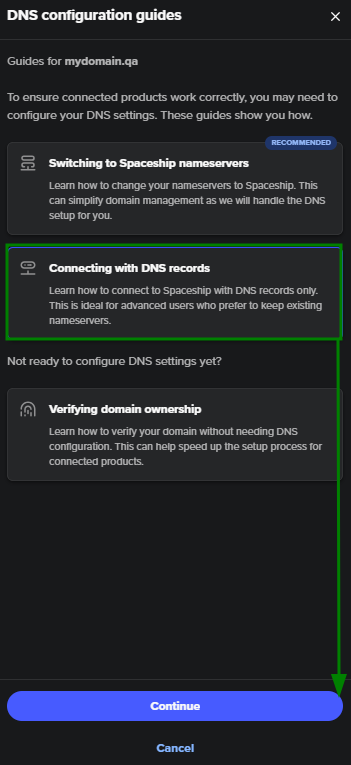
There are two options for connecting an external domain name (registered with a third-party Domain Registrar) to the Spaceship Web Hosting product:
Switching to Spaceship nameservers;
Connecting with DNS records.
We recommend pointing the domain to Spaceship nameservers:
launch1.spaceship.net
launch2.spaceship.net
By changing to Spaceship nameservers, DNS management for Spaceship products becomes automatic.
NOTE: When you switch nameservers for a domain name, this change might take up to 48 hours to propagate.
If you want to point your domain to our servers without changing the nameservers, the following host records should be created for the domain on your DNS provider side:
Host | Type | Value | TTL |
|---|---|---|---|
@ | TXT | verification string | Any / Server default |
@ | A | IP address of the server | Any / Server default |
@ | A | the second IP address of the server | Any / Server default |
www | CNAME | bare domain (yourdomain.com) | Any / Server default |
NOTE: @ stands for your bare domain - yourdomain.com.
The TXT record verifies your domain and is required for all external connections. Without this record, none of the connecting products will work.
The A and CNAME records are responsible for the hosting connection.
Values for the TXT and A records should be taken from the guidelines, which are tailored for a specific domain inside the Domain Manager menu:
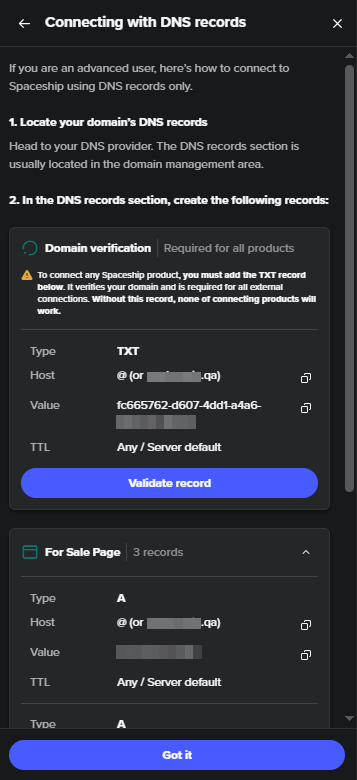
Once the DNS records are created on the DNS provider side, it may take up to 48 hours for the changes to complete. After this, your products should work correctly.