
Se sei qui, hai già preso una buona decisione: scegliere di configurare un'email aziendale. Un indirizzo email professionale può essere carburante per razzi per il tuo brand e per la fiducia che costruisci con i clienti.
Questo articolo ti aiuta a prendere la tua seconda buona decisione e a scegliere il miglior servizio di email aziendale economica nel 2026.
Che cos'è l'hosting email aziendale?
Di tanto in tanto, potresti ricevere un'email da un indirizzo che attira la tua attenzione. 10 volte su 10, quell'indirizzo email non finisce con @yahoo.com o @gmail.com. Questo perché le email gratuite non hanno lo stesso peso o impatto delle email aziendali.
Le email aziendali come @mybusiness.com creano un collegamento diretto tra il tuo brand e il tuo indirizzo email ogni volta che la tua email arriva nella casella di posta di un cliente. Il cliente vede la tua email e capisce subito chi sei. Sembra più affidabile e aiuta il riconoscimento del brand.
Porta anche a una migliore deliverability. I filtri antispam sono sempre più tarati per segnalare i mittenti con dominio gratuito che cercano di vendere qualcosa via email. Inoltre, le email gratuite non ti danno lo stesso livello di controllo sulla tua sicurezza. Se vuoi una protezione reale con funzionalità come 2FA e monitoraggio delle attività, probabilmente dovrai sborsare più soldi.
Cosa cercare in un provider di email aziendale economico
Prima di tirare fuori i dati della tua carta di credito, ecco cosa dovresti cercare in un provider di email aziendale.
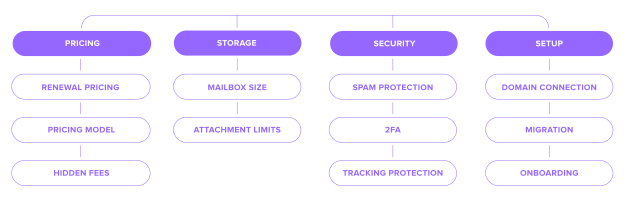
Prezzi
Se hai trovato un'email aziendale professionale a 1 dollaro l'anno, forse è meglio aspettare prima di festeggiare. Il prezzo pubblicizzato potrebbe non essere quello che pagherai davvero. Ecco perché.
Prezzi di rinnovo – È qui che la maggior parte dei provider guadagna davvero. Un'email aziendale economica da $3/mese potrebbe salire a $10/mese dopo il periodo iniziale. Controlla sempre la tariffa di rinnovo prima di acquistare, non dopo.
Modello di prezzo – Il prezzo per utente aumenta in modo pesante con ogni collaboratore, ogni alias e ogni casella condivisa che aggiungi. Il prezzo per dominio può essere molto più conveniente se hai bisogno di più indirizzi.
Costi nascosti – Componenti aggiuntivi di sicurezza, protezione dalle minacce e funzionalità di conformità possono aggiungere $3–10/utente/mese. Aggiungi a questo i costi di configurazione, migrazione e uso eccessivo dello spazio di archiviazione, e il totale può crescere rapidamente.
Archiviazione
Se esaurisci lo spazio della casella di posta, le nuove email verranno respinte ai mittenti con un messaggio di "casella piena". Non è una bella immagine quando un cliente cerca di contattarti.
Dimensione della casella di posta – 10GB per casella di posta sono un punto di partenza solido e sicuro. Se fai un uso leggero, potresti aver bisogno di 3–5GB/anno, ma una condivisione intensa di file può portare il fabbisogno a 10–20GB.
Limiti degli allegati – La maggior parte dei provider impone un limite di 20–25MB per messaggio. Se invii regolarmente file di grandi dimensioni, verifica se limiti più alti o allegati collegati al cloud sono inclusi prima di acquistare.
Sicurezza
Un prezzo basso non dovrebbe significare scendere a compromessi sulla sicurezza. Se la tua attività ha qualcosa di cui vale la pena parlare via email, ha anche qualcosa che vale la pena proteggere.
Protezione antispam – Il filtro di base dovrebbe essere incluso, ma la qualità varia. È importante verificare che SPF, DKIM e DMARC siano inclusi. Dovrebbero essere standard, non extra.
2FA – L'81% delle violazioni legate agli attacchi informatici deriva da password deboli o rubate. Questo rende il 2FA una delle cose più importanti da controllare in qualsiasi provider email.
Protezione dal tracciamento – I mittenti possono usare pixel invisibili per tracciare quando apri le email. Cerca un provider che li blocchi per impostazione predefinita e abbia una politica sulla privacy chiara.
Configurazione
Mettere in funzione l'email aziendale richiede più che creare un account.
Connessione del dominio – Dovrai aggiornare i tuoi record DNS per collegare il dominio. Verifica che il provider ti guidi in questo processo, inclusa la configurazione di SPF, DKIM e DMARC.
Migrazione – Un buon provider migrerà le tue email, i contatti e i calendari, ma non tutti i piani economici coprono tutti e tre. Controlla cosa è incluso e se è disponibile assistenza durante il trasferimento.
Onboarding – Il tempo di configurazione può variare tra i provider. Alcuni ti rendono operativo in 30 minuti. Altri impiegano ore. Controlla quale assistenza è disponibile durante la configurazione, non solo dopo.
Confronto tra i provider di email aziendale più economici

La migliore email aziendale economica per te dipende interamente dalle dimensioni della tua attività e da come prevedi di usarla. Per tua fortuna, abbiamo analizzato i principali concorrenti.
Provider | A partire da prezzo | Spazio per casella di posta | Dominio personalizzato | Strumenti AI | Ideale per |
|---|---|---|---|---|---|
Hostinger | da $0.59/mese per un piano di 1 anno | 5GB (base) | Sì | Sì (assistente AI per la casella di posta Kodee, solo piani premium ) | Creare un sito web e email insieme |
Neo Mail | da $1.25/mese per un piano di 1 anno | 15GB (base) | Sì | Sì (Smart Write e AI Summary) | Freelance e piccole aziende che vogliono email più strumenti di comunicazione con i clienti |
Spacemail by Spaceship | da $0.98/mese per un piano di 1 anno | 5GB (base, possibilità di espansione) | Sì | Sì (assistente AI, tutti i piani) | Liberi professionisti fino a aziende in crescita |
Namecheap Private Email | da $0.99/mese per un piano di 1 anno | 5GB (base) | Sì | Sì (assistente AI, tutti i piani) | Utenti che desiderano una casella semplice e affidabile |
IONOS | da $1.10/mese per un piano di 3 anni | 2GB (base) | Sì | Componente aggiuntivo a pagamento | Dominio incluso, hosting + email |
Zoho Mail | da $0.95/mese per un piano di 1 anno | 5GB (base) | Sì | Sì (Zia, tutti i piani) | Liberi professionisti individuali che vogliono spazio per crescere |
Proton Mail | a partire da $3.99/mese per un piano annuale | 15GB (base) | Sì | Sì (Proton Scribe assistente di scrittura) | Gestione di dati sensibili o riservati |
La migliore email aziendale economica per piccole imprese e startup
Avviare un'attività significa mantenere bassi i costi senza tagliare gli angoli dove conta davvero. L'email è uno di quegli ambiti in cui una scelta sbagliata all'inizio crea problemi in seguito. Ecco i migliori servizi di hosting email economici per startup che hanno più senso se stai appena iniziando.
1. Spacemail by Spaceship
Ideale per: Startup che vogliono una configurazione email professionale completa fin dal primo giorno, senza complessità tecniche.
Spacemail è leggero e veloce, ma copre moltissime esigenze. Unbox™ gestisce automaticamente la configurazione iniziale con un solo tocco, le email sono crittografate durante il transito e a riposo, e lo spam è gestito da Jellyfish, che impara come lavori e si aggiorna da solo.
Cosa ottieni:
Prova gratuita di 30 giorni per tutti i piani
Email con dominio personalizzato con configurazione DNS automatica tramite Unbox™
Calendario integrato e accesso mobile su iOS e Android
Strumento di migrazione integrato senza costi aggiuntivi
Assistente di scrittura AI e 2FA inclusi di serie
Protezione con password per i messaggi sensibili
Protezione antispam Jellyfish su tutti i piani
2.Neo Mail
Ideale per: Startup e piccole imprese che vogliono email professionale, strumenti AI e semplici funzionalità di crescita senza pagare per una suite da ufficio completa.
Neo Mail mantiene tutto semplice. Puoi collegare un dominio che possiedi già oppure iniziare con un'opzione di dominio gratuito inclusa. Ti consente anche di ottenere un'email aziendale senza dominio. Oltre alla casella di posta, offre ai piccoli team strumenti utili per scrivere email, seguire i lead, prenotare riunioni e costruire una presenza online professionale.
Cosa ottieni:
Piani da $1.25 per casella di posta al mese, fatturati annualmente
15GB di spazio su Starter, 50GB su Standard e 100GB su Max
Email con dominio personalizzato o opzione di dominio inclusa se non ne possiedi uno
Builder di siti web AI gratuito
Smart Write e AI Summary
Conferme di lettura, modelli email, invio programmato, backup email e promemoria di follow-up
Calendario integrato, app mobili e supporto POP/IMAP
Autenticazione a due fattori, antivirus e protezione antispam avanzata
Strumenti aggiuntivi per campagne email, prenotazione appuntamenti e firme email
3. Namecheap Private Email
Ideale per: Startup che usano già Namecheap per il loro dominio e vogliono una configurazione familiare e a basso costo.
Namecheap Private Email si colloca in una comoda via di mezzo. Ottieni email sul tuo dominio insieme a un calendario, un assistente email AI e protezione antispam. Non ci sono annunci né scansione della posta in arrivo, e si adatta bene se in seguito hai bisogno di aggiungere utenti.
Cosa ottieni:
Piani da $0.99 al mese con una prova gratuita di 30 giorni
Email con dominio personalizzato senza annunci né scansione della posta in arrivo
Calendario, assistente email AI e protezione antispam
Crittografia di sicurezza e 2FA integrati
Supporto completo IMAP, POP3 e SMTP
4. Hostinger
Ideale per: Startup che stanno creando un sito web e configurando l'email allo stesso tempo.
L'offerta email di Hostinger è progettata per affiancare i suoi piani di hosting, con due livelli che coprono la maggior parte delle esigenze delle startup.
Cosa ottieni:
Starter da $0.39 al mese, rinnovo a $1.59/mese (durata di 2 anni)
Premium da $1.59 al mese, rinnovo a $3.99/mese (durata di 2 anni)
10GB di spazio su Starter, 50GB su Premium
10 alias su Starter, 30 su Premium
1.000 email al giorno su Starter, 3.000 su Premium
Kodee AI Mailbox Assistant (solo su Premium)
5. IONOS
Ideale per: Chi desidera dominio, hosting ed email in un unico posto, oppure piccoli team che hanno bisogno di più caselle di posta fin dall'inizio.
IONOS include dominio, email e SSL in tutti i piani. È una buona opzione per piccoli team che hanno bisogno di più caselle di posta senza pagare per utente.
Cosa ottieni:
Mail Basic 1 da $1.10 al mese; Mail Basic 25 da $2 al mese (durata di 3 anni)
Dominio personalizzato gratuito su tutti i piani
2GB di spazio sui piani Basic, 50GB su Mail Business
Protezione antivirus premium e strumenti di collaborazione per team su Mail Business
Consulente personale assegnato a ogni account senza costi aggiuntivi
AI Email Assistant disponibile come componente aggiuntivo a pagamento opzionale
Garanzia di rimborso di 30 giorni
La migliore email aziendale economica per freelance
I freelance hanno bisogno soprattutto di una cosa: un indirizzo professionale sul proprio dominio che sia semplice da gestire ed economico da mantenere. Questi sono i provider che lo offrono senza complicare inutilmente le cose.
1.Neo Mail
Ideale per: Freelance che vogliono gestire proposte, follow-up e comunicazioni con i clienti da un'unica casella professionale.
Neo Mail va oltre il semplice invio e ricezione di messaggi. Le conferme di lettura ti aiutano a vedere quando una proposta è stata aperta, i promemoria di follow-up evitano che le conversazioni con i clienti sfuggano di mano e Smart Write ti aiuta a scrivere risposte più velocemente quando il lavoro si intensifica.
Cosa ottieni:
Piani da $1.25 per casella di posta al mese, fatturati annualmente
Email professionale usando il tuo dominio o un'opzione di dominio gratuito inclusa
Email aziendale senza opzione di dominio
Smart Write e AI Summary
Builder di siti web AI gratuito
Conferme di lettura, modelli email, invio programmato e promemoria di follow-up
Calendario integrato e prenotazione appuntamenti
Signature Designer per email professionali ai clienti
App mobili, autenticazione a due fattori e protezione antispam
2. Zoho Mail
Ideale per: Liberi professionisti individuali che vogliono una casella pulita e conveniente sul proprio dominio con spazio per crescere.
Zoho Mail ti offre un dominio personalizzato, nessuna pubblicità e un solido set di controlli amministrativi senza trascinarti in una suite più ampia. Funziona bene per utenti singoli che vogliono la possibilità di aggiungere funzionalità di team in seguito senza cambiare provider.
Cosa ottieni:
Mail Lite da €0.90 per utente al mese, fatturato annualmente
5GB di spazio su Mail Lite
Assistente AI Zia su tutti i piani
Assistenza alla migrazione inclusa
App mobili e desktop incluse
Interfaccia pulita e senza pubblicità
3. Namecheap Private Email
Ideale per: Freelance che vogliono una casella semplice e affidabile sul proprio dominio senza pagare per funzionalità che non useranno.
Namecheap Private Email mantiene tutto semplice. Ottieni email sul tuo dominio, una dashboard pulita e intuitiva e tutto ciò di cui hai bisogno per restare professionale senza essere spinto verso strumenti che non aprirai mai.
Cosa ottieni:
Piani da $0.99 al mese con una prova gratuita di 30 giorni
Una casella di posta con 5GB di spazio nel piano base
Accesso completo IMAP/SMTP/POP3 su tutti i piani
Dashboard pulita e facile da navigare
Crittografia di sicurezza e 2FA integrati
4. Spacemail by Spaceship
Ideale per: Freelance che vogliono la configurazione più rapida possibile e un toolkit completo in un unico posto.
Spacemail è adatto ai freelance che vogliono iniziare rapidamente senza dover gestire più strumenti o una dashboard complicata.
Cosa ottieni:
Piani da $0.79 al mese con una prova gratuita di 30 giorni
Unbox™ elimina ogni attrito nella configurazione DNS
Assistente di scrittura AI integrato nel compositore
Calendario integrato incluso di serie
2FA e antispam Jellyfish su tutti i piani
App mobili per iOS e Android
La migliore email aziendale economica e sicura
La sicurezza conta per ogni attività, ma per alcune conta più che per altre. Se gestisci dati sensibili dei clienti, NDA, corrispondenza legale o informazioni finanziarie, il provider che scegli deve fare più che filtrare lo spam.
1. Proton Mail
Ideale per: Aziende attente alla privacy e chiunque gestisca dati sensibili dei clienti, documenti legali o comunicazioni riservate.
Proton Mail offre zero pubblicità e nessuna scansione delle tue email per pubblicità, profilazione o data mining, supportato dalla crittografia end-to-end e dalla legge svizzera sulla privacy. Gli alias ti permettono di distribuire indirizzi email diversi per scopi diversi e disattivarli all'istante se uno inizia a ricevere spam.
Cosa ottieni:
Piano gratuito con 1GB di spazio e un indirizzo crittografato
Mail Plus da $3.99 al mese con 15GB di spazio e 10 indirizzi crittografati
Crittografia end-to-end su tutti i piani
Architettura zero-access; il contenuto delle email non può essere accessibile nemmeno su ordine legale
Supporto per dominio personalizzato su Mail Plus e superiori
Assistenza clienti prioritaria su Mail Plus e superiori
2.Neo Mail
Ideale per: Piccole imprese che vogliono sicurezza email quotidiana insieme a utili strumenti di produttività.
Neo Mail include funzionalità di sicurezza essenziali senza rendere complicata la configurazione. Protegge gli account con autenticazione a due fattori, scansione antivirus, filtro antispam avanzato e DKIM personalizzato.
Cosa ottieni:
Autenticazione a due fattori
Protezione antivirus in entrata e in uscita
Protezione antispam avanzata
Supporto DKIM personalizzato
Backup email
App mobili e webmail sicura
3. Spacemail by Spaceship
Ideale per: aziende che vogliono una solida sicurezza quotidiana inclusa di serie senza doverla gestire da sole.
Spacemail gestisce la sicurezza dietro le quinte. Le email sono crittografate durante il transito e a riposo, i record di autenticazione vengono configurati automaticamente e le attività sospette vengono segnalate senza che tu debba impostare nulla.
Cosa ottieni:
Piani da $0.79 al mese con prova gratuita di 30 giorni
2FA, SPF/DKIM/DMARC e filtro antispam inclusi di serie
Monitoraggio degli accessi sospetti e registri attività integrati
Protezione con password per i messaggi sensibili
Jellyfish anti-spam su tutti i piani
Alias inclusi con ogni piano
App mobili per iOS e Android
4. IONOS
Ideale per: aziende che desiderano una sicurezza superiore alla media senza il prezzo premium di un provider completamente orientato alla privacy.
IONOS include solidi controlli di accesso e protezione antispam in tutti i piani. A ogni account viene assegnato un consulente personale, il che può fare la differenza se qualcosa va storto.
Cosa ottieni:
Mail Basic 1 da $1.10 al mese
Dominio personalizzato gratuito su tutti i piani
Solidi controlli di accesso
Protezione antivirus premium su Mail Business
Consulente personale assegnato a ogni account senza costi aggiuntivi
Garanzia di rimborso di 30 giorni
Email aziendale economica vs servizi email gratuiti

È gratis. Ne hai già una. E funziona. Quindi perché non gestire la tua attività con un'email personale? Perché anche il "gratis" ha un prezzo, è solo nascosto. E non si vedrà finché non inizierà a costarti clienti, sicurezza e credibilità. A quel punto, il danno è fatto.
Vediamo perché una casella di posta gratuita è uno degli errori più comuni e costosi che le nuove aziende commettono.
Il problema del branding
Il tuo indirizzo email non è solo il luogo in cui arriva la posta. È una prima impressione. Spesso è la primissima cosa che un cliente vede prima ancora di leggere una sola parola che hai scritto. E un indirizzo gmail.com o outlook.com comunica qualcosa. Solo che non è ciò che vuoi comunicare.
I numeri lo confermano. Il 75% dei consumatori si fida di più di un'azienda quando la sua email è brandizzata. Le email con dominio gratuito? Hanno il 35% di probabilità in più di essere ignorate del tutto. Questo significa che lavorano contro di te prima ancora che la tua email venga aperta.
Il tuo dominio è la tua identità digitale. Tutto ciò che vi è collegato o costruisce quell'identità o la indebolisce.
Il problema della deliverability
Ecco un numero su cui riflettere: nel 2026, il 32% delle email finisce nello spam. Quasi una su tre. Sparita. E con un account gratuito, non hai quasi alcuna voce in capitolo sul fatto che la tua sia una di quelle.
Nel corso del 2025 e fino al 2026, Gmail, Microsoft e Yahoo hanno inasprito le loro regole di autenticazione. Le email senza record SPF, DKIM e DMARC configurati correttamente non vengono più filtrate, vengono rifiutate direttamente. Gli account gratuiti non ti offrono alcun vero modo per gestire tutto questo. Invii da un'infrastruttura condivisa, con una reputazione condivisa. E quella reputazione non è tua da proteggere.
Il problema della sicurezza
La compromissione dell'email aziendale ha causato perdite segnalate per 2,9 miliardi di dollari nel 2025. Gli attacchi sono aumentati del 15% anno su anno. E la webmail gratuita? Il 73% degli attacchi di compromissione dell'email aziendale inizia da servizi di webmail gratuiti.
Un indirizzo gmail.com compromesso è più difficile da verificare, più facile da falsificare e più rapido da segnalare. Peggio ancora, se vieni bloccato fuori o subisci un attacco, i servizi gratuiti non offrono assistenza dal vivo. Sei da solo, di solito proprio nel momento in cui la tua attività non può permetterselo.
Il problema della scalabilità
L'email gratuita è stata pensata per una sola persona. Quindi aggiungere un team significa accumulare caselle separate e scollegate. Questo significa nessuna gestione condivisa, nessun controllo amministrativo, nessuna traccia di audit, nessun modo rapido per revocare l'accesso quando qualcuno se ne va.
L'email aziendale ti offre un'unica dashboard da cui puoi aggiungere e rimuovere utenti in pochi secondi. Impostare autorizzazioni per tutti. Monitorare l'attività da un solo posto.
Il costo?
Ecco la parte che la maggior parte delle persone sbaglia. Presumono che un'email di qualità sia costosa. Non lo è. I provider a pagamento affidabili partono da meno di $1 per casella di posta, al mese.
Per un freelance o una piccola impresa, una piccola spesa in cambio di credibilità, sicurezza e controllo dovrebbe essere facile da giustificare.
L'email giusta per il tuo modo di lavorare
Ogni provider in questo elenco fa bene qualcosa, ma la scelta giusta dipende da ciò di cui hai davvero bisogno. Ecco una rapida panoramica per aiutarti a decidere.
Valore più funzionalità
Spacemail by Spaceship – Da $0.79/mese. Configurazione DNS automatica, alias, calendario integrato, 2FA e assistente di scrittura AI sono tutti inclusi di serie.
Budget limitato
Hostinger – Piano Starter da $0.39/mese con un termine di 48 mesi. 10GB di spazio, 10 alias e 1.000 email al giorno per casella di posta.
Adatto alle startup
Spacemail by Spaceship – Da $0.59/mese. Unbox™ gestisce automaticamente tutta la configurazione DNS. Strumento di migrazione integrato, calendario incorporato, 2FA e prova gratuita di 30 giorni.
Comunicazione con i clienti
Neo Mail- Da $1.25 per casella di posta al mese, fatturati annualmente. Conferme di lettura, promemoria di follow-up, modelli email, scrittura AI, prenotazione appuntamenti e calendario integrato lo rendono un'opzione pratica per freelance e piccoli team che comunicano regolarmente con i clienti.
Privacy al primo posto
Proton Mail – Crittografia end-to-end integrata nella piattaforma. Giurisdizione della legge svizzera sulla privacy. Piani da $3.99/mese con supporto per dominio personalizzato.
Utente avanzato
Zoho Mail – Workplace Standard include email, calendario, app da ufficio, archiviazione file e un gestore di password. Tutto in un unico posto da €0.90/utente/mese.
Configurazione semplice
Namecheap Private Email – Da $0.99/mese con prova gratuita di 30 giorni. Dashboard pulita, Jellyfish anti-spam e accesso IMAP completo fin dal primo giorno.
Domande frequenti
L'hosting email più economico dipende dalle tue esigenze. Hostinger costa $0.39 al mese, ma quel prezzo si applica solo con un termine di 48 mesi. Anche Spacemail offre un ottimo rapporto qualità-prezzo per l'uso quotidiano a $0.98 al mese senza un lungo vincolo contrattuale.
Sì. Un'email con dominio personalizzato ti consente di inviare messaggi da un indirizzo come you@yourbusiness.com invece che da un indirizzo generico gmail.com o outlook.com. Questo rende la tua email più professionale e collega ogni messaggio direttamente al tuo brand. Provider come Neo Mail ti permettono di creare un'email aziendale usando il tuo dominio. Neo Mail ti consente anche di iniziare con un dominio incluso se non ne possiedi già uno.
La chiave è sapere cosa cercare. Il filtro antispam dovrebbe essere standard, insieme a SPF, DKIM e DMARC per verificare le tue email. Anche l'autenticazione a due fattori è importante, poiché la maggior parte delle violazioni inizia con una password debole o rubata. Se gestisci dati sensibili, cerca funzionalità più avanzate come la crittografia end-to-end.
Google Workspace è una suite completa per l'ufficio. Paghi per docs, sheets, drive e meet, anche se vuoi solo l'email. L'hosting email standalone ti offre una casella di posta professionale e le funzionalità di base a una frazione del prezzo.
Il provider migliore dipende dagli strumenti di cui la tua startup ha bisogno. Neo Mail è una buona scelta per le startup che desiderano email aziendale, strumenti di IA, conferme di lettura, promemoria di follow-up e prenotazione di appuntamenti. Spacemail è un'ottima opzione completa se desideri una configurazione semplice, alias, un calendario integrato, autenticazione a due fattori e strumenti di scrittura con IA.
Di solito, sì. La maggior parte dei provider ti consente di spostare le tue email, i contatti e i calendari esistenti, anche se ciò che è incluso può variare in base al piano. Neo Mail offre l'importazione con un clic per email e contatti esistenti, rendendo più semplice trasferire la tua casella di posta attuale.
La maggior parte sì, ma la qualità varia. Il filtro di base dovrebbe sempre essere standard, anche nei piani più economici. Alcuni provider fanno di più con filtri di machine learning che intercettano più minacce. Prima di acquistare, verifica che siano inclusi anche SPF, DKIM e DMARC. Questi verificano le tue email e tengono sotto controllo sia la posta indesiderata sia i messaggi falsificati.
Può funzionare proprio all'inizio, ma ha limiti reali. Un indirizzo gratuito sembra meno professionale e viene ignorato più spesso. Le email da domini gratuiti hanno il 35% di probabilità in più di essere saltate. Gli account gratuiti inoltre ti offrono poco controllo su sicurezza o recapito e nessuno strumento di amministrazione condivisa man mano che aggiungi persone. Una casella di posta a pagamento parte da meno di $1 al mese. Per la maggior parte delle piccole imprese, il passaggio si ripaga rapidamente.

Articoli suggeriti




Condividi i tuoi pensieri