Como conectar um domínio Spaceship a servidores de nomes de terceiros
Alterando os servidores de nomes para personalizados
Se você precisar alterar os servidores de nomes do seu domínio Spaceship para servidores de terceiros, siga estas etapas:
Abra a página DNS Avançado e selecione o domínio que deseja atualizar.
Na seção Servidores de nomes, clique em Alterar:

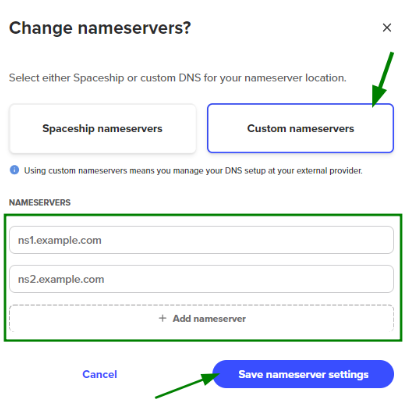
Na janela que aparecer, selecione Servidores de nomes personalizados.
Insira os servidores de nomes fornecidos pelo outro provedor de serviços.
Se necessário, clique em + Adicionar servidor de nomes para entradas adicionais.
Clique em Salvar configurações do servidor de nomes para aplicar as alterações.
Se o seu domínio estiver conectado a qualquer produto Spaceship ou já tiver outros registros DNS configurados, o sistema irá avisar que todas as conexões ativas — incluindo hospedagem e e-mail — serão encerradas.
Se quiser manter seu domínio conectado a esses serviços, será necessário recriar os registros necessários no seu novo provedor de DNS.
Observação: Os registros DNS nos servidores de nomes Spaceship não serão perdidos — eles apenas ficarão inativos.
Selecione Sim, alterar para DNS personalizado para confirmar sua escolha:

Agora, basta aguardar até que a propagação do DNS seja concluída. Esse período de transição para o seu nome de domínio pode durar até 48 horas. Durante esse tempo, a conexão com o serviço em seus servidores de nomes personalizados pode ser intermitente.
Registros inativos
Se o seu domínio já possuía registros DNS criados nos servidores de nomes Spaceship, você pode visualizá-los rolando até a seção Registros inativos:
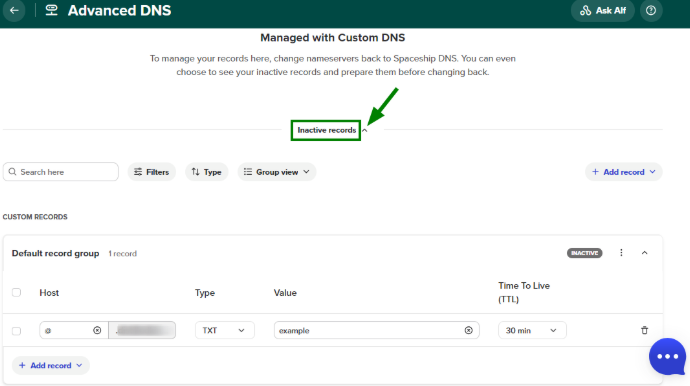
Registros DNS associados a serviços Spaceship conectados anteriormente também serão exibidos lá:

Você pode modificar registros inativos e salvá-los nesse estado. Isso é útil, por exemplo, se você estiver migrando seu site de um serviço personalizado para a hospedagem Spaceship e quiser que os registros de host sejam criados antecipadamente para minimizar o tempo de inatividade associado à propagação do DNS.
Observação: Se você alterou o seu domínio para servidores de nomes personalizados, agora precisa gerenciar os registros DNS por meio do seu provedor de terceiros. Modificar os Registros inativos não causará nenhuma alteração, a menos que você retorne o domínio para os servidores de nomes Spaceship. Assim que fizer isso, esses registros de host se tornarão ativos.