
リモートワーカーは、無料Wi-Fiに接続するたびに深刻なセキュリティリスクにさらされます。Virtual Private Network(VPN)はインターネット接続を暗号化し、カフェや空港のネットワークに潜むハッカーから業務データを守ります。どこからでも安全に仕事ができ、顧客ファイル、パスワード、銀行情報のプライバシーを保てます。
プレゼンを仕上げるためにカフェの無料Wi-Fiを使いたくなるかもしれませんが、その便利さの裏にはより深刻な現実が隠れています。
保護なしでノートPCを接続すると、ハッカーは開いているタブを見たり、すべてのキーストロークを追跡したり、支払い情報を盗んだりできます。10分後には、あなたがまだエスプレッソを待っている間に、彼らはパスワードを手に入れています。
VPNはオンラインでの仕事を守るシールドを作り、キッチンテーブルでもメキシコシティのコワーキングスペースでも、インターネット接続さえあればどこからでも仕事ができるようにします。この自由は素晴らしいキャリアの機会をもたらす一方で、深刻なリスクも伴います。
VPNがどのように自由に移動する権利を守るのかをご紹介します。
VPNはリモートワーカーをどのように保護しますか?
VPNは安全なデジタル境界線のようなものだと考えてください。他の人が公共Wi-Fiでパスワードや銀行情報をさらすリスクを負う中、あなたは安全なトンネルを通じて作業できます。
VPNに接続した瞬間、オンラインバンキングでも画面共有でも、インターネット通信は暗号化されます。誰かがあなたの通信を傍受しても、見えるのは意味をなさない乱れたコードだけです。
「connect」をクリックすると、次のことが起こります:
インターネット通信は暗号化され、読み取れなくなります
実際の位置情報はVPNサーバーの背後に隠されます
すべての通信は安全なサーバーを経由します
閲覧アクティビティはISPから見えません
なぜリモートワークにVPNを使うべきなのか?
ほとんどのWebサイトやアプリにはセキュリティ機能があります。ブラウザーに小さな南京錠が表示されるのは、HTTPS暗号化を意味します。Slack、Teams、Google Workspaceもこれをセキュリティプロトコルとして使用しています。では、なぜさらにVPNが必要なのでしょうか?
VPNは、それらのアプリでは守れないものすべてを保護するからです。たとえば、IPアドレス、位置情報、そして強力な暗号化がないサイトです。玄関の鍵だけ閉めて窓を全部開けたままにするのか、家全体を守るのか、その違いです。
しかし、VPNの仕組みを知るだけでは十分ではありません。保護を怠ることで、あなたの職業上の評判を一夜で壊しかねないフィッシング攻撃にどれほど無防備になるのかを見ていきましょう。
リモートワーカーにとって最大のセキュリティリスクは何ですか?
リモートワーカーにはIT部門も、セキュリティチームも、企業のファイアウォールもありません。自分で守るしかないのです。保護されていないログインはどれも、顧客ファイルを公共の掲示板に貼り出し、パスワードを付箋でノートPCに貼っているようなものです。
公共Wi-Fiで詐欺師に情報を抜かれたせいで、Coinbaseウォレットが空になるのを見守るために9–5を辞めたわけではないはずです。あるいは、自分のアカウントからのフィッシング試行について顧客のITチームから問い詰められるためでもありません。あなたの職業上の評判は?数分で失われます。
仕事用メール、Slack、Google Driveへの日々のログインにはすべてリスクがあります。必要なのはたった1回の侵害です。保護されていない接続を通じて機密データが漏えいすれば、そのNDA違反があなたのビジネスを失わせるかもしれません。
要点:リモートワーカーにVPN保護が必要な理由
公共Wi-Fiのリスク: ハッカーは偽ネットワークを使ってパスワードや支払いデータを盗みます
データ暗号化:VPNはすべての業務活動のために安全なトンネルを作ります
場所の柔軟性:自国のリソースにアクセスしながら、どこからでも仕事ができます
複数デバイス対応:1つのサブスクリプションでノートPC、スマートフォン、タブレットを保護
職業上の保護:顧客関係を壊しかねない侵害を防ぎます。
公共Wi-Fi:見えない脅威

VPNは、料金を払って忘れてしまうような単なるソフトウェアのサブスクリプションではありません。銀行口座を空にされたり、顧客データを盗まれたり、職業上の評判を壊されたりすることから24時間365日守ってくれる保護です。
空港のWi-Fiは安全だと思いますか?2024年6月、オーストラリア連邦警察は、空港各地で「evil twin」Wi-Fiネットワークを設置したとして1人の男を起訴しました。場所はパース、メルボルン、アデレードです。これらの偽ホットスポットは正規ネットワークを装い、接続したデバイスからログイン情報を盗んでいました。
リモートワーカーに本当に必要なVPN機能とは?
出張で飛行機に乗るときでも、カフェでプレゼンを仕上げるときでも、VPN保護は必要です。
中核となるセキュリティ機能
|
グローバルアクセス
リモートワークでは、自宅オフィス、AirBnb、コワーキングスペース、バリのビーチバーなどを行き来することもあります。移動中にVPNがどのようにデータを守るのか見てみましょう:
|
常時オンの保護

最高のオンラインセキュリティは目に見えません。自宅のWi-Fiに接続するのと同じように、VPNはバックグラウンドでシームレスに動作します。これが日々のワークフローにどう役立つか見てみましょう:
|
これらの機能は魅力的ですが、どのプランがあなたのニーズに合うのでしょうか?個人向けVPNとビジネス向けVPNを比較して、最適な選択を見つけましょう。
個人向けVPNとビジネス向けVPN:あなたに合うのはどちら?
これらの機能は魅力的ですが、どのプランがあなたのニーズに合うのでしょうか?個人向けVPNとビジネス向けVPNを比較して、最適な選択を見つけましょう。
|
ビジネス向けVPNが適している場合:
20人を超えるチームメンバーを管理している
専用IPアドレスが必要
顧客が契約でそれを求めている
チームの請求を一元管理したい
オーストラリアの空港にあった偽Wi-Fiネットワークを覚えていますか?ハッカーは、どの種類のVPNを使っているかなど気にしません。彼らが狙うのは簡単な標的、つまり保護されていないデバイスです。リモートワーカーにとって、個人向けプランならエンタープライズ価格を払わずに必要な保護を得られます。
賢い選択:実際に支払う金額

VPNは高そうだと思いますか?ほかの仕事関連の出費と比べて、実際にどれくらいかかるのか見てみましょう。
月あたり空港のコーヒー1杯未満
コワーキングスペースの1日利用券より安い
雨の中ノートPCを持ち歩きたくなくて乗ったUberより安い
VPNの月額プランは$0.00/月から始められます(30日間無料トライアル)。
VPNの価値を分解してみる
|
これをセキュリティ侵害のコストと比べてみてください:
顧客からの信頼喪失
銀行情報の漏えい
暗号資産の盗難
職業上の評判の低下
NDA違反による法的費用
計算は簡単です。たった1回のセキュリティ事故で数千ドルの損失になる可能性があります。月に数ドルで保護できるなら?それは賢いビジネス判断です。
さらにお得にしたいですか?
最大65%節約 年間プランなら
季節限定プロモーションを探す
返金保証を利用する
セキュリティ侵害が起きてから仕事を守ろうとしても遅すぎます。オーストラリアの空港Wi-Fi詐欺は、こうした脅威がどれほど巧妙かを示しています。
はじめ方:60秒でできるVPN設定
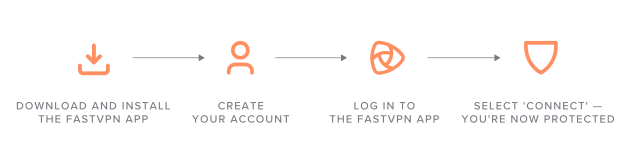
VPNの設定は1分もかかりません。手順はこれだけです:
クイック設定チェックリスト:
お使いのデバイス向けFastVPNアプリをダウンロードしてインストールします(Windows、Mac、iOS、Android)。
アカウントを作成します。
Spaceshipのログイン情報でFastVPNアプリにログインします。
「Connect」を選択します。これで保護されます。
上級者向けのヒント:
ビデオ通話を鮮明にするには近くのサーバーを選ぶ
よく使う作業場所をお気に入り登録する
Wi-Fiを渡り歩くなら自動接続を有効にする
スプリットトンネリングを使えば、機密性の高い業務(顧客ファイル、財務データ、メール)はVPN経由にしつつ、プリンターやネットワークドライブなどのローカルリソースは通常接続のまま高速に利用できます。
技術面はこれで整理できました。次は、これがあなたのリモートワークのキャリアにとって何を意味するのかを見ていきましょう。
リモートワーカーに最適なVPNは?
オーストラリアの空港の事例は大きく報じられましたが、同様の詐欺は毎日起きています。デジタルウォレットが空になってから行動しても遅いのです。
たった1回のセキュリティ侵害で、顧客喪失や法的費用により数千ドルの損失が出る可能性があります。VPNの費用は、空港のコーヒー1杯分より安いこともあります。9-to-5を辞めたのは、ハッカーに口座を空にされるのを見るためではないはずです。30日間のFastVPNトライアルを始めることで、背後を気にせず仕事に集中できます。
よくあるご質問
はい。自宅のネットワークは公共Wi-Fiより安全ですが、VPNを使えばインターネットプロバイダーによる業務活動の追跡を防ぎ、機密性の高い顧客データを保護できます。いずれカフェで仕事をしたり旅行したりするときにも、すでに保護されています。月にコーヒー1杯より安い保険のようなものだと考えてください。
個人向けVPNではできません。雇用主は、業務用メール、Slack、社内ソフトウェアなど自社のシステムは引き続き監視できます。しかし、より広いインターネット上での活動や個人アカウントはプライベートに保たれます。企業VPNは異なり、雇用主のサーバーを経由して通信するため、トラフィックを監視される可能性があります。
VPNはビデオ通話を遅くすることがあるため、最適な通話品質を得るには現在地に近いサーバーを選んでください。ニューヨークなら東海岸のサーバー、ロンドンなら英国のサーバー、などです。公共Wi-Fiでの安全性を考えれば、このわずかなトレードオフには価値があります。
はい。米国、英国、カナダ、オーストラリアを含むほとんどの国で合法です。中国、ロシア、UAEなど一部の国ではVPNが制限されています。海外で働く際は現地の規制を確認し、接続前に雇用主のITポリシーに準拠していることを確認してください。
個人向けVPNは5~10台のデバイスをカバーし、個人のリモートワーカーや小規模チームに最適です。ビジネス向けVPNは、一元管理や専用IPを必要とする従業員20人以上の企業向けです。個人向けプランで、ほとんどのリモートワーカーに必要なものはすべて揃います。
できません。パスワードで保護されたネットワークや公式らしい名前であっても、偽物の可能性があります。自宅のネットワーク外で接続するたびにVPNを使用してください。それが唯一の信頼できる保護です。
いいえ。VPNは接続を暗号化しますが、メール内のフィッシングをスキャンするわけではありません。悪意のあるリンクをクリックすると、偽サイトにアクセスしてしまいます。ただし、フィッシング被害に遭ったときに公共Wi-Fiを使っていた場合、VPNは誤って入力したデータがネットワーク上のハッカーに傍受されるのを防ぎます。
はい。FastVPNは1つのサブスクリプションで10台のデバイスをカバーし、すべて同時に接続できます。ノートパソコン、スマートフォン、タブレット、予備のデバイスまで保護されます。

おすすめの記事




あなたの考えを共有してください