
L'email consiste nel creare connessioni. Più persone riesci a contattare con successo via email, più connessioni costruisci. Ecco come farlo nel modo corretto.
Perché è importante rivolgersi correttamente a più persone in un'email
Un'email di gruppo è come qualsiasi altra email. Il tuo obiettivo principale dovrebbe essere la professionalità e la netiquette. L'email è principalmente un mezzo professionale, il che significa che ciò che invii conta. Conta per le relazioni future e per i risultati futuri.
Si tratta anche di far sentire le persone considerate, ma questo è più difficile quando invii email di gruppo.
Come ci si rivolge a più persone in un'email?
Il tuo obiettivo principale dovrebbe essere la dimensione del gruppo e chi ne fa parte. Per gruppi più piccoli, ad esempio se ti rivolgi a due persone in un'email, dovresti salutare le persone per nome per renderla più personale.
Per gruppi più grandi, un saluto generico come “Ciao team” o “Cari colleghi” è di solito più pratico. Assicurati di rispettare eventuali titoli formali come Professore, Dr. o Sig., e valuta attentamente l'ordine dei nomi. Potresti volerli ordinare in base all'anzianità, mettendo i clienti prima dei membri del team interno, oppure semplicemente in ordine alfabetico per mantenere le cose semplici.
Se sono nell'email, chiamali per nome
Elencare le persone per nome è il modo più personale per iniziare la tua email. Costruisce rispetto e fa sentire tutti inclusi. Consigliamo di elencare le persone per nome solo per gruppi da 2 a 4 persone. Se ne elenchi di più, può iniziare a sembrare un po' ridicolo.
Tieni presente che in alcune culture e Paesi usare i nomi di battesimo non è sempre appropriato nelle prime email, quindi assicurati di rispettare il tuo contesto locale. Forse devi passare a cognomi più Sig. o Sig.ra per le prime email prima di aver costruito un rapporto.
Il modo giusto per salutare per nome:
Ciao John, Maria e Sam,
Buongiorno Alex, Jamie e Taylor,
Ciao Chris e Morgan,
Saluti di gruppo fatti bene

Spesso è più facile fare in modo che tutti si sentano rispettati quando si invia un'email a una o due persone. Ma quando ci si rivolge a un gruppo in un'email, questo diventa più difficile. Più grande è il gruppo, più il contesto entra in gioco.
Quando parliamo di contesto, intendiamo lo scopo dell'email. Se stai aggiornando un team affiatato sui preparativi per la festa di Natale, il tono sarà molto diverso rispetto a quando comunichi con dirigenti senior o in un contesto aziendale più strutturato.
Quando invii email tra reparti, a manager, clienti o partner esterni, è più sicuro mantenere un tono leggermente più formale, soprattutto se ti stai presentando per la prima volta. Tra amici o colleghi stretti, puoi essere leggermente più informale.
Il modo giusto per salutare un gruppo:
Saluti informali:
Ciao team!
Ciao a tutti,
Saluti formali di gruppo:
Cari colleghi,
Buongiorno!
Buongiorno a tutti,
Gentile team dirigenziale,
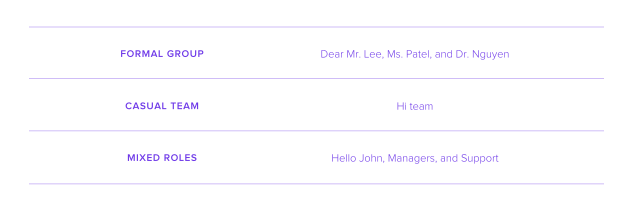
Il modo migliore per usare i titoli formali
Diventare dottore in qualsiasi disciplina non è facile e, dopo tutto il duro lavoro svolto, la maggior parte delle persone si aspetta che tu usi il loro titolo formale. Qui non stiamo parlando solo di medici in senso stretto — potrebbero anche essere professori universitari, avere un dottorato in economia, e l'elenco potrebbe continuare. Ma, qualunque sia il titolo, è importante rispettarlo nella comunicazione via email.
Quando invii un'email a un Dr., Professore, Sig., Sig.ra, ecc., è molto probabile che il destinatario si aspetti un tono professionale. Questo significa evitare saluti eccessivamente informali e garantire coerenza tra tutti i destinatari dell'email. Significa quindi non usare un titolo per una persona e non per un'altra nella stessa email.
Anche la gerarchia è importante. Se hai più destinatari con titoli, prova a elencarli in ordine. Questo significa Professore prima di Dottore e Dottore prima di Sig., ecc.
Il modo giusto di usare i titoli:
Gentile Dr. Lee, Sig.ra Carter e Sig. Brown,
Gentile Dr. Smith e team,
Gentili direttori e responsabili di dipartimento.
Gentile Leadership Team,
Come includere tutti con rispetto
Negli ambienti professionali, l'anzianità è sempre rispettata. I CEO tengono il discorso più importante, hanno l'ufficio migliore dell'edificio e di solito ottengono il posto migliore al tavolo. Le email non sono diverse.
Quando ti rivolgi a più persone in un'email, l'ordine dei nomi e l'uso della punteggiatura possono comunicare rispetto in modo sottile. L'ordine in cui elenchi i destinatari dovrebbe essere intenzionale. Questo significa menzionare prima chi ha maggiore anzianità e per ultimi quelli con minore anzianità.
Potresti anche dover considerare chi lavora fuori dalla tua azienda e i colleghi interni. In questo caso, elencare prima i collaboratori esterni potrebbe comunicare rispetto, soprattutto se stai cercando una partnership a lungo termine. Una volta considerati anzianità e distinzione tra interno ed esterno, può avere senso organizzare il resto in ordine alfabetico.
Come includere tutti con rispetto:
Gerarchia o anzianità – Negli ambienti formali o aziendali, elenca per prima la persona più senior. Ad es., Gentile Dr. Evans, Sig.ra Khan e Sig. Patel,
Esterni prima degli interni –Quando invii un'email ai clienti insieme al tuo team interno, elenca prima il cliente. Ad es., Gentile Sig.ra Roberts e team.
Ordine alfabetico – Quando tutti sono sullo stesso piano, l'ordine alfabetico è la scelta più sicura. Ad es., Ciao Angela, Brian e Carlos,
Come usare CC e BCC quando invii email a più persone
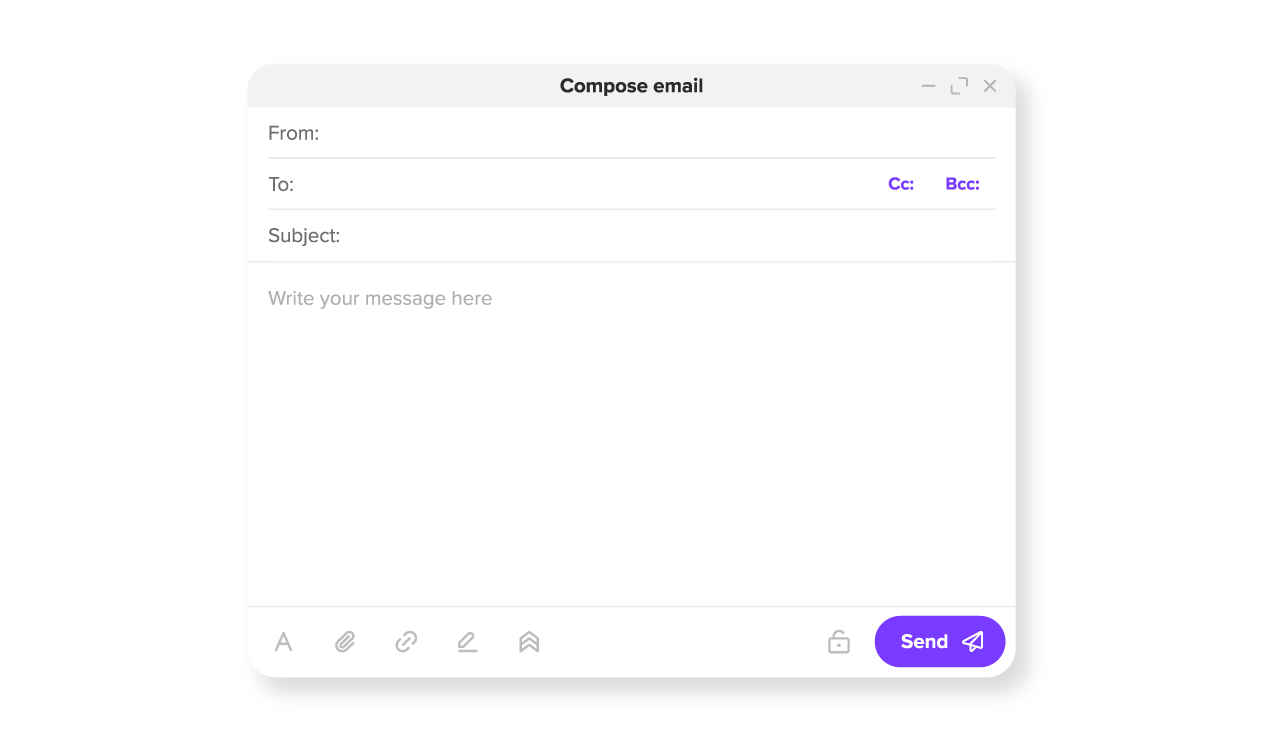
Successivamente, dovrai aggiungere gli indirizzi email di più destinatari. In questa fase, è utile capire la differenza tra CC e BCC.
CC significa copia conoscenza. BCC significa copia conoscenza nascosta. La parola "nascosta" sarà il tuo indizio principale per capire come usare queste due opzioni.
Usa CC quando i destinatari devono potersi vedere tra loro e possono rispondere.
Usa BCC quando i destinatari non devono vedersi tra loro (nascosti) ed è richiesta la privacy. In genere questa è l'opzione migliore per le email di massa.
Il momento giusto per usare CC
L'idea della CC risale ai tempi delle vecchie macchine da scrivere. Si inseriva un foglio di carta carbone e si ottenevano due copie in una volta sola. L'email ha ripreso questa stessa idea, usando la CC per inviare una copia del messaggio a qualcun altro.
Quando aggiungi qualcuno al campo CC, non ti stai rivolgendo direttamente a quella persona, le stai solo inviando una copia. Per esempio, stai parlando con un cliente esterno e vuoi tenere aggiornato il tuo capo. Metteresti il cliente esterno nel campo A e l'email del tuo capo andrebbe nel campo CC. In questo modo, il cliente può vedere che il tuo capo è aggiornato sulla situazione.
Il momento giusto per usare CC:
Aggiornamento di progetto con supervisione – Invi un'email a un collega su un'attività. Il tuo manager deve avere visibilità ma non intervenire. Metti in CC il tuo manager per tenerlo aggiornato.
Collaborazione tra team– Ti stai coordinando con un altro reparto e vuoi che entrambi i team siano allineati. Metti in CC l'altro team quando invii un'email al tuo designer per tenerli aggiornati.
Report sullo stato– Invi un aggiornamento settimanale al tuo supervisore e copi gli stakeholder. Puoi mettere in CC il tuo supervisore così può monitorare i tuoi progressi.
Il momento giusto per usare BCC
Gli altri destinatari non possono vedere il campo BCC, ma possono vedere i destinatari nei campi CC e A. Questo è utile se vuoi inviare a qualcuno una copia dell'email senza che gli altri destinatari lo sappiano.
Usa BCC per grandi mailing list, annunci pubblici o altre situazioni in cui i destinatari non si conoscono e non dovrebbero vedere i dettagli reciproci. Puoi anche usare BCC per includere discretamente qualcuno in una conversazione.
Il momento giusto per usare BCC:
Newsletter– Invi un aggiornamento aziendale a 300 iscritti. Aggiungi te stesso nel campo A e metti in BCC tutti i tuoi iscritti.
Lista degli invitati – Inviti 100 ospiti esterni che non si conoscono tra loro. Aggiungili al campo BCC così uno di loro non risponderà accidentalmente a tutti.
Supervisione discreta– Un direttore vuole osservare una conversazione senza partecipare. Aggiungilo al campo BCC così potrà osservare.
Errori nelle email di gruppo a cui prestare attenzione
Inviare email a più persone è una questione di abitudine; diventa più facile ogni volta che lo fai. Ricordare i suggerimenti qui sotto ti aiuterà a iniziare.
Sovraccaricare il saluto – La tua email non dovrebbe sembrare un insegnante che fa l'appello all'inizio della lezione. Se hai più di 3-4 destinatari, usa un saluto collettivo come “Ciao team”.
Tono incoerente – Decidi se vuoi essere informale o formale. “Gentile Dr. Lee e John” crea uno squilibrio. Mantieni lo stesso livello di formalità per tutti i destinatari e assicurati che sia in linea con la cultura aziendale.
Usare il campo sbagliato– Usare troppo la CC rende più difficile capire chi deve davvero agire, mentre usare BCC in una conversazione collaborativa può sembrare poco trasparente e danneggiare la fiducia.
Ignorare la gerarchia o le norme culturali – Elencare i nomi in ordine casuale, saltare i titoli o usare saluti troppo informali con la dirigenza farà sentire le persone poco rispettate.
Lasciare fuori partecipanti chiave nel saluto– Tutti vogliono sentirsi apprezzati. Se stai inviando un'email a poche persone, ricordati di menzionarle tutte così che ognuno si senta rispettato.
Domande frequenti
Di solito no. Quando indirizzi un'email a più destinatari e il gruppo è composto da più di tre o quattro persone, elencare ogni nome può risultare macchinoso e forzato. Nella maggior parte dei casi, un saluto collettivo come “Ciao team” è il modo più pratico e professionale per rivolgersi a più destinatari.
Usa CC quando le persone devono vedere chi altro ha ricevuto l'email. Usa BCC quando la privacy è importante, ad esempio nelle email di massa o negli annunci in cui i destinatari non si conoscono e non dovrebbero vedere i dettagli reciproci.
Il modo corretto per rivolgersi a più destinatari è usare un saluto neutro e rispettoso come, “Gentile team,” “Ciao a tutti,” oppure “Gentile commissione di selezione,” a seconda del contesto. Mantiene il messaggio inclusivo senza rischiare errori.
Sì, nella maggior parte degli ambienti di lavoro moderni è perfettamente accettabile. Se non sei sicuro del tono o quando scrivi via email a dirigenti senior o clienti esterni, puoi adattarlo leggermente a qualcosa di più formale, come “Gentili colleghi,” per mantenerlo in linea con la situazione.

Articoli suggeriti




Condividi i tuoi pensieri