
Riepilogo puntato (in alto):
L'importanza della sicurezza dei siti web
Nozioni fondamentali sulla sicurezza del sito per proteggere visitatori e dati
Minacce alla sicurezza più comuni
Proteggere il tuo sito senza conoscenze di programmazione
Strumenti di sicurezza di cui i creatori hanno bisogno
Proteggere il tuo sito dagli hacker
La sicurezza è una preoccupazione continua per chiunque sia online. Questo vale il doppio per i proprietari di siti web. Trascurare la sicurezza essenziale dei siti web può mettere a rischio te e il tuo pubblico in numerosi modi, danneggiando in ultima analisi i tuoi obiettivi online nel lungo periodo.
Con il 72% delle aziende che affronta crescenti rischi di cybersicurezza, questo non è il momento di correre rischi. Ecco perché chiunque abbia sogni digitali dovrebbe conoscere i passaggi per ottenere la sicurezza del sito web.
Quindi, come puoi proteggere il tuo sito web? Che tu sia un esperto di tecnologia o un principiante, questa guida fornisce consigli pratici, raccomandazioni sugli strumenti e strategie di protezione continua per garantire che il tuo sito sia il più sicuro possibile fin dall'inizio.
Perché la sicurezza dei siti web è così importante nel 2026?
Trascurare di proteggere correttamente un sito web può avere molte conseguenze, tra cui:
Furto di dati – Molti siti archiviano dati sensibili degli utenti, inclusi nomi, indirizzi e dettagli finanziari. Una sicurezza carente può farli finire nelle mani sbagliate.
Penalizzazioni SEO – Una buona SEO si basa su vari fattori, inclusa la sicurezza del sito web. Una sicurezza carente può portare a un basso posizionamento e ad avvisi da parte dei motori di ricerca.
Presa di controllo del sito web – Gli hacker possono violare i dati dei moduli, gli accessi di login o interi siti web, commettendo reati come frodi, furto di dati o diffusione di malware.
Sfiducia dei clienti – Il furto di dati, le penalizzazioni SEO e le violazioni degli account incidono comprensibilmente sulla fiducia e possono portare alla perdita di clienti.
Perdita di traffico – Che sia dovuta alla perdita di fiducia o agli attacchi DDoS, una sicurezza carente porta inevitabilmente a meno visitatori sui siti web.
Le violazioni della sicurezza colpiscono in modo particolarmente duro i piccoli siti e le piccole imprese. Mentre le aziende più grandi hanno le risorse per mitigare un simile impatto, una sola grave violazione può mandare fuori mercato i piccoli siti. Secondo il National Cybersecurity Institute, il 50% delle piccole e medie imprese ha subito attacchi informatici e oltre il 60% di queste ha poi chiuso l'attività.
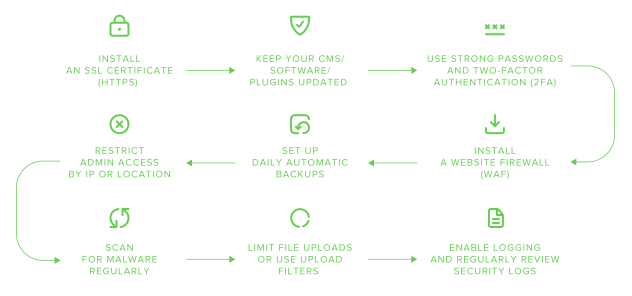
Come puoi proteggere il tuo sito web passo dopo passo?
Fortunatamente, proteggere un sito web dai malintenzionati non deve essere complicato. Ecco come rendere sicuro un sito web, suddiviso in passaggi chiave:
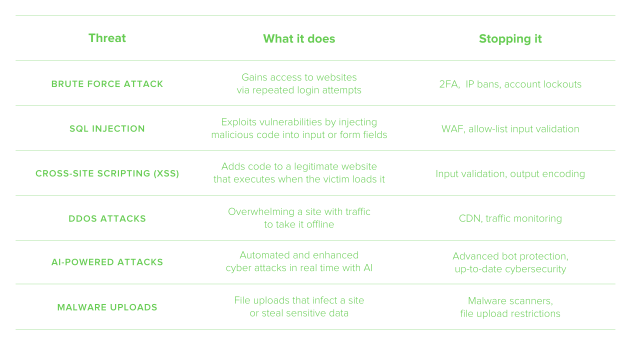
Quali sono le minacce alla sicurezza dei siti web più comuni?
Una parte significativa della sicurezza del sito consiste nel sapere cosa aspettarsi, così da poterlo fermare. La tabella seguente presenta le minacce più comuni alla sicurezza delle pagine web di cui dovresti essere a conoscenza.
Come rendere sicuro un sito web senza conoscenze di programmazione
Molte delle potenziali minacce e soluzioni menzionate finora possono sembrare opprimenti e complesse da affrontare, ma le conoscenze di programmazione non sono essenziali. Usare la piattaforma, gli strumenti e le soluzioni giuste elimina ogni complicazione dalla sicurezza del sito web. Tra questi ci sono:
Un provider di hosting sicuro – La sicurezza integrata come SSL, firewall e rilevamento del malware garantirà la sicurezza del tuo sito fin dal primo giorno.
Un firewall DNS – Piattaforme come Cloudflare prevengono gli attacchi DDoS e mantengono il tuo sito attivo e funzionante.
Plugin di sicurezza per WordPress – Plugin facili da installare come Wordfence e Sucuri offrono una protezione estesa per i siti WordPress.
Semplici strumenti di verifica del sito web – Controlla gli indicatori chiave di sicurezza del tuo sito con strumenti gratuiti come SSL Labs o Mozilla Observatory.
Sistemi di backup con 1 clic – esiste una gamma di strumenti semplici per impostare backup giornalieri, come Jetpack e UpdraftPlus.
Aggiornamento di temi e plugin – Assicurarsi che tutti i temi e i plugin siano mantenuti aggiornati e scaricati solo da fonti verificate.
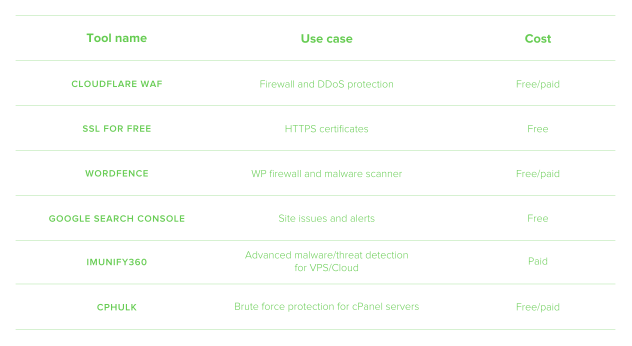
Quali strumenti di sicurezza dovrebbero usare i creatori di siti web nel 2026?
Ora sai che ci sono molti strumenti e servizi disponibili per rendere facile la protezione del tuo sito. Ma quali dovresti usare? Questo dipenderà sempre da numerosi fattori, tra cui le esigenze specifiche del tuo sito e il budget. La tabella seguente elenca diversi esempi di strumenti di qualità, le loro funzioni e i costi associati.
Come proteggere il tuo sito web dagli hacker
Sebbene alcune violazioni dei siti web possano verificarsi a causa di negligenza, errore umano o persino di insider malintenzionati, i siti web sono spesso presi di mira in modo specifico. Ecco alcuni consigli per impedire ai malintenzionati di infiltrarsi nel tuo sito.
Implementa la protezione del login
L'accesso non autorizzato spesso inizia dalla pagina di login, quindi ecco alcuni modi per blindarla.
Usa il 2FA – anche se un hacker riesce a indovinare la tua password, il 2FA lo terrà fuori dal tuo account.
Limita i tentativi di login – se qualcuno sta cercando di accedere provando numerose password, limitare i tentativi di login impedisce il successo degli attacchi brute force.
Cambia l'URL di login predefinito su WordPress – ogni sito WordPress ha lo stesso URL, quindi cambiare il tuo può renderlo più difficile da trovare per gli hacker.
Abilita la protezione brute force lato server – Strumenti come cPHulk per hosting basato su cPanel rendono la protezione del login molto più semplice.
Applica la protezione dal malware
Il malware può infettare il tuo sito attraverso numerose vie, quindi ecco alcuni modi per prevenirlo.
Usa plugin di sicurezza con scansione in tempo reale – Plugin come Wordfence e Imunify360 impediscono in modo proattivo che il malware comprometta il tuo sito.
Pianifica scansioni automatiche – Questo garantisce una protezione continua del sito web senza che tu debba pensarci.
Mantieni aggiornati il server e il software CMS – trascurare questo aspetto espone il tuo sito agli hacker che possono sfruttare vulnerabilità di sicurezza non corrette.
Regola i caricamenti di file
I caricamenti di file sono un'altra area attraverso cui malware, codice dannoso e altre minacce possono infiltrarsi nel tuo sito.
Limita i tipi di file – Vietare il caricamento di file come .exe, .php e .rar aiuterà a prevenire l'esecuzione di codice dannoso sul tuo sito.
Usa la scansione antivirus – gli strumenti con scansione in tempo reale controlleranno anche i file caricati alla ricerca di malware.
Gestisci l'accesso amministratore
Essere troppo permissivi con i privilegi di amministratore sul tuo sito potrebbe portare a incidenti e accessi non autorizzati. Previeni tutto ciò facendo quanto segue.
Limita gli utenti – Concedere l'accesso amministratore con privilegi solo al personale necessario riduce i rischi per la sicurezza, come modifiche non autorizzate ed errore umano.
Evita il nome utente “admin” – Poiché “admin” è il nome utente predefinito di WordPress,può anche aumentare le probabilità che un hacker riesca a forzare il tuo account con un attacco brute force.
Limita IP o geolocalizzazione – Questo limiterà anche l'accesso al sito solo a chi ha indirizzi IP noti, impedendo così accessi non autorizzati.
Inizia a proteggere il tuo sito
Se non sei sicuro che il tuo sito web sia protetto correttamente, non aspettare che qualcosa vada storto per scoprirlo. Puoi eseguire un rapido audit di sicurezza del tuo sito, seguendo la pratica checklist passo dopo passo riportata sopra.
Se sei all'inizio del tuo percorso digitale, parti nel modo giusto affrontando la sicurezza del sito web prima ancora del lancio. Il modo più semplice per farlo è scegliere un provider di hosting che includa funzionalità di sicurezza essenziali, come SSL gratuito e protezione dal malware. Una base sicura alleggerirà il carico, permettendoti di concentrarti su altri aspetti della sicurezza e sulla creazione di un ottimo sito web.
Domande frequenti
Sì. Se il tuo sito web non ha HTTPS, il tuo pubblico non avrà una connessione sicura e crittografata al tuo sito. Corri anche il rischio di penalizzazioni da parte dei motori di ricerca e che il tuo sito venga contrassegnato come “non sicuro” per i potenziali visitatori. Questo influirà sia sul traffico del sito sia sull'ottimizzazione per i motori di ricerca. Per evitarlo, installa un certificato SSL.
Sì. Esistono molti modi in cui un sito web può essere violato oltre alle password compromesse, tra cui:
Attacchi DDoS
Caricamenti di malware
Iniezioni SQL
Il modo migliore per evitare che il tuo sito venga violato è assicurarti che sia protetto a ogni livello, dalla scelta di un provider di hosting sicuro all'installazione di software antimalware e di un firewall per applicazioni web.
Il primo modo essenziale per mantenere sicuro un sito WordPress è tenerlo aggiornato. Il software non aggiornato presenta vulnerabilità di sicurezza che possono essere facilmente sfruttate. Esistono vari plugin gratuiti e a pagamento che possono aiutare a migliorare facilmente la sicurezza di un sito WordPress. Tra questi ci sono firewall, difesa dal malware e scanner di vulnerabilità. Assicurati solo che provengano da una fonte affidabile. Anche questi devono essere mantenuti aggiornati. E non dimenticare di usare una password complessa e di abilitare l'autenticazione a due fattori.
I siti web creati e ospitati su un provider di website builder hanno le stesse esigenze di sicurezza degli altri siti web. Tuttavia, potresti avere meno flessibilità nelle tue scelte. I website builder spesso dispongono di misure di sicurezza integrate e rigide, con utenti che hanno un controllo limitato su come vengono implementate. Questo può essere più comodo per chi ha meno conoscenze tecniche, ma se desideri maggiore libertà e personalizzazione, WordPress o un sito codificato su misura potrebbero essere una scelta migliore.

Condividi i tuoi pensieri